> ## Documentation Index
> Fetch the complete documentation index at: https://docs.checkoutrules.com/llms.txt
> Use this file to discover all available pages before exploring further.
# Block Replication
> Learn how to copy a block inside a rule, paste it, and reuse it.
## Overview
Block replication allows you to quickly duplicate existing logic in a rule without manually recreating it. This is especially useful when the content of the blocks is similar, as it saves time and ensures consistency.
## Usage
### Copy the Block
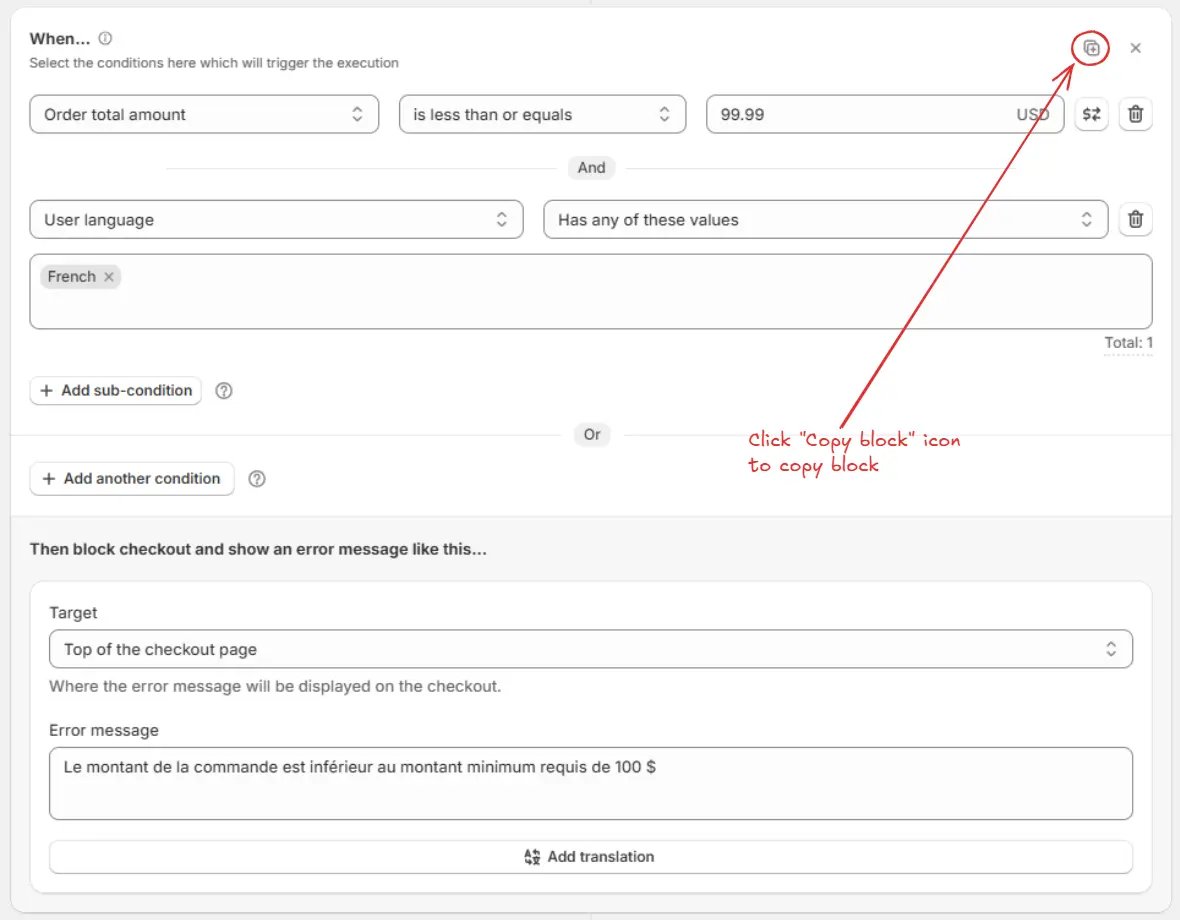
Click the **Copy block** icon on the block you want to duplicate. This will copy the entire block, including its conditions and actions.
After copying, the **tick icon** and **"Copied"** text will appear in place of the Copy block icon. Also, a confirmation message **"Block copied successfully!"** will be shown at the bottom.
### Paste the Block
Paste the copied block below by clicking on the **Paste block** icon inside the **same rule** or any other same type rule.
A confirmation message **"Block pasted successfully!"** will be shown at the bottom.
If you copy more than one block, only the **last copied block** will be pasted, not all.
### Update the Content
Modify the necessary conditions, values, or actions in the pasted block to match the new scenario. This allows you to reuse the structure while customizing it for the new case.
**Example:**\
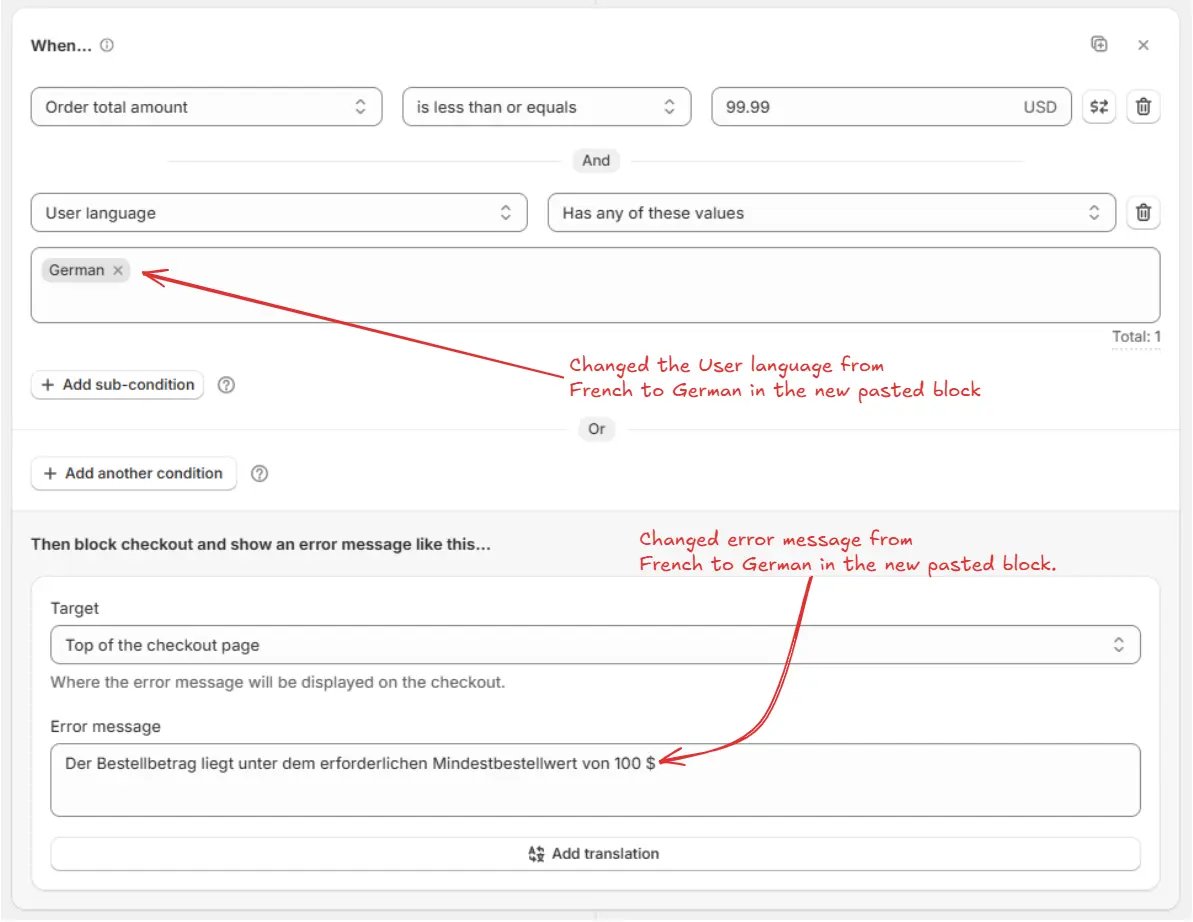
If you copied a block where the sub-condition **User language** is set to **French** with the error message in French, after pasting the block you can:
* Change the sub-condition **User language** from **French** to **German**.
* Replace the error message text with the German translation.
This way, the logic of the block remains the same (minimum order check), but the details are customized for a different language.
## Example Use Case
Let’s create a rule that enforces a **minimum order amount** while showing error messages in multiple languages.
By using **block replication**, you only need to create the first block (French), then simply copy and paste it inside the same rule, and update the **User language** condition and error message for German. Finally, add a fallback block for English.
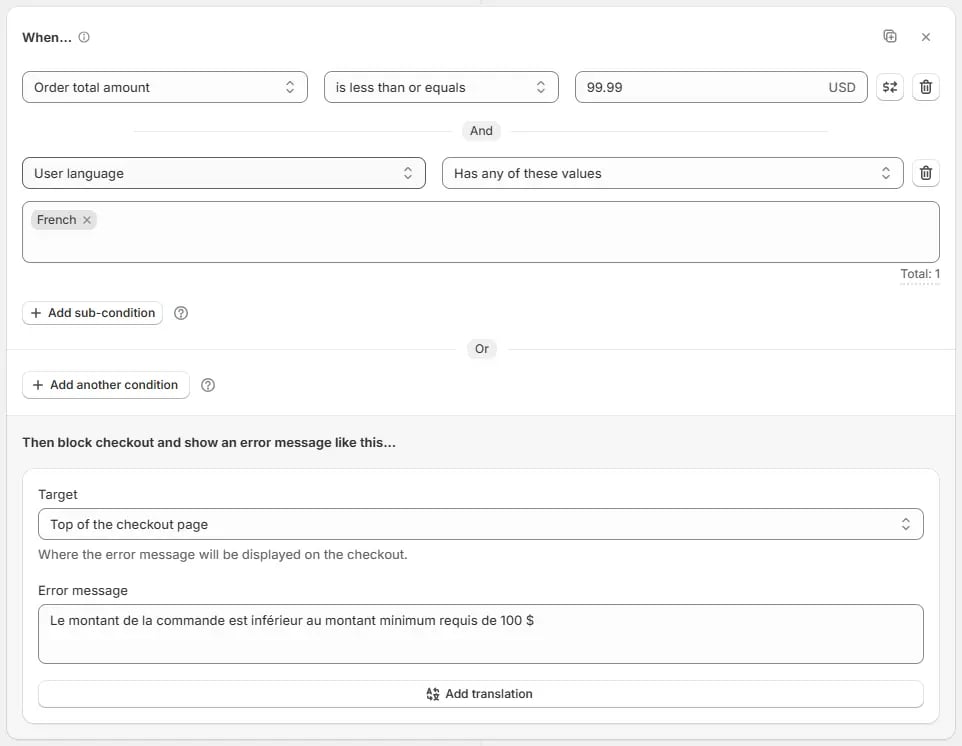
### Block 1 (French)
* Add the **Order total amount** condition and set it to **less than or equal to 99.99** to trigger an error if the order amount is under 100.
* AND sub-condition **User language** is **French**.
* Set the error message:
> "Le montant de la commande est inférieur au montant minimum requis de 100 \$"
### Block 2 (German) — created by copying Block 1
* Paste the copied block below all blocks by clicking on the **Paste block** icon inside the **same rule**.
* Update the **User language** sub-condition to **German**.
* Update the error message:
> "Der Bestellbetrag liegt unter dem erforderlichen Mindestbestellwert von 100 \$"
### Block 3 (Default fallback – English)
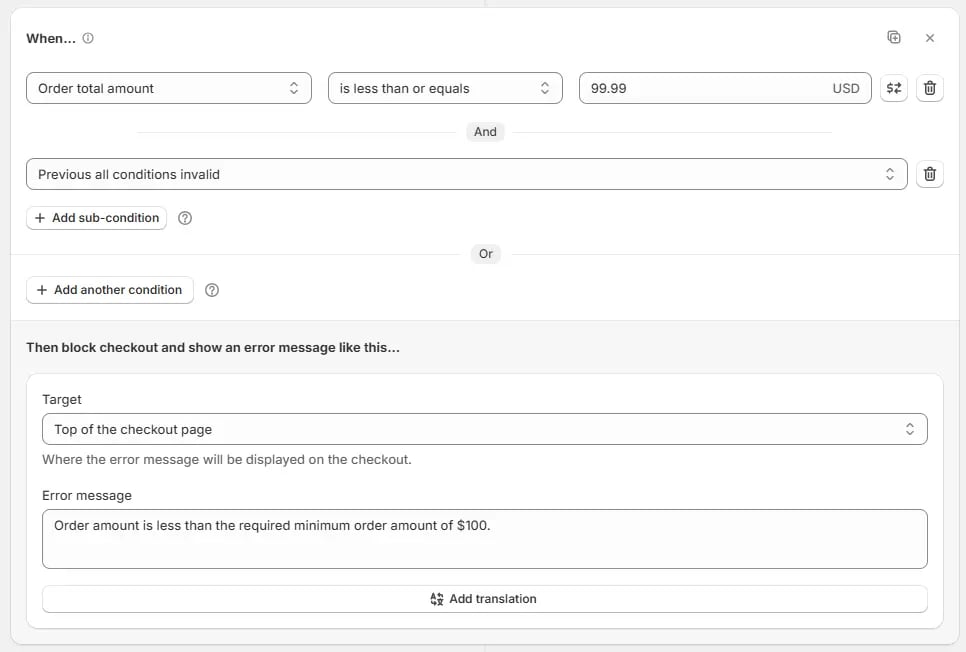
* Add the **Order total amount** condition and set it to **less than or equal to 99.99** to trigger an error if the order amount is under 100.
* For the **else / fallback condition**, AND sub-condition **Previous all conditions invalid**.
* Set the error message:
> "Order amount is less than the required minimum order amount of \$100"
 ### Paste the Block
Paste the copied block below by clicking on the **Paste block** icon inside the **same rule** or any other same type rule.
### Paste the Block
Paste the copied block below by clicking on the **Paste block** icon inside the **same rule** or any other same type rule.

 ## Example Use Case
Let’s create a rule that enforces a **minimum order amount** while showing error messages in multiple languages.
By using **block replication**, you only need to create the first block (French), then simply copy and paste it inside the same rule, and update the **User language** condition and error message for German. Finally, add a fallback block for English.
### Block 1 (French)
* Add the **Order total amount** condition and set it to **less than or equal to 99.99** to trigger an error if the order amount is under 100.
* AND sub-condition **User language** is **French**.
* Set the error message:
> "Le montant de la commande est inférieur au montant minimum requis de 100 \$"
## Example Use Case
Let’s create a rule that enforces a **minimum order amount** while showing error messages in multiple languages.
By using **block replication**, you only need to create the first block (French), then simply copy and paste it inside the same rule, and update the **User language** condition and error message for German. Finally, add a fallback block for English.
### Block 1 (French)
* Add the **Order total amount** condition and set it to **less than or equal to 99.99** to trigger an error if the order amount is under 100.
* AND sub-condition **User language** is **French**.
* Set the error message:
> "Le montant de la commande est inférieur au montant minimum requis de 100 \$"
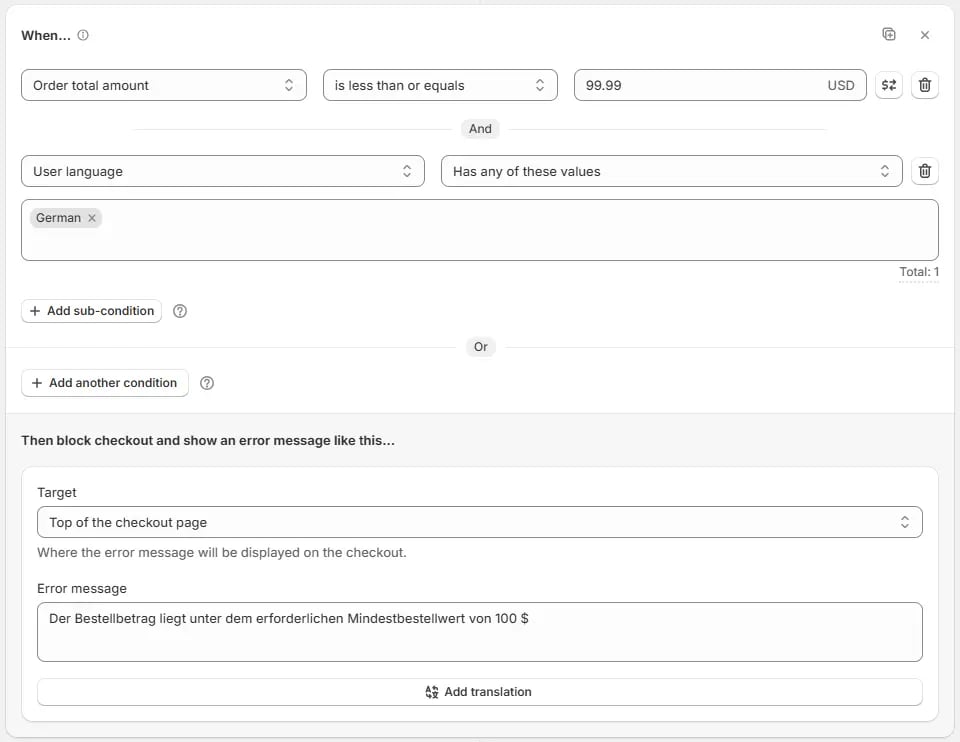
 ### Block 2 (German) — created by copying Block 1
* Paste the copied block below all blocks by clicking on the **Paste block** icon inside the **same rule**.
* Update the **User language** sub-condition to **German**.
* Update the error message:
> "Der Bestellbetrag liegt unter dem erforderlichen Mindestbestellwert von 100 \$"
### Block 2 (German) — created by copying Block 1
* Paste the copied block below all blocks by clicking on the **Paste block** icon inside the **same rule**.
* Update the **User language** sub-condition to **German**.
* Update the error message:
> "Der Bestellbetrag liegt unter dem erforderlichen Mindestbestellwert von 100 \$"
 ### Block 3 (Default fallback – English)
* Add the **Order total amount** condition and set it to **less than or equal to 99.99** to trigger an error if the order amount is under 100.
* For the **else / fallback condition**, AND sub-condition **Previous all conditions invalid**.
* Set the error message:
> "Order amount is less than the required minimum order amount of \$100"
### Block 3 (Default fallback – English)
* Add the **Order total amount** condition and set it to **less than or equal to 99.99** to trigger an error if the order amount is under 100.
* For the **else / fallback condition**, AND sub-condition **Previous all conditions invalid**.
* Set the error message:
> "Order amount is less than the required minimum order amount of \$100"