> ## Documentation Index
> Fetch the complete documentation index at: https://docs.checkoutrules.com/llms.txt
> Use this file to discover all available pages before exploring further.
# Branching (if else)
> Learn how to create and use an if, else if, else rule structure to handle multiple conditions in your rules.
## Overview
Usually when a rule has more than one blocks, then each block is executed in a sequence from top to bottom, and if conditions for any block are met, then the actions for that block are executed. So, each rule can have multiple actions. But some times we do not want this behavior, we only want one block to execute and then the rule should stop. This is where branching comes in.
Branching allows you to build rules using multiple condition blocks that follow **if → else if → else** logic. Each block is checked in **sequence**, and as soon as one block matches, its actions are executed, and the rule stops. This ensures that **only one block runs**, preventing overlapping or conflicting actions. This is a very powerful feature and can be used to create complex rules with multiple conditions.
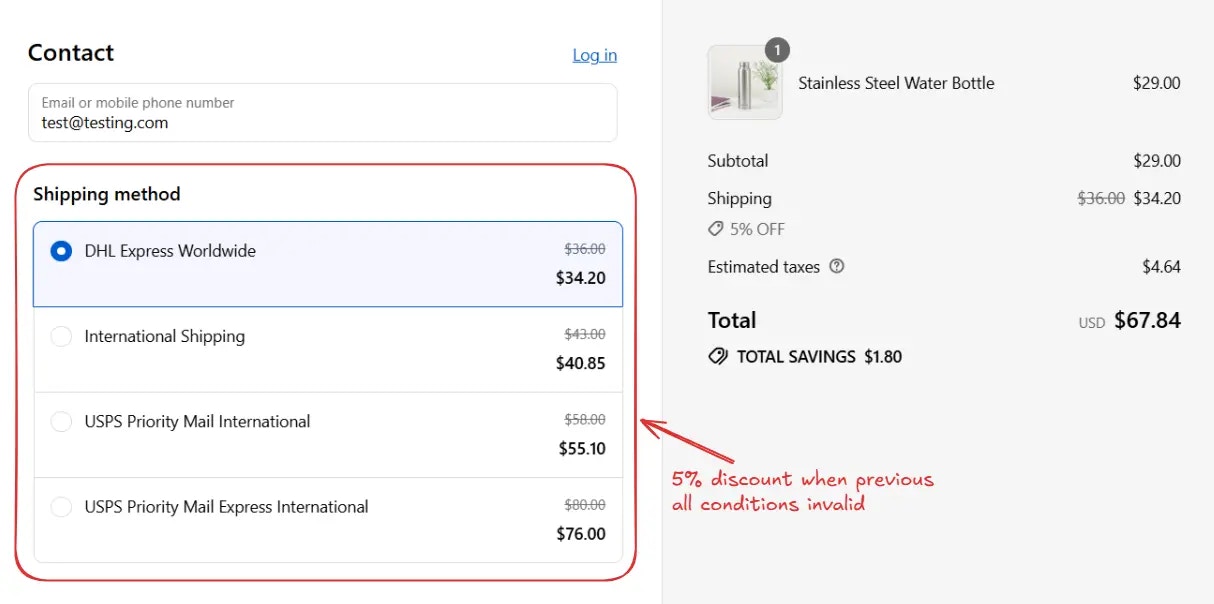
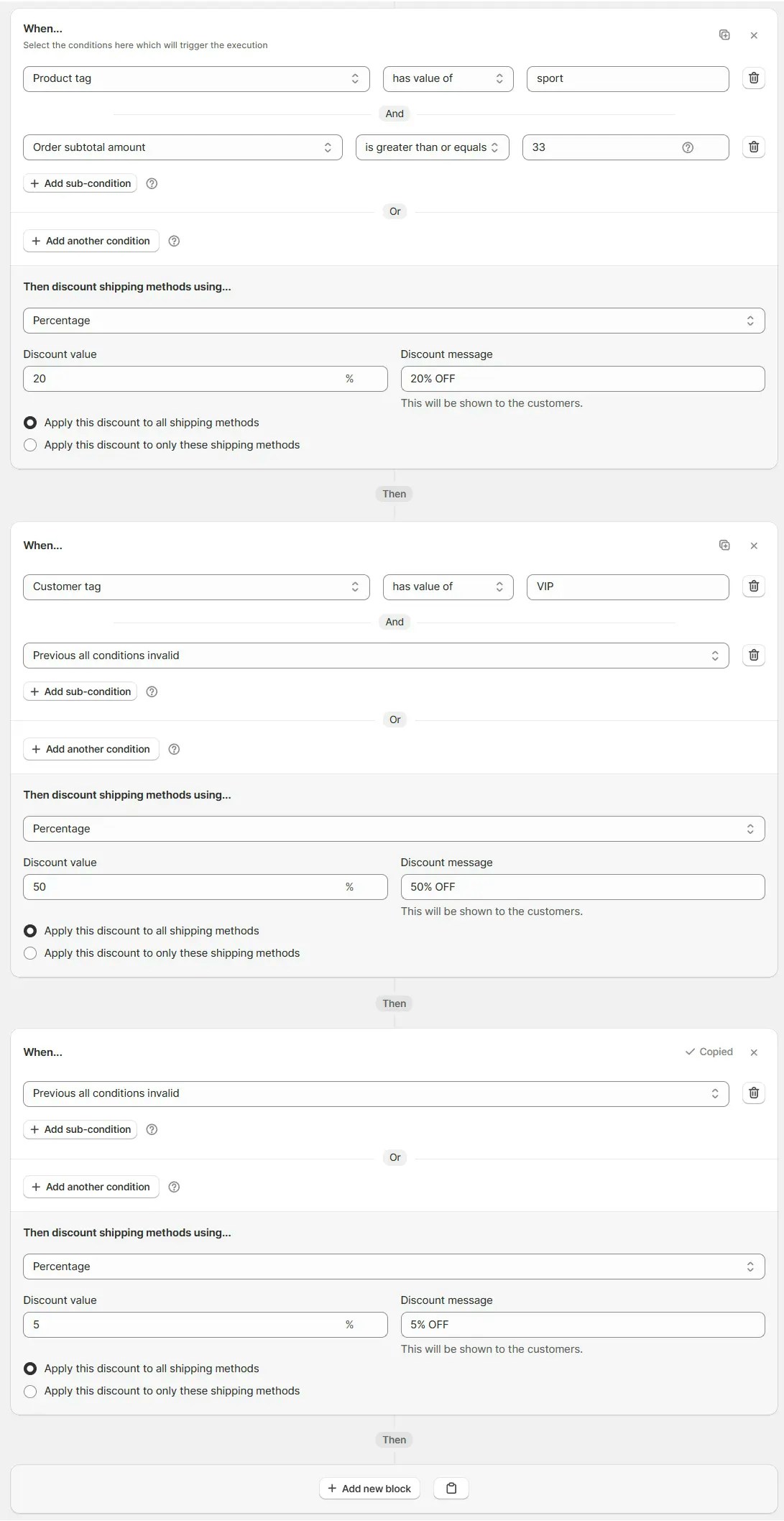
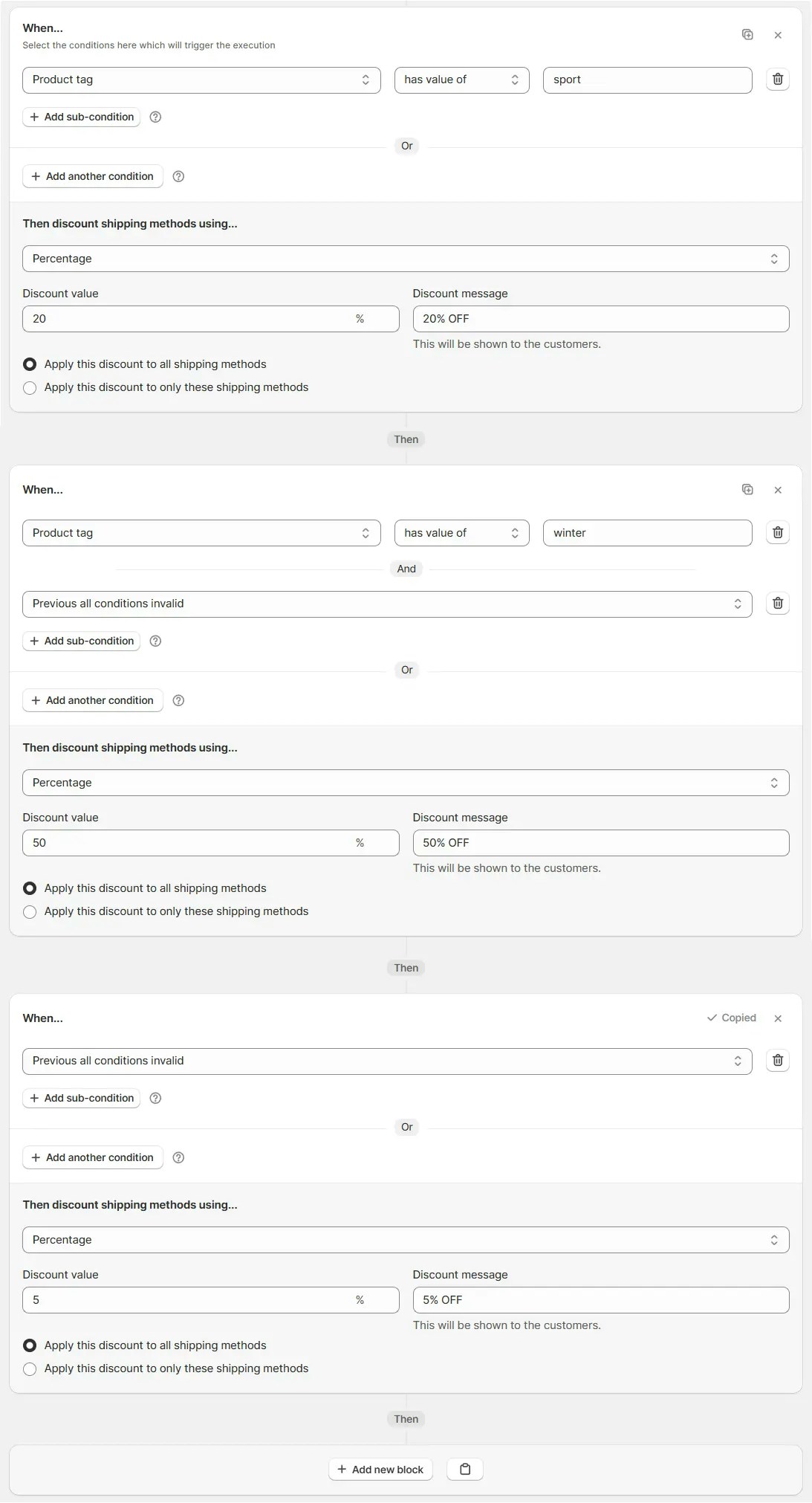
> Here is an example of a branching rule with three blocks. Here, we want to apply different discounts based on the product tag and we have a default discount of 5% off on all shipping in the case customer is not eligible for any of the other discounts. Only one block will execute based on the conditions and then the rule will stop.
The key condition here is [Previous all conditions
invalid](/guides/en/essentials/condition-sets/condition-set-1#previous-all-conditions-invalid)
in second and third blocks, which ensures only one block will execute based on
the conditions and then the rule will stop. Using this condition you can use
branching in any rule.
This is how this rule will execute:
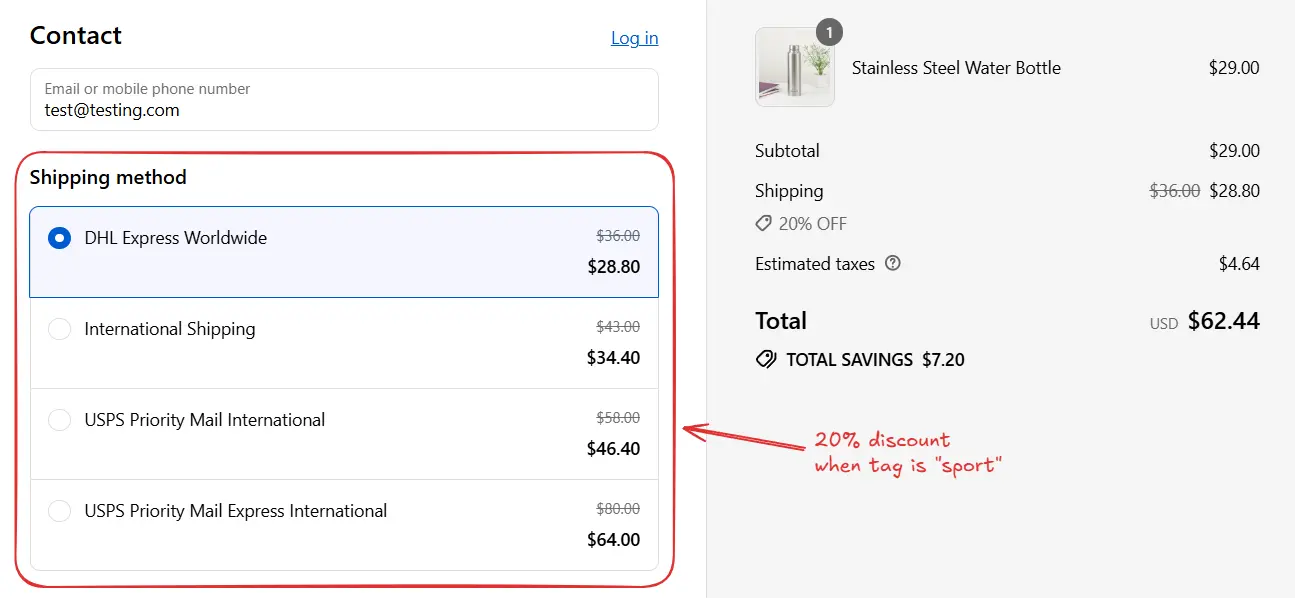
Then 20% off shipping will be applied and the rule will stop.
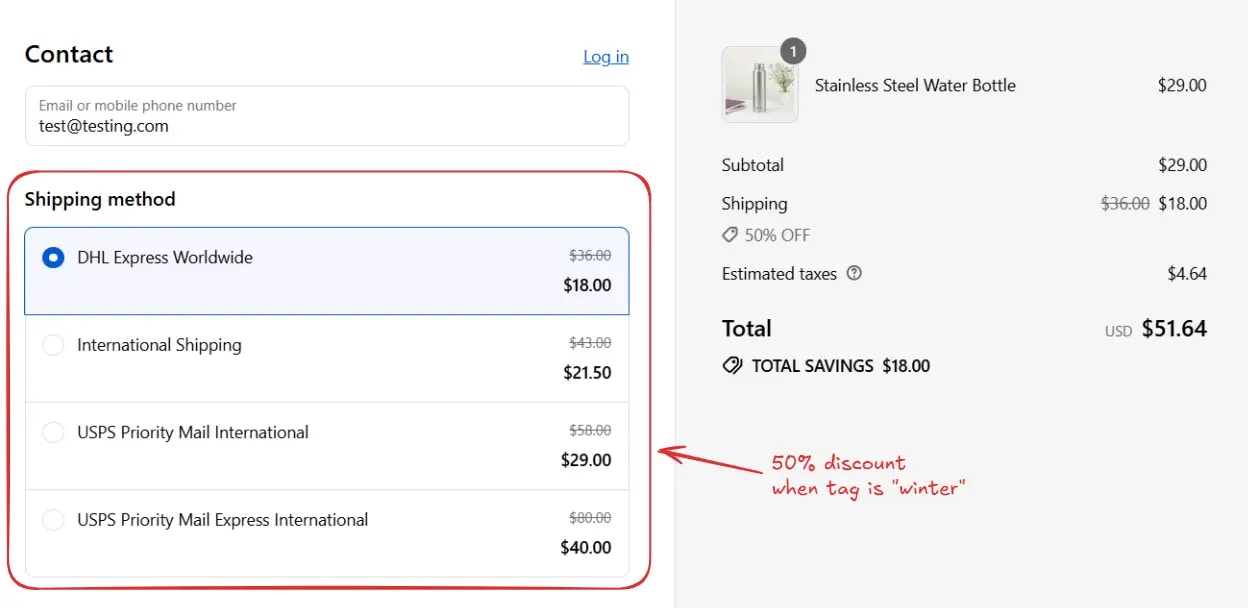
Then 50% off shipping will be applied and the rule will stop.
Then 5% off shipping will be applied.
## Explanation
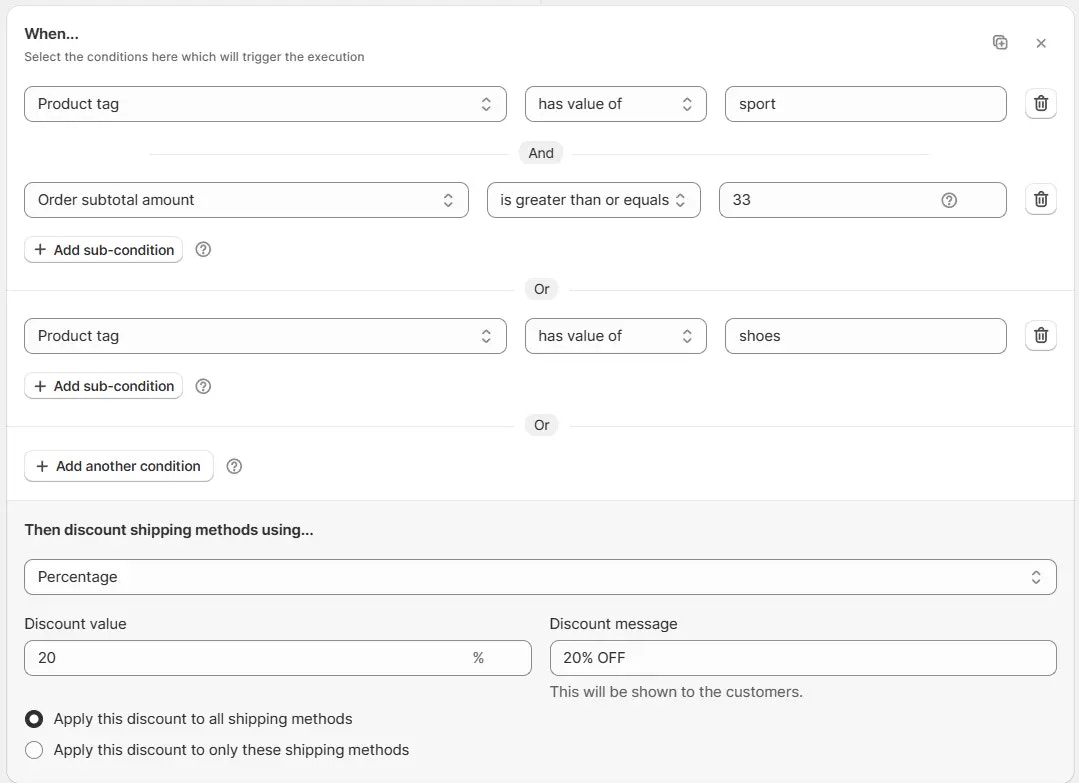
### First condition block (if)
* The system starts with the first condition block.
* This block can include multiple **sub-conditions** combined with **AND** or **OR**.
* If the overall block condition is fulfilled, its **“Then” action** runs (e.g., apply 20% discount).
* Once it runs, the system does not check the next blocks.
> **Example:** Product tag has value of **sport** *AND* Order subtotal amount ≥ **33** *OR* Product tag has value of **shoes** → Apply 20% OFF on all shipping
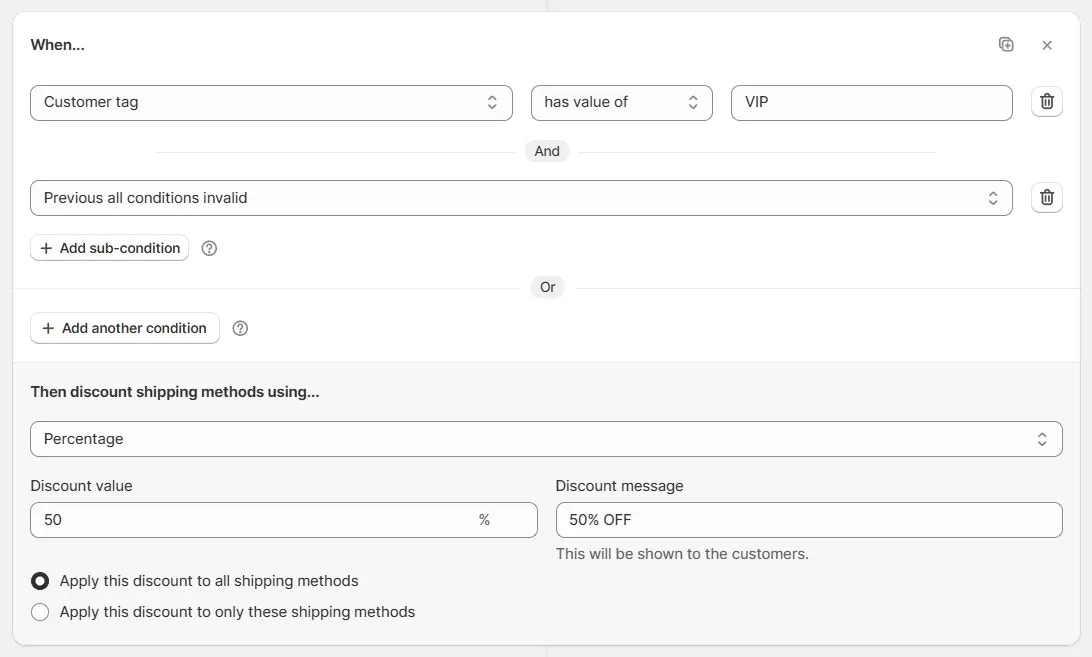
### Else if condition block(s)
* If the first block does not match, the system checks the next block(s).
* An **Else If** block can contain multiple **sub-conditions** using **AND** or **OR**, and it must include the **"Previous all conditions invalid"** condition as a subcondition.
* There may be one or more blocks in sequence. However, if the **"Previous all conditions invalid"** condition is not present, the block will not work as an **Else If** and will behave as a regular **If** block.
* If the overall block condition for any block is fulfilled, its **“Then” action** runs (e.g., apply 50% discount), and evaluation stops.
> **Example:** Previous all conditions invalid AND Customer tag has value of **VIP** → Apply 50% off on all shipping
### Fallback block (else)
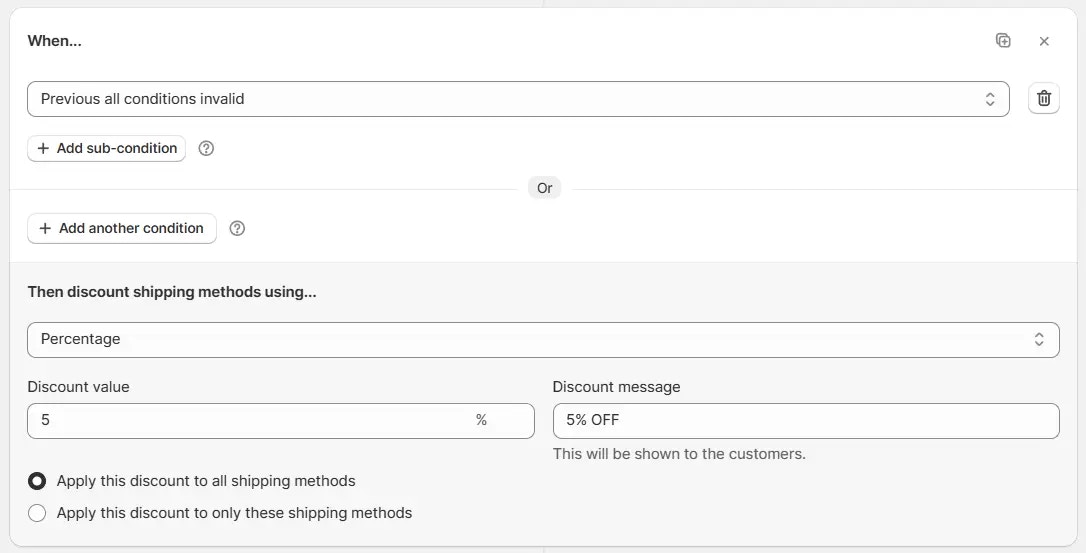
* If none of the previous blocks match, you can add a fallback block with a condition of [Previous all conditions invalid](/guides/en/essentials/condition-sets/condition-set-1#previous-all-conditions-invalid).
* This acts as the **Else (default catch all)** and ensures that there is always a default **“Then” action** (e.g., apply 5% discount), when no previous blocks were executed.
> **Example:** Previous all conditions invalid → Apply 5% OFF on all shipping
You should arrange the blocks in the order of highest priority to lowest
priority. The first block is the highest priority and the last block is the
lowest priority.
## Example use case
Let’s say you want to apply different shipping discounts based on **product tags**.
### Rule setup
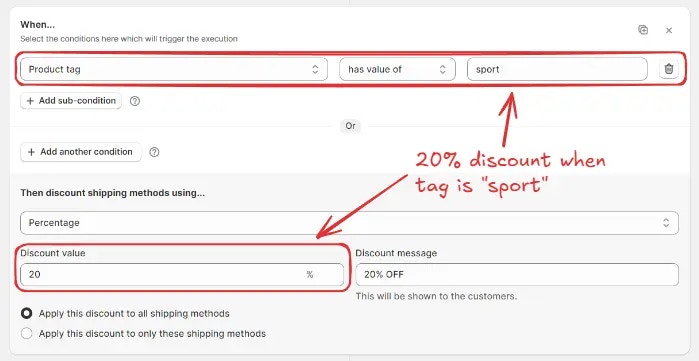
**Block 1 (if)** → *Product tag has value of `sport`* → Apply **20%** off on all shipping (highest priority).
**Adding the next block**\
To add a new block after the first one, you can either:\
Click the **“Add new block”** button in the rule builder.
Or, [copy the previous block](/guides/en/advanced/block-replication) and **paste it below** using the **paste icon**, then modify its conditions and actions.
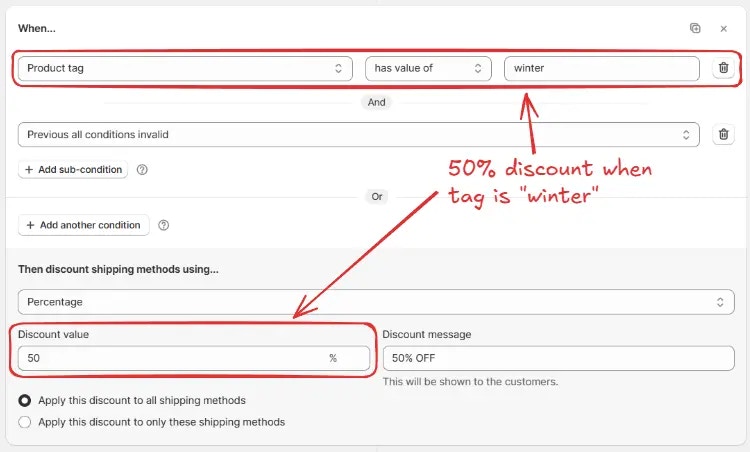
**Block 2 (else if)** → *Product tag has value of `winter`* AND *Previous all conditions invalid* → Apply **50% off on all shipping**
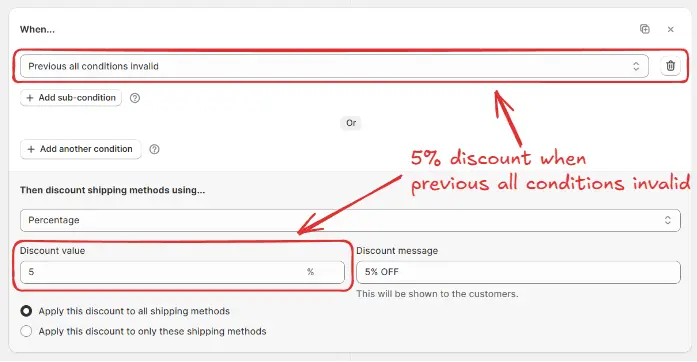
**Block 3 (else)** → *Previous all conditions invalid* → Apply **5% off on all shipping** (default discount).
Here is how the whole rule setup will look.
### Execution flow
The system starts with **Block 1**. If it matches (product tag = `sport`), **20% off shipping** is applied, and the rule ends.
If Block 1 does not match, it checks **Block 2**. If product tag = `winter`, then **50% off shipping** applies, and the rule ends.
If neither Block 1 nor Block 2 matches, **Block 3** executes. Since it uses **Previous all conditions invalid**, it acts as a **default catch all**, applying **5% off shipping**.
 This is how this rule will execute:
 ### Else if condition block(s)
* If the first block does not match, the system checks the next block(s).
* An **Else If** block can contain multiple **sub-conditions** using **AND** or **OR**, and it must include the **"Previous all conditions invalid"** condition as a subcondition.
* There may be one or more blocks in sequence. However, if the **"Previous all conditions invalid"** condition is not present, the block will not work as an **Else If** and will behave as a regular **If** block.
* If the overall block condition for any block is fulfilled, its **“Then” action** runs (e.g., apply 50% discount), and evaluation stops.
> **Example:** Previous all conditions invalid AND Customer tag has value of **VIP** → Apply 50% off on all shipping
### Else if condition block(s)
* If the first block does not match, the system checks the next block(s).
* An **Else If** block can contain multiple **sub-conditions** using **AND** or **OR**, and it must include the **"Previous all conditions invalid"** condition as a subcondition.
* There may be one or more blocks in sequence. However, if the **"Previous all conditions invalid"** condition is not present, the block will not work as an **Else If** and will behave as a regular **If** block.
* If the overall block condition for any block is fulfilled, its **“Then” action** runs (e.g., apply 50% discount), and evaluation stops.
> **Example:** Previous all conditions invalid AND Customer tag has value of **VIP** → Apply 50% off on all shipping
 ### Fallback block (else)
* If none of the previous blocks match, you can add a fallback block with a condition of [Previous all conditions invalid](/guides/en/essentials/condition-sets/condition-set-1#previous-all-conditions-invalid).
* This acts as the **Else (default catch all)** and ensures that there is always a default **“Then” action** (e.g., apply 5% discount), when no previous blocks were executed.
> **Example:** Previous all conditions invalid → Apply 5% OFF on all shipping
### Fallback block (else)
* If none of the previous blocks match, you can add a fallback block with a condition of [Previous all conditions invalid](/guides/en/essentials/condition-sets/condition-set-1#previous-all-conditions-invalid).
* This acts as the **Else (default catch all)** and ensures that there is always a default **“Then” action** (e.g., apply 5% discount), when no previous blocks were executed.
> **Example:** Previous all conditions invalid → Apply 5% OFF on all shipping
 **Adding the next block**\
To add a new block after the first one, you can either:\
Click the **“Add new block”** button in the rule builder.
**Adding the next block**\
To add a new block after the first one, you can either:\
Click the **“Add new block”** button in the rule builder.
 Or, [copy the previous block](/guides/en/advanced/block-replication) and **paste it below** using the **paste icon**, then modify its conditions and actions.
**Block 2 (else if)** → *Product tag has value of `winter`* AND *Previous all conditions invalid* → Apply **50% off on all shipping**
Or, [copy the previous block](/guides/en/advanced/block-replication) and **paste it below** using the **paste icon**, then modify its conditions and actions.
**Block 2 (else if)** → *Product tag has value of `winter`* AND *Previous all conditions invalid* → Apply **50% off on all shipping**
 **Block 3 (else)** → *Previous all conditions invalid* → Apply **5% off on all shipping** (default discount).
 Here is how the whole rule setup will look.
 ### Execution flow
The system starts with **Block 1**. If it matches (product tag = `sport`), **20% off shipping** is applied, and the rule ends.
### Execution flow
The system starts with **Block 1**. If it matches (product tag = `sport`), **20% off shipping** is applied, and the rule ends.
 If Block 1 does not match, it checks **Block 2**. If product tag = `winter`, then **50% off shipping** applies, and the rule ends.
 If neither Block 1 nor Block 2 matches, **Block 3** executes. Since it uses **Previous all conditions invalid**, it acts as a **default catch all**, applying **5% off shipping**.