> ## Documentation Index
> Fetch the complete documentation index at: https://docs.checkoutrules.com/llms.txt
> Use this file to discover all available pages before exploring further.
# Condition Set 5
> Learn about each condition available inside _Condition Set 5_.
## Always
If you don’t want to set any condition, select *Always*. The rule will run every time for everyone, without checking any conditions.
 ## Previous all conditions invalid
When all previous conditions are invalid in the previous [rule block](/guides/en/get-started/concepts#block), i-e the previous rule block did not run, this condition becomes true, ensuring the action is triggered only if none of the earlier conditions are met.
Available only when at least one previous rule block exists.
## Previous all conditions invalid
When all previous conditions are invalid in the previous [rule block](/guides/en/get-started/concepts#block), i-e the previous rule block did not run, this condition becomes true, ensuring the action is triggered only if none of the earlier conditions are met.
Available only when at least one previous rule block exists.
 ## Customer
### New customer
This condition becomes true if the customer is a new customer, i-e the customer has not previously spent any amount in the store to buy products.
## Customer
### New customer
This condition becomes true if the customer is a new customer, i-e the customer has not previously spent any amount in the store to buy products.
 ### Repeat customer
This condition becomes true if the customer has previously spent any amount in the store to buy products.
### Repeat customer
This condition becomes true if the customer has previously spent any amount in the store to buy products.
 ### Customer total previous spent
This condition checks the customer’s **total previous spent amount** against specific criteria, based on one of the following sub-conditions:
* **is greater than or equals** (Matches when the customer’s total previous spent amount is greater than or equal to the entered amount)
* **is less than or equals** (Matches when the customer’s total previous spent amount is less than or equal to the entered amount)
To set these conditions, enter the amount in the field and choose the appropriate comparison from the dropdown.
Enter the amount in your store currency. Settings > Store Details > Store
Currency
> For example, `is greater than or equals 500` → Matches customers who have spent 500 or more in total on previous purchases.
### Customer total previous spent
This condition checks the customer’s **total previous spent amount** against specific criteria, based on one of the following sub-conditions:
* **is greater than or equals** (Matches when the customer’s total previous spent amount is greater than or equal to the entered amount)
* **is less than or equals** (Matches when the customer’s total previous spent amount is less than or equal to the entered amount)
To set these conditions, enter the amount in the field and choose the appropriate comparison from the dropdown.
Enter the amount in your store currency. Settings > Store Details > Store
Currency
> For example, `is greater than or equals 500` → Matches customers who have spent 500 or more in total on previous purchases.
 ### Email address
This condition checks the customer’s **email address** against specific criteria, based on one of the following sub-conditions:
* **contains** (The email address includes the entered value)
* **does not contain** (The email address does not include the entered value)
* **is empty** (No email address is provided)
* **is not empty** (An email address is provided)
* **is** (The email address exactly matches the entered value)
* **is not** (The email address does not exactly match the entered value)
For **contains**, **does not contain**, **is**, and **is not**, type a value in the text box to compare against the customer’s email address.
> For example, `contains @gmail.com` → Matches any email address ending with “@gmail.com”.
### Email address
This condition checks the customer’s **email address** against specific criteria, based on one of the following sub-conditions:
* **contains** (The email address includes the entered value)
* **does not contain** (The email address does not include the entered value)
* **is empty** (No email address is provided)
* **is not empty** (An email address is provided)
* **is** (The email address exactly matches the entered value)
* **is not** (The email address does not exactly match the entered value)
For **contains**, **does not contain**, **is**, and **is not**, type a value in the text box to compare against the customer’s email address.
> For example, `contains @gmail.com` → Matches any email address ending with “@gmail.com”.
 For **is empty** and **is not empty**, no value entry is required.
> For example, `is empty` → Matches when the email field is blank.
For **is empty** and **is not empty**, no value entry is required.
> For example, `is empty` → Matches when the email field is blank.
 ### Customer tag
This condition checks the **customer’s tag** against specific criteria, based on one of the following sub-conditions:
* **has value of** (Matches when the customer’s tags include the entered value)
* **does not have value of** (Matches when the customer’s tags do not include the entered value)
To set these conditions, enter the tag value in the field and choose the appropriate comparison from the dropdown.
> For example, `has value of VIP` → Matches customers who have the **VIP** tag.
### Customer tag
This condition checks the **customer’s tag** against specific criteria, based on one of the following sub-conditions:
* **has value of** (Matches when the customer’s tags include the entered value)
* **does not have value of** (Matches when the customer’s tags do not include the entered value)
To set these conditions, enter the tag value in the field and choose the appropriate comparison from the dropdown.
> For example, `has value of VIP` → Matches customers who have the **VIP** tag.
 ### Customer tags
This condition checks the customer’s **tags** against specific criteria, based on one of the following sub-conditions:
* **Has any of these values** (Matches if the customer has at least one of the entered tags)
* **Does not have any of these values** (Matches if the customer has none of the entered tags)
You can only use this condition with the same values throughout the rule. If
you want to use different values in different rule blocks, you should switch
to condition set 5 which allows more flexibility.
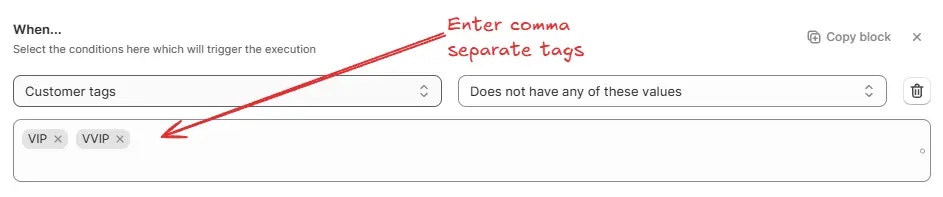
To set these conditions, type one or more tags into the field and choose the appropriate comparison from the dropdown. Separate multiple tags with commas and then press enter to load the tags simultaneously.
> For example, `Has any of these values: VIP, VVIP` → Matches customers who have either the “VIP” or “VVIP” tag.
### Customer tags
This condition checks the customer’s **tags** against specific criteria, based on one of the following sub-conditions:
* **Has any of these values** (Matches if the customer has at least one of the entered tags)
* **Does not have any of these values** (Matches if the customer has none of the entered tags)
You can only use this condition with the same values throughout the rule. If
you want to use different values in different rule blocks, you should switch
to condition set 5 which allows more flexibility.
To set these conditions, type one or more tags into the field and choose the appropriate comparison from the dropdown. Separate multiple tags with commas and then press enter to load the tags simultaneously.
> For example, `Has any of these values: VIP, VVIP` → Matches customers who have either the “VIP” or “VVIP” tag.
 ## B2B Details
### Purchasing company metafield
This condition checks a **purchasing company metafield** you specify by **namespace** and **key**, then evaluates it using one of the following sub-conditions:
* **Has any of these values** (Matches if the metafield has at least one of the entered values)
* **Does not have any of these values** (Matches if the metafield has none of the entered values)
* **Has any other value besides these values** (Matches if the metafield has a value that is not among the entered values)
* **Does not have any other value besides these values** (Matches if the metafield has only the entered values and no others)
* **Has empty value** (Matches if the metafield has no value)
* **Does not have empty value** (Matches if the metafield contains any value)
* **Has number greater than or equal to** (Matches if the metafield’s numeric value is greater than or equal to the entered number)
* **Has number less than or equal to** (Matches if the metafield’s numeric value is less than or equal to the entered number)
* **Has number of values greater than or equals** (Matches if the **count** of values in the metafield is greater than or equal to the entered number)
* **Has number of values less than or equals** (Matches if the **count** of values in the metafield is less than or equal to the entered number)
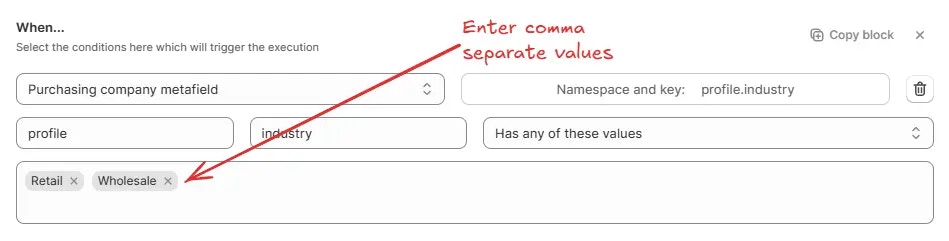
For **Has any of these values**, **Does not have any of these values**, **Has any other value besides these values**, and **Does not have any other value besides these values**, enter one or more values into the field. Separate multiple values with commas.
> For example, `Namespace: profile` · `Key: industry` · `Has any of these values: Retail, Wholesale` → Matches if the purchasing company’s metafield contains either “Retail” or “Wholesale”.
## B2B Details
### Purchasing company metafield
This condition checks a **purchasing company metafield** you specify by **namespace** and **key**, then evaluates it using one of the following sub-conditions:
* **Has any of these values** (Matches if the metafield has at least one of the entered values)
* **Does not have any of these values** (Matches if the metafield has none of the entered values)
* **Has any other value besides these values** (Matches if the metafield has a value that is not among the entered values)
* **Does not have any other value besides these values** (Matches if the metafield has only the entered values and no others)
* **Has empty value** (Matches if the metafield has no value)
* **Does not have empty value** (Matches if the metafield contains any value)
* **Has number greater than or equal to** (Matches if the metafield’s numeric value is greater than or equal to the entered number)
* **Has number less than or equal to** (Matches if the metafield’s numeric value is less than or equal to the entered number)
* **Has number of values greater than or equals** (Matches if the **count** of values in the metafield is greater than or equal to the entered number)
* **Has number of values less than or equals** (Matches if the **count** of values in the metafield is less than or equal to the entered number)
For **Has any of these values**, **Does not have any of these values**, **Has any other value besides these values**, and **Does not have any other value besides these values**, enter one or more values into the field. Separate multiple values with commas.
> For example, `Namespace: profile` · `Key: industry` · `Has any of these values: Retail, Wholesale` → Matches if the purchasing company’s metafield contains either “Retail” or “Wholesale”.
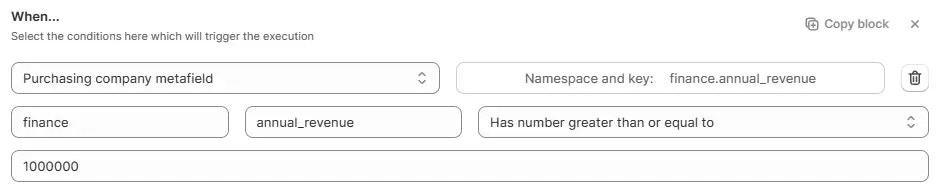
 For **Has number greater than or equal to** and **Has number less than or equal to**, enter a single numeric value in the field to match against the metafield’s numeric value.
> For example, `Namespace: finance` · `Key: annual_revenue` · `Has number greater than or equal to 1000000` → Matches if the purchasing company’s annual revenue is one million or more.
For **Has number greater than or equal to** and **Has number less than or equal to**, enter a single numeric value in the field to match against the metafield’s numeric value.
> For example, `Namespace: finance` · `Key: annual_revenue` · `Has number greater than or equal to 1000000` → Matches if the purchasing company’s annual revenue is one million or more.
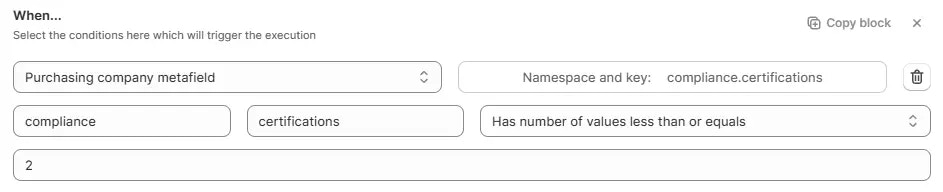
 For **Has number of values greater than or equals** and **Has number of values less than or equals**, enter a single numeric value in the field to match against the count of values in the metafield.
> For example, `Namespace: compliance` · `Key: certifications` · `Has number of values less than or equals 2` → Matches if the company has two or fewer certifications.
For **Has number of values greater than or equals** and **Has number of values less than or equals**, enter a single numeric value in the field to match against the count of values in the metafield.
> For example, `Namespace: compliance` · `Key: certifications` · `Has number of values less than or equals 2` → Matches if the company has two or fewer certifications.
 ### Purchasing company location metafield
This condition checks a **purchasing company location metafield** you specify by **namespace** and **key**, then evaluates it using one of the following sub-conditions:
* **Has any of these values** (Matches if the metafield has at least one of the entered values)
* **Does not have any of these values** (Matches if the metafield has none of the entered values)
* **Has any other value besides these values** (Matches if the metafield has a value that is not among the entered values)
* **Does not have any other value besides these values** (Matches if the metafield has only the entered values and no others)
* **Has empty value** (Matches if the metafield has no value)
* **Does not have empty value** (Matches if the metafield contains any value)
* **Has number greater than or equal to** (Matches if the metafield’s numeric value is greater than or equal to the entered number)
* **Has number less than or equal to** (Matches if the metafield’s numeric value is less than or equal to the entered number)
* **Has number of values greater than or equals** (Matches if the **count** of values in the metafield is greater than or equal to the entered number)
* **Has number of values less than or equals** (Matches if the **count** of values in the metafield is less than or equal to the entered number)
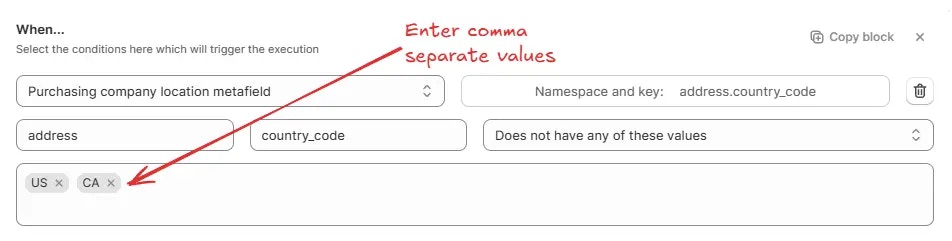
For **Has any of these values**, **Does not have any of these values**, **Has any other value besides these values**, and **Does not have any other value besides these values**, enter one or more values into the field. Separate multiple values with commas.
> For example, `Namespace: address` · `Key: country_code` · `Does not have any of these values: US, CA` → Matches if the purchasing company location is not in the United States or Canada.
### Purchasing company location metafield
This condition checks a **purchasing company location metafield** you specify by **namespace** and **key**, then evaluates it using one of the following sub-conditions:
* **Has any of these values** (Matches if the metafield has at least one of the entered values)
* **Does not have any of these values** (Matches if the metafield has none of the entered values)
* **Has any other value besides these values** (Matches if the metafield has a value that is not among the entered values)
* **Does not have any other value besides these values** (Matches if the metafield has only the entered values and no others)
* **Has empty value** (Matches if the metafield has no value)
* **Does not have empty value** (Matches if the metafield contains any value)
* **Has number greater than or equal to** (Matches if the metafield’s numeric value is greater than or equal to the entered number)
* **Has number less than or equal to** (Matches if the metafield’s numeric value is less than or equal to the entered number)
* **Has number of values greater than or equals** (Matches if the **count** of values in the metafield is greater than or equal to the entered number)
* **Has number of values less than or equals** (Matches if the **count** of values in the metafield is less than or equal to the entered number)
For **Has any of these values**, **Does not have any of these values**, **Has any other value besides these values**, and **Does not have any other value besides these values**, enter one or more values into the field. Separate multiple values with commas.
> For example, `Namespace: address` · `Key: country_code` · `Does not have any of these values: US, CA` → Matches if the purchasing company location is not in the United States or Canada.
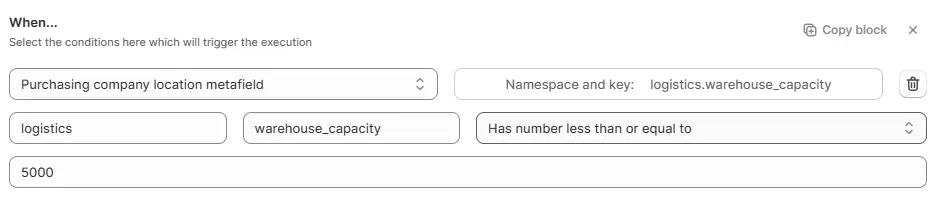
 For **Has number greater than or equal to** and **Has number less than or equal to**, enter a single numeric value in the field to match against the metafield’s numeric value.
> For example, `Namespace: logistics` · `Key: warehouse_capacity` · `Has number less than or equal to 5000` → Matches if the purchasing company location’s warehouse capacity is 5,000 units or fewer.
For **Has number greater than or equal to** and **Has number less than or equal to**, enter a single numeric value in the field to match against the metafield’s numeric value.
> For example, `Namespace: logistics` · `Key: warehouse_capacity` · `Has number less than or equal to 5000` → Matches if the purchasing company location’s warehouse capacity is 5,000 units or fewer.
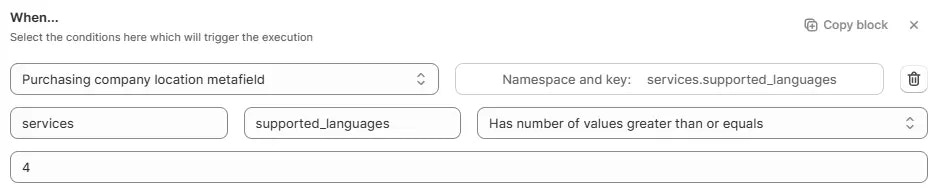
 For **Has number of values greater than or equals** and **Has number of values less than or equals**, enter a single numeric value in the field to match against the count of values in the metafield.
> For example, `Namespace: services` · `Key: supported_languages` · `Has number of values greater than or equals 4` → Matches if the location supports four or more languages.
For **Has number of values greater than or equals** and **Has number of values less than or equals**, enter a single numeric value in the field to match against the count of values in the metafield.
> For example, `Namespace: services` · `Key: supported_languages` · `Has number of values greater than or equals 4` → Matches if the location supports four or more languages.
 ## Order Details
### Order total amount
This condition checks the **order’s total amount** against specific criteria, based on one of the following sub-conditions:
* **is greater than or equals** (Matches when the order’s total amount is greater than or equal to the entered amount)
* **is less than or equals** (Matches when the order’s total amount is less than or equal to the entered amount)
To set these conditions, enter the amount in the field and choose the appropriate comparison from the dropdown.
Enter the amount in your store currency. Settings > Store Details > Store
Currency
> For example, `is greater than or equals 600` → Matches orders with a total amount of 600 or more.
## Order Details
### Order total amount
This condition checks the **order’s total amount** against specific criteria, based on one of the following sub-conditions:
* **is greater than or equals** (Matches when the order’s total amount is greater than or equal to the entered amount)
* **is less than or equals** (Matches when the order’s total amount is less than or equal to the entered amount)
To set these conditions, enter the amount in the field and choose the appropriate comparison from the dropdown.
Enter the amount in your store currency. Settings > Store Details > Store
Currency
> For example, `is greater than or equals 600` → Matches orders with a total amount of 600 or more.
 ### Order subtotal amount
This condition checks the **order’s subtotal amount** against specific criteria, based on one of the following sub-conditions:
* **is greater than or equals** (Matches when the order’s subtotal amount is greater than or equal to the entered amount)
* **is less than or equals** (Matches when the order’s subtotal amount is less than or equal to the entered amount)
To set these conditions, enter the amount in the field and choose the appropriate comparison from the dropdown.
Enter the amount in your store currency. Settings > Store Details > Store
Currency
> For example, `is greater than or equals 699` → Matches orders with a subtotal amount of 699 or more.
### Order subtotal amount
This condition checks the **order’s subtotal amount** against specific criteria, based on one of the following sub-conditions:
* **is greater than or equals** (Matches when the order’s subtotal amount is greater than or equal to the entered amount)
* **is less than or equals** (Matches when the order’s subtotal amount is less than or equal to the entered amount)
To set these conditions, enter the amount in the field and choose the appropriate comparison from the dropdown.
Enter the amount in your store currency. Settings > Store Details > Store
Currency
> For example, `is greater than or equals 699` → Matches orders with a subtotal amount of 699 or more.
 ### Order total quantity
This condition checks the **total quantity of items in an order** against specific criteria, based on one of the following sub-conditions:
* **is greater than or equals** (Matches when the total quantity of items is greater than or equal to the entered number)
* **is less than or equals** (Matches when the total quantity of items is less than or equal to the entered number)
* **is multiple of** (Matches when the total quantity is an exact multiple of the entered number)
* **is not multiple of** (Matches when the total quantity is not a multiple of the entered number)
To set these conditions, enter a quantity in the field and choose the appropriate comparison from the dropdown.
The quantity refers to the **sum of all item quantities** in the order, not
the number of distinct products.
> **Example for “is multiple of”**:\
> `is multiple of 5` → Matches orders with total quantities like 5, 10, 15, 20, etc.
### Order total quantity
This condition checks the **total quantity of items in an order** against specific criteria, based on one of the following sub-conditions:
* **is greater than or equals** (Matches when the total quantity of items is greater than or equal to the entered number)
* **is less than or equals** (Matches when the total quantity of items is less than or equal to the entered number)
* **is multiple of** (Matches when the total quantity is an exact multiple of the entered number)
* **is not multiple of** (Matches when the total quantity is not a multiple of the entered number)
To set these conditions, enter a quantity in the field and choose the appropriate comparison from the dropdown.
The quantity refers to the **sum of all item quantities** in the order, not
the number of distinct products.
> **Example for “is multiple of”**:\
> `is multiple of 5` → Matches orders with total quantities like 5, 10, 15, 20, etc.
 > **Example for “is greater than or equals”**:\
> `is greater than or equals 3` → Matches orders with 3 or more total items.
> **Example for “is greater than or equals”**:\
> `is greater than or equals 3` → Matches orders with 3 or more total items.
 ### Order total weight
This condition checks the **order’s total weight** against specific criteria, based on one of the following sub-conditions:
* **is greater than or equals** (Matches when the order’s total weight is greater than or equal to the entered weight)
* **is less than or equals** (Matches when the order’s total weight is less than or equal to the entered weight)
To set these conditions, enter the weight in the field, select the weight unit (**lb**, **oz**, **kg**, or **g**) from the dropdown, and choose the appropriate comparison.
> For example, `is less than or equals 5 kg` → Matches orders with a total weight of 5 kilograms or less.
### Order total weight
This condition checks the **order’s total weight** against specific criteria, based on one of the following sub-conditions:
* **is greater than or equals** (Matches when the order’s total weight is greater than or equal to the entered weight)
* **is less than or equals** (Matches when the order’s total weight is less than or equal to the entered weight)
To set these conditions, enter the weight in the field, select the weight unit (**lb**, **oz**, **kg**, or **g**) from the dropdown, and choose the appropriate comparison.
> For example, `is less than or equals 5 kg` → Matches orders with a total weight of 5 kilograms or less.
 ## Cart Has Any Items
### Product tag
This condition checks the **product tag** in the order against specific criteria. It will become true if **any** product in the cart has the entered Product Tag value, based on one of the following sub-conditions:
* **has value of** (Matches when the product tag has the specified value)
* **does not have value of** (Matches when the product tag does not have the specified value)
* **has any other value besides** (Matches when the product tag has any value except the entered one)
* **does not have any other value besides** (Matches when the product tag has only the entered value and no other)
To set these conditions, enter the value in the “Enter value” field, then choose the appropriate comparison from the dropdown.
> For example, `has value of NewArrival` → Matches when the product tag is **NewArrival**.
## Cart Has Any Items
### Product tag
This condition checks the **product tag** in the order against specific criteria. It will become true if **any** product in the cart has the entered Product Tag value, based on one of the following sub-conditions:
* **has value of** (Matches when the product tag has the specified value)
* **does not have value of** (Matches when the product tag does not have the specified value)
* **has any other value besides** (Matches when the product tag has any value except the entered one)
* **does not have any other value besides** (Matches when the product tag has only the entered value and no other)
To set these conditions, enter the value in the “Enter value” field, then choose the appropriate comparison from the dropdown.
> For example, `has value of NewArrival` → Matches when the product tag is **NewArrival**.
 ### Product tags
This condition checks the **Product Tags** against specific criteria. It will become true if **any** product in the cart has the entered Product Tag value, based on one of the following sub-conditions:
* **Has any of these values** (Matches if the Product Tags have at least one of the entered values)
* **Does not have any of these values** (Matches if the Product Tags have none of the entered values)
* **Has any other value besides these values** (Matches if the Product Tags have a value that is not among the entered values)
* **Does not have any other value besides these values** (Matches if the Product Tags have only the entered values and no others)
* **Has number of values greater than or equals** (Matches if the **count** of Product Tags is greater than or equal to the entered number)
* **Has number of values less than or equals** (Matches if the **count** of Product Tags is less than or equal to the entered number)
You can only use this condition with the same values throughout the rule. If
you want to use different values in different rule blocks, you should switch
to condition set 3, 5, or 6 which allow more flexibility.
For **Has any of these values**, **Does not have any of these values**, **Has any other value besides these values**, and **Does not have any other value besides these values**, enter one or more Product Tag values into the field. Separate multiple values with commas.
> For example, `Does not have any of these values: summer, clearance` → Matches if the Product Tag does not include “summer” or “clearance”.
### Product tags
This condition checks the **Product Tags** against specific criteria. It will become true if **any** product in the cart has the entered Product Tag value, based on one of the following sub-conditions:
* **Has any of these values** (Matches if the Product Tags have at least one of the entered values)
* **Does not have any of these values** (Matches if the Product Tags have none of the entered values)
* **Has any other value besides these values** (Matches if the Product Tags have a value that is not among the entered values)
* **Does not have any other value besides these values** (Matches if the Product Tags have only the entered values and no others)
* **Has number of values greater than or equals** (Matches if the **count** of Product Tags is greater than or equal to the entered number)
* **Has number of values less than or equals** (Matches if the **count** of Product Tags is less than or equal to the entered number)
You can only use this condition with the same values throughout the rule. If
you want to use different values in different rule blocks, you should switch
to condition set 3, 5, or 6 which allow more flexibility.
For **Has any of these values**, **Does not have any of these values**, **Has any other value besides these values**, and **Does not have any other value besides these values**, enter one or more Product Tag values into the field. Separate multiple values with commas.
> For example, `Does not have any of these values: summer, clearance` → Matches if the Product Tag does not include “summer” or “clearance”.
 For **Has number of values greater than or equals** and **Has number of values less than or equals**, enter a single numeric value in the field to match the Product Tags count.
> For example, `Has number of values less than or equals 4` → Matches if there are four or fewer Product Tags.
For **Has number of values greater than or equals** and **Has number of values less than or equals**, enter a single numeric value in the field to match the Product Tags count.
> For example, `Has number of values less than or equals 4` → Matches if there are four or fewer Product Tags.
 ### Product variant option
This condition checks the **Product Variant Options** against specific criteria. If any product in the cart has the entered Product Variant Option value, based on one of the following sub-conditions:
* **Has any of these values** (Matches if the Product Variant Options have at least one of the entered values)
* **Does not have any of these values** (Matches if the Product Variant Options have none of the entered values)
* **Has any other value besides these values** (Matches if the Product Variant Options have a value that is not among the entered values)
* **Does not have any other value besides these values** (Matches if the Product Variant Options have only the entered values and no others)
* **Has number of values greater than or equals** (Matches if the **count** of Product Variant Options is greater than or equal to the entered number)
* **Has number of values less than or equals** (Matches if the **count** of Product Variant Options is less than or equal to the entered number)
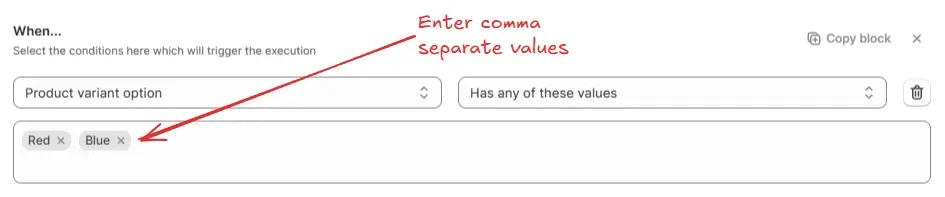
For **Has any of these values**, **Does not have any of these values**, **Has any other value besides these values**, and **Does not have any other value besides these values**, enter one or more Product Variant Option values into the field. Separate multiple values with commas.
> For example, `Has any of these values: Red, Blue` → Matches if the Product Variant Option includes either “Red” or “Blue”.
### Product variant option
This condition checks the **Product Variant Options** against specific criteria. If any product in the cart has the entered Product Variant Option value, based on one of the following sub-conditions:
* **Has any of these values** (Matches if the Product Variant Options have at least one of the entered values)
* **Does not have any of these values** (Matches if the Product Variant Options have none of the entered values)
* **Has any other value besides these values** (Matches if the Product Variant Options have a value that is not among the entered values)
* **Does not have any other value besides these values** (Matches if the Product Variant Options have only the entered values and no others)
* **Has number of values greater than or equals** (Matches if the **count** of Product Variant Options is greater than or equal to the entered number)
* **Has number of values less than or equals** (Matches if the **count** of Product Variant Options is less than or equal to the entered number)
For **Has any of these values**, **Does not have any of these values**, **Has any other value besides these values**, and **Does not have any other value besides these values**, enter one or more Product Variant Option values into the field. Separate multiple values with commas.
> For example, `Has any of these values: Red, Blue` → Matches if the Product Variant Option includes either “Red” or “Blue”.
 For **Has number of values greater than or equals** and **Has number of values less than or equals**, enter a single numeric value in the field to match the Product Variant Options count.
> For example, `Has number of values greater than or equals 3` → Matches if there are three or more Product Variant Options.
For **Has number of values greater than or equals** and **Has number of values less than or equals**, enter a single numeric value in the field to match the Product Variant Options count.
> For example, `Has number of values greater than or equals 3` → Matches if there are three or more Product Variant Options.
 ## Discount
### Discount code
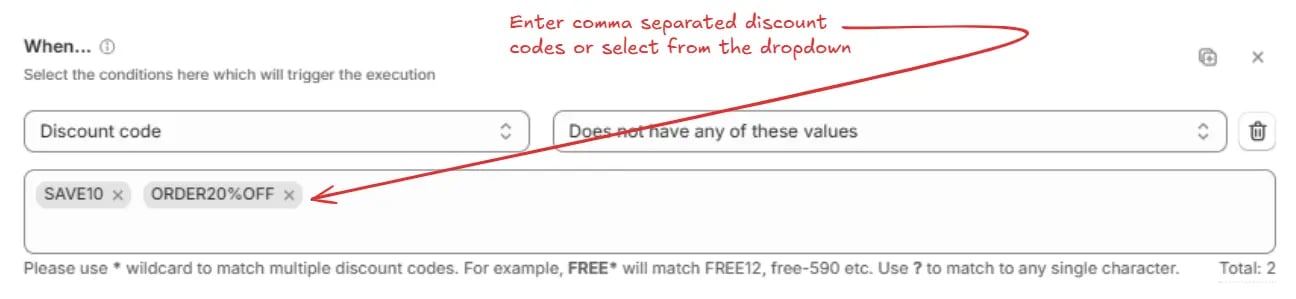
This condition evaluates discount codes used at checkout against selected values and determines whether the rule is satisfied based on the chosen logic.
* **Has any of these values** (The condition is satisfied if at least one entered discount code matches one or more of the selected values )
* **Does not have any of these values** ( The condition is satisfied if none of the entered discount codes match any of the selected values )
* **Has any other value besides these values** ( The condition is satisfied if at least one entered discount code is different from the selected values )
* **Does not have any other value besides these values** ( The condition is satisfied only if all entered discount codes exactly match the selected values and no additional discount codes are present )
Please use `*` wildcard to match multiple discount codes. For example, `FREE*`
will match FREE12, free-590 etc. Use `?` to match to any single character.
For **Has any of these values**, **Does not have any of these values**, **Has any other value besides these values**, and **Does not have any other value besides these values**, enter one or more values into the field. Separate multiple values with commas or select from the dropdown.
> For example, `Does not have any of these values: SAVE10, ORDER20%OFF` → Matches discount codes other than “SAVE10” or “ORDER20%OFF”.
## Discount
### Discount code
This condition evaluates discount codes used at checkout against selected values and determines whether the rule is satisfied based on the chosen logic.
* **Has any of these values** (The condition is satisfied if at least one entered discount code matches one or more of the selected values )
* **Does not have any of these values** ( The condition is satisfied if none of the entered discount codes match any of the selected values )
* **Has any other value besides these values** ( The condition is satisfied if at least one entered discount code is different from the selected values )
* **Does not have any other value besides these values** ( The condition is satisfied only if all entered discount codes exactly match the selected values and no additional discount codes are present )
Please use `*` wildcard to match multiple discount codes. For example, `FREE*`
will match FREE12, free-590 etc. Use `?` to match to any single character.
For **Has any of these values**, **Does not have any of these values**, **Has any other value besides these values**, and **Does not have any other value besides these values**, enter one or more values into the field. Separate multiple values with commas or select from the dropdown.
> For example, `Does not have any of these values: SAVE10, ORDER20%OFF` → Matches discount codes other than “SAVE10” or “ORDER20%OFF”.
 ## Shipping
### Selected shipping type (Ship/Pickup)
This condition checks the "Ship vs Pickup in store" selection on the checkout page, as shown below.
## Shipping
### Selected shipping type (Ship/Pickup)
This condition checks the "Ship vs Pickup in store" selection on the checkout page, as shown below.
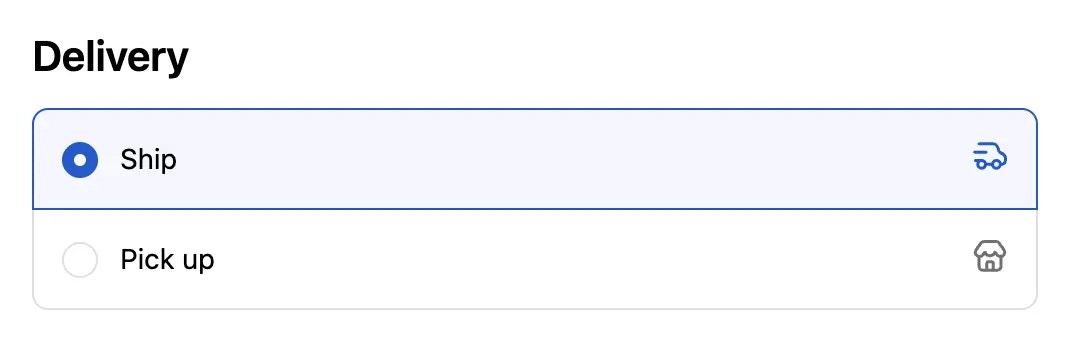 It will become true if the selected shipping type is the same as the entered value, based on one of the following sub-conditions:
* **is** (Matches if the Delivery selection is exactly as the entered value)
* **is not** (Matches if the Delivery selection is different from the entered value)
For any of the above options, choose one shipping type from the list: **Pickup**, **Local delivery**, **Shipping**, **Pickup point**, **Retail**, or **None**.
> **Example:** `is not: Pickup` → Matches if the selected shipping type is anything other than “Pickup”, i-e it is "Ship".
It will become true if the selected shipping type is the same as the entered value, based on one of the following sub-conditions:
* **is** (Matches if the Delivery selection is exactly as the entered value)
* **is not** (Matches if the Delivery selection is different from the entered value)
For any of the above options, choose one shipping type from the list: **Pickup**, **Local delivery**, **Shipping**, **Pickup point**, **Retail**, or **None**.
> **Example:** `is not: Pickup` → Matches if the selected shipping type is anything other than “Pickup”, i-e it is "Ship".
 ### Shipping methods available
Used to check if the given shipping methods are actually available on the checkout page, based on one of the following sub-conditions:
* **Has any of these values** (Matches if the checkout page contains at least one of the listed shipping methods)
* **Does not have any of these values** (Matches if the checkout page does not contain any of the listed shipping methods)
* **Has any other value besides these values** (Matches if the checkout page contains shipping methods other than the listed ones)
* **Does not have any other value besides these values** (Matches if the checkout page contains only the listed shipping methods and no others)
* **Has number of values greater than or equals** (Matches if the number of shipping methods available on the checkout page is greater than or equal to the specified number)
* **Has number of values less than or equals** (Matches if the number of shipping methods available on the checkout page is less than or equal to the specified number)
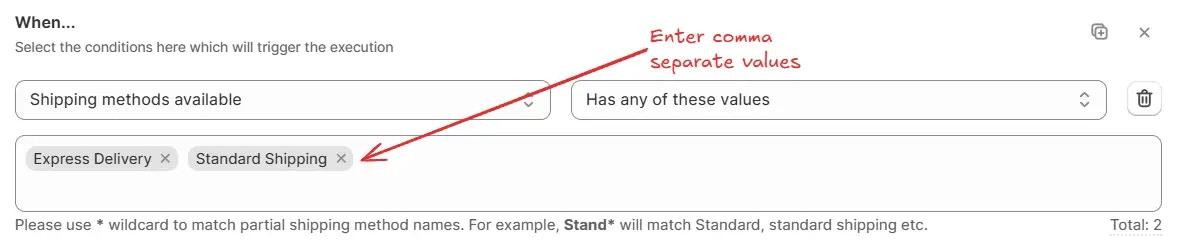
For **Has any of these values**, **Does not have any of these values**, **Has any other value besides these values**, or **Does not have any other value besides these values**, enter one or more values to match. Separate multiple values with commas.
Use \* wildcard to match partial shipping method names. For example, Stand\*
will match Standard, standard shipping etc.
> For example, `Has any of these values: Express Delivery, Standard Shipping` → Matches if at least one of the selected shipping methods is available.
### Shipping methods available
Used to check if the given shipping methods are actually available on the checkout page, based on one of the following sub-conditions:
* **Has any of these values** (Matches if the checkout page contains at least one of the listed shipping methods)
* **Does not have any of these values** (Matches if the checkout page does not contain any of the listed shipping methods)
* **Has any other value besides these values** (Matches if the checkout page contains shipping methods other than the listed ones)
* **Does not have any other value besides these values** (Matches if the checkout page contains only the listed shipping methods and no others)
* **Has number of values greater than or equals** (Matches if the number of shipping methods available on the checkout page is greater than or equal to the specified number)
* **Has number of values less than or equals** (Matches if the number of shipping methods available on the checkout page is less than or equal to the specified number)
For **Has any of these values**, **Does not have any of these values**, **Has any other value besides these values**, or **Does not have any other value besides these values**, enter one or more values to match. Separate multiple values with commas.
Use \* wildcard to match partial shipping method names. For example, Stand\*
will match Standard, standard shipping etc.
> For example, `Has any of these values: Express Delivery, Standard Shipping` → Matches if at least one of the selected shipping methods is available.
 For **Has number of values greater than or equals** or **Has number of values less than or equals**, enter the count threshold.
> For example, `Has number of values greater than or equals 3` → Matches if three or more shipping methods are available.
For **Has number of values greater than or equals** or **Has number of values less than or equals**, enter the count threshold.
> For example, `Has number of values greater than or equals 3` → Matches if three or more shipping methods are available.
 ## Localization
### User language
This condition checks the language selected by the customer, based on one of the following sub-conditions:
* **Has any of these values** (Matches if the customer language is from the given list)
* **Does not have any of these values** (Matches if the customer language is not from the given list)
* **Has any other value besides these values** (Matches if the customer language is not from the given list)
* **Does not have any other value besides these values** (Matches if the customer language is from the given list and no others)
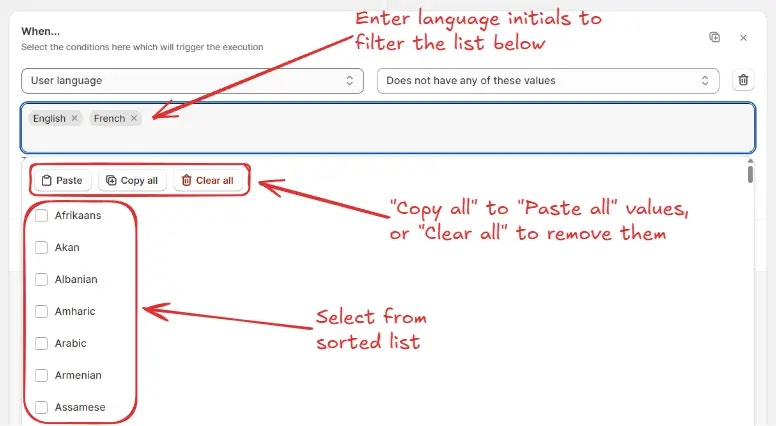
For any of the above options, search and select one or more languages from the list. You can also use the **Paste**, **Copy all**, or **Clear all** options for quick selection.
> For example, `Does not have any of these values: English, French` → Matches if the field does not contain “English” or “French”.
## Localization
### User language
This condition checks the language selected by the customer, based on one of the following sub-conditions:
* **Has any of these values** (Matches if the customer language is from the given list)
* **Does not have any of these values** (Matches if the customer language is not from the given list)
* **Has any other value besides these values** (Matches if the customer language is not from the given list)
* **Does not have any other value besides these values** (Matches if the customer language is from the given list and no others)
For any of the above options, search and select one or more languages from the list. You can also use the **Paste**, **Copy all**, or **Clear all** options for quick selection.
> For example, `Does not have any of these values: English, French` → Matches if the field does not contain “English” or “French”.
 ## Shipping Address
### Shipping address is empty
This condition becomes true if the shipping address fields are empty.
## Shipping Address
### Shipping address is empty
This condition becomes true if the shipping address fields are empty.
 ### Shipping address is not empty
This condition becomes true if the shipping address fields are not empty.
### Shipping address is not empty
This condition becomes true if the shipping address fields are not empty.
 ### Full name (First name + Last name)
Used to compare the customer’s full name with one or more specific values, counts, or states, based on one of the following sub-conditions:
* **Contains** (Matches if the full name contains the specified value or partial value)
* **Does not contain** (Matches if the full name does not contain the specified value or partial value)
* **Is empty** (Matches if no name is entered)
* **Is not empty** (Matches if any value is entered in the name field)
* **Is** (Matches if the full name exactly matches the specified value)
* **Is not** (Matches if the full name is not exactly the specified value)
* **Has no of characters greater than or equals** (Matches if the total character count in the name is greater than or equal to the specified number)
* **Has no of characters less than or equals** (Matches if the total character count in the name is less than or equal to the specified number)
* **Has only** (Matches if the full name contains only the allowed character type from the dropdown)
* **Does not have only** (Matches if the full name contains characters other than the allowed character type from the dropdown)
For **Contains**, **Does not contain**, **Is**, and **Is not**, enter the value to match.
> For example, `Does not contain: Test` → Matches if the name does not contain “Test” anywhere.
### Full name (First name + Last name)
Used to compare the customer’s full name with one or more specific values, counts, or states, based on one of the following sub-conditions:
* **Contains** (Matches if the full name contains the specified value or partial value)
* **Does not contain** (Matches if the full name does not contain the specified value or partial value)
* **Is empty** (Matches if no name is entered)
* **Is not empty** (Matches if any value is entered in the name field)
* **Is** (Matches if the full name exactly matches the specified value)
* **Is not** (Matches if the full name is not exactly the specified value)
* **Has no of characters greater than or equals** (Matches if the total character count in the name is greater than or equal to the specified number)
* **Has no of characters less than or equals** (Matches if the total character count in the name is less than or equal to the specified number)
* **Has only** (Matches if the full name contains only the allowed character type from the dropdown)
* **Does not have only** (Matches if the full name contains characters other than the allowed character type from the dropdown)
For **Contains**, **Does not contain**, **Is**, and **Is not**, enter the value to match.
> For example, `Does not contain: Test` → Matches if the name does not contain “Test” anywhere.
 For **Has only** and **Does not have only**, select the character type from the dropdown:
* **English characters** (Allows only A–Z and a–z)
* **English characters + accent variants** (Allows A–Z, a–z, plus accented characters like é, ñ, ö)
> For example, `has only: english characters` → Matches if the customer’s name contains english characters only.
For **Has only** and **Does not have only**, select the character type from the dropdown:
* **English characters** (Allows only A–Z and a–z)
* **English characters + accent variants** (Allows A–Z, a–z, plus accented characters like é, ñ, ö)
> For example, `has only: english characters` → Matches if the customer’s name contains english characters only.
 For **Has no of characters greater than or equals** or **Has no of characters less than or equals**, enter the character count threshold.
> For example, `Has no of characters greater than or equals 10` → Matches if the full name contains 10 or more characters.
For **Has no of characters greater than or equals** or **Has no of characters less than or equals**, enter the character count threshold.
> For example, `Has no of characters greater than or equals 10` → Matches if the full name contains 10 or more characters.
 For **Is empty** and **Is not empty**, no value entry is needed.
> For example, `Is empty` → Matches if the full name field is left blank.
For **Is empty** and **Is not empty**, no value entry is needed.
> For example, `Is empty` → Matches if the full name field is left blank.
 ### First name
Used to compare the customer’s first name with one or more specific values, counts, or states, based on one of the following sub-conditions:
* **Contains** (Matches if the first name contains the specified value or partial value)
* **Does not contain** (Matches if the first name does not contain the specified value or partial value)
* **Is empty** (Matches if no first name is entered)
* **Is not empty** (Matches if any value is entered in the first name field)
* **Is** (Matches if the first name exactly matches the specified value)
* **Is not** (Matches if the first name is not exactly the specified value)
* **Has no of characters greater than or equals** (Matches if the total character count in the first name is greater than or equal to the specified number)
* **Has no of characters less than or equals** (Matches if the total character count in the first name is less than or equal to the specified number)
* **Has only** (Matches if the first name contains only the allowed character type from the dropdown)
* **Does not have only** (Matches if the first name contains characters other than the allowed character type from the dropdown)
For **Contains**, **Does not contain**, **Is**, and **Is not**, enter the value to match.
> For example, `Is not: Jane` → Matches if the first name is anything except “Jane”.
### First name
Used to compare the customer’s first name with one or more specific values, counts, or states, based on one of the following sub-conditions:
* **Contains** (Matches if the first name contains the specified value or partial value)
* **Does not contain** (Matches if the first name does not contain the specified value or partial value)
* **Is empty** (Matches if no first name is entered)
* **Is not empty** (Matches if any value is entered in the first name field)
* **Is** (Matches if the first name exactly matches the specified value)
* **Is not** (Matches if the first name is not exactly the specified value)
* **Has no of characters greater than or equals** (Matches if the total character count in the first name is greater than or equal to the specified number)
* **Has no of characters less than or equals** (Matches if the total character count in the first name is less than or equal to the specified number)
* **Has only** (Matches if the first name contains only the allowed character type from the dropdown)
* **Does not have only** (Matches if the first name contains characters other than the allowed character type from the dropdown)
For **Contains**, **Does not contain**, **Is**, and **Is not**, enter the value to match.
> For example, `Is not: Jane` → Matches if the first name is anything except “Jane”.
 For **Has only** and **Does not have only**, select the character type from the dropdown:
* **English characters** (Allows only A–Z and a–z)
* **English characters + accent variants** (Allows A–Z, a–z, plus accented characters like é, ñ, ö)
> For example, `has only: english characters` → Matches if the first name contains english characters only.
For **Has only** and **Does not have only**, select the character type from the dropdown:
* **English characters** (Allows only A–Z and a–z)
* **English characters + accent variants** (Allows A–Z, a–z, plus accented characters like é, ñ, ö)
> For example, `has only: english characters` → Matches if the first name contains english characters only.
 For **Has no of characters greater than or equals** or **Has no of characters less than or equals**, enter the character count threshold.
> For example, `Has no of characters greater than or equals 5` → Matches if the first name contains 5 or more characters.
For **Has no of characters greater than or equals** or **Has no of characters less than or equals**, enter the character count threshold.
> For example, `Has no of characters greater than or equals 5` → Matches if the first name contains 5 or more characters.
 For **Is empty** and **Is not empty**, no value entry is needed.
> For example, `Is empty` → Matches if the first name field is left blank.
For **Is empty** and **Is not empty**, no value entry is needed.
> For example, `Is empty` → Matches if the first name field is left blank.
 ### Last name
Used to compare the customer’s last name with one or more specific values, counts, or states, based on one of the following sub-conditions:
* **Contains** (Matches if the last name contains the specified value or partial value)
* **Does not contain** (Matches if the last name does not contain the specified value or partial value)
* **Is empty** (Matches if no last name is entered)
* **Is not empty** (Matches if any value is entered in the last name field)
* **Is** (Matches if the last name exactly matches the specified value)
* **Is not** (Matches if the last name is not exactly the specified value)
* **Has no of characters greater than or equals** (Matches if the total character count in the last name is greater than or equal to the specified number)
* **Has no of characters less than or equals** (Matches if the total character count in the last name is less than or equal to the specified number)
* **Has only** (Matches if the last name contains only the allowed character type from the dropdown)
* **Does not have only** (Matches if the last name contains characters other than the allowed character type from the dropdown)
For **Contains**, **Does not contain**, **Is**, and **Is not**, enter the value to match.
> For example, `Is not: Smith` → Matches if the last name is anything except “Smith”.
### Last name
Used to compare the customer’s last name with one or more specific values, counts, or states, based on one of the following sub-conditions:
* **Contains** (Matches if the last name contains the specified value or partial value)
* **Does not contain** (Matches if the last name does not contain the specified value or partial value)
* **Is empty** (Matches if no last name is entered)
* **Is not empty** (Matches if any value is entered in the last name field)
* **Is** (Matches if the last name exactly matches the specified value)
* **Is not** (Matches if the last name is not exactly the specified value)
* **Has no of characters greater than or equals** (Matches if the total character count in the last name is greater than or equal to the specified number)
* **Has no of characters less than or equals** (Matches if the total character count in the last name is less than or equal to the specified number)
* **Has only** (Matches if the last name contains only the allowed character type from the dropdown)
* **Does not have only** (Matches if the last name contains characters other than the allowed character type from the dropdown)
For **Contains**, **Does not contain**, **Is**, and **Is not**, enter the value to match.
> For example, `Is not: Smith` → Matches if the last name is anything except “Smith”.
 For **Has only** and **Does not have only**, select the character type from the dropdown:
* **English characters** (Allows only A–Z and a–z)
* **English characters + accent variants** (Allows A–Z, a–z, plus accented characters like é, ñ, ö)
> For example, `Has only: English characters` → Matches if the last name contains English characters only.
For **Has only** and **Does not have only**, select the character type from the dropdown:
* **English characters** (Allows only A–Z and a–z)
* **English characters + accent variants** (Allows A–Z, a–z, plus accented characters like é, ñ, ö)
> For example, `Has only: English characters` → Matches if the last name contains English characters only.
 For **Has no of characters greater than or equals** or **Has no of characters less than or equals**, enter the character count threshold.
> For example, `Has no of characters greater than or equals 5` → Matches if the last name contains 5 or more characters.
For **Has no of characters greater than or equals** or **Has no of characters less than or equals**, enter the character count threshold.
> For example, `Has no of characters greater than or equals 5` → Matches if the last name contains 5 or more characters.
 For **Is empty** and **Is not empty**, no value entry is needed.
> For example, `Is empty` → Matches if the last name field is left blank.
For **Is empty** and **Is not empty**, no value entry is needed.
> For example, `Is empty` → Matches if the last name field is left blank.
 ### Company
Used to compare the customer’s company name (The company name field on the checkout page) with one or more specific values, counts, or states, based on one of the following sub-conditions:
* **Contains** (Matches if the company name contains the specified value or partial value)
* **Does not contain** (Matches if the company name does not contain the specified value or partial value)
* **Is empty** (Matches if no company name is entered)
* **Is not empty** (Matches if any value is entered in the company name field)
* **Is** (Matches if the company name exactly matches the specified value)
* **Is not** (Matches if the company name is not exactly the specified value)
* **Has no of digits greater than or equals** (Matches if the total number of digits in the company name is greater than or equal to the specified number)
* **Has no of digits less than or equals** (Matches if the total number of digits in the company name is less than or equal to the specified number)
* **Has no of characters greater than or equals** (Matches if the total number of characters in the company name is greater than or equal to the specified number)
* **Has no of characters less than or equals** (Matches if the total number of characters in the company name is less than or equal to the specified number)
* **Has only** (Matches if the company name contains only the allowed character type from the dropdown)
* **Does not have only** (Matches if the company name contains characters other than the allowed character type from the dropdown)
For **Contains**, **Does not contain**, **Is**, and **Is not**, enter the value to match.
> For example, `Contains: Tech` → Matches if the company name contains the word “Tech”.
### Company
Used to compare the customer’s company name (The company name field on the checkout page) with one or more specific values, counts, or states, based on one of the following sub-conditions:
* **Contains** (Matches if the company name contains the specified value or partial value)
* **Does not contain** (Matches if the company name does not contain the specified value or partial value)
* **Is empty** (Matches if no company name is entered)
* **Is not empty** (Matches if any value is entered in the company name field)
* **Is** (Matches if the company name exactly matches the specified value)
* **Is not** (Matches if the company name is not exactly the specified value)
* **Has no of digits greater than or equals** (Matches if the total number of digits in the company name is greater than or equal to the specified number)
* **Has no of digits less than or equals** (Matches if the total number of digits in the company name is less than or equal to the specified number)
* **Has no of characters greater than or equals** (Matches if the total number of characters in the company name is greater than or equal to the specified number)
* **Has no of characters less than or equals** (Matches if the total number of characters in the company name is less than or equal to the specified number)
* **Has only** (Matches if the company name contains only the allowed character type from the dropdown)
* **Does not have only** (Matches if the company name contains characters other than the allowed character type from the dropdown)
For **Contains**, **Does not contain**, **Is**, and **Is not**, enter the value to match.
> For example, `Contains: Tech` → Matches if the company name contains the word “Tech”.
 For **Has only** and **Does not have only**, select the character type from the dropdown:
* **English characters** (Allows only A–Z and a–z)
* **English characters + accent variants** (Allows A–Z, a–z, plus accented characters like é, ñ, ö)
> For example, `Has only: English characters` → Matches if the company name contains English characters only.
For **Has only** and **Does not have only**, select the character type from the dropdown:
* **English characters** (Allows only A–Z and a–z)
* **English characters + accent variants** (Allows A–Z, a–z, plus accented characters like é, ñ, ö)
> For example, `Has only: English characters` → Matches if the company name contains English characters only.
 For **Has no of digits/characters greater than or equals** or **less than or equals**, enter the threshold value.
> For example, `Has no of characters greater than or equals 10` → Matches if the company name contains 10 or more characters.
For **Has no of digits/characters greater than or equals** or **less than or equals**, enter the threshold value.
> For example, `Has no of characters greater than or equals 10` → Matches if the company name contains 10 or more characters.
 For **Is empty** and **Is not empty**, no value entry is needed.
> For example, `Is empty` → Matches if the company name field is left blank.
For **Is empty** and **Is not empty**, no value entry is needed.
> For example, `Is empty` → Matches if the company name field is left blank.
 ### Phone number
Used to compare the customer’s phone number (The phone number field on the checkout page) with one or more specific values, counts, or states, based on one of the following sub-conditions:
* **Contains** (Matches if the phone number contains the specified value or partial value)
* **Does not contain** (Matches if the phone number does not contain the specified value or partial value)
* **Is empty** (Matches if no phone number is entered)
* **Is not empty** (Matches if any value is entered in the phone number field)
* **Is** (Matches if the phone number exactly matches the specified value)
* **Is not** (Matches if the phone number is not exactly the specified value)
* **Has no of digits greater than or equals** (Matches if the total number of digits in the phone number is greater than or equal to the specified number)
* **Has no of digits less than or equals** (Matches if the total number of digits in the phone number is less than or equal to the specified number)
For **Contains**, **Does not contain**, **Is**, and **Is not**, enter the value to match.
> For example, `Contains: 123` → Matches if the phone number contains “123” anywhere.
### Phone number
Used to compare the customer’s phone number (The phone number field on the checkout page) with one or more specific values, counts, or states, based on one of the following sub-conditions:
* **Contains** (Matches if the phone number contains the specified value or partial value)
* **Does not contain** (Matches if the phone number does not contain the specified value or partial value)
* **Is empty** (Matches if no phone number is entered)
* **Is not empty** (Matches if any value is entered in the phone number field)
* **Is** (Matches if the phone number exactly matches the specified value)
* **Is not** (Matches if the phone number is not exactly the specified value)
* **Has no of digits greater than or equals** (Matches if the total number of digits in the phone number is greater than or equal to the specified number)
* **Has no of digits less than or equals** (Matches if the total number of digits in the phone number is less than or equal to the specified number)
For **Contains**, **Does not contain**, **Is**, and **Is not**, enter the value to match.
> For example, `Contains: 123` → Matches if the phone number contains “123” anywhere.
 For **Has no of digits greater than or equals** or **Has no of digits less than or equals**, enter the threshold value.
> For example, `Has no of digits greater than or equals 10` → Matches if the phone number contains 10 or more digits.
For **Has no of digits greater than or equals** or **Has no of digits less than or equals**, enter the threshold value.
> For example, `Has no of digits greater than or equals 10` → Matches if the phone number contains 10 or more digits.
 For **Is empty** and **Is not empty**, no value entry is needed.
> For example, `Is empty` → Matches if the phone number field is left blank.
For **Is empty** and **Is not empty**, no value entry is needed.
> For example, `Is empty` → Matches if the phone number field is left blank.
 ### City / Area
Used to compare the City / Area (The City/Area field on the checkout page) values with one or more specific values, counts, or states, based on one of the following sub-conditions:
* **Has any of these values** (Matches if the city field contains at least one of the listed values)
* **Does not have any of these values** (Matches if the city field does not contain any of the listed values)
* **Has any other value besides these values** (Matches if the city field contains values other than the listed ones)
* **Does not have any other value besides these values** (Matches if the city field contains only the listed values and no others)
* **Has number of digits greater than or equals** (Matches if the number of digits in the city field is greater than or equal to the specified number)
* **Has number of digits less than or equals** (Matches if the number of digits in the city field is less than or equal to the specified number)
* **Is empty** (Matches if the city field has no value)
* **Is not empty** (Matches if the city field contains any value)
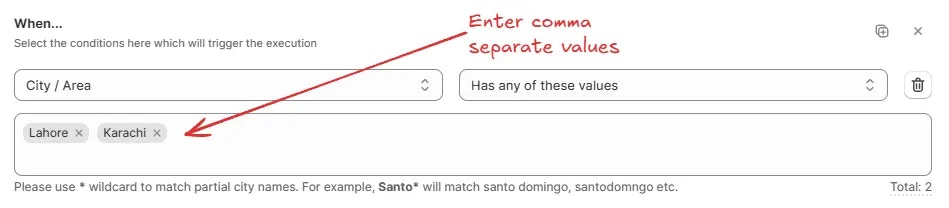
For **Has any of these values**, **Does not have any of these values**, **Has any other value besides these values**, **Does not have any other value besides these values**, enter one or more values to match. Separate multiple values with commas.
Use \* wildcard to match partial city names. For example, Santo\* will match
santo domingo, santodomngo etc.
> For example, `Has any of these values: Lahore, Karachi` → Matches if the field contains either “Lahore” or “Karachi”.
### City / Area
Used to compare the City / Area (The City/Area field on the checkout page) values with one or more specific values, counts, or states, based on one of the following sub-conditions:
* **Has any of these values** (Matches if the city field contains at least one of the listed values)
* **Does not have any of these values** (Matches if the city field does not contain any of the listed values)
* **Has any other value besides these values** (Matches if the city field contains values other than the listed ones)
* **Does not have any other value besides these values** (Matches if the city field contains only the listed values and no others)
* **Has number of digits greater than or equals** (Matches if the number of digits in the city field is greater than or equal to the specified number)
* **Has number of digits less than or equals** (Matches if the number of digits in the city field is less than or equal to the specified number)
* **Is empty** (Matches if the city field has no value)
* **Is not empty** (Matches if the city field contains any value)
For **Has any of these values**, **Does not have any of these values**, **Has any other value besides these values**, **Does not have any other value besides these values**, enter one or more values to match. Separate multiple values with commas.
Use \* wildcard to match partial city names. For example, Santo\* will match
santo domingo, santodomngo etc.
> For example, `Has any of these values: Lahore, Karachi` → Matches if the field contains either “Lahore” or “Karachi”.
 For **Has number of digits greater than or equals** or **Has number of digits less than or equals**, enter the digit count threshold.
> For example, `Has number of digits greater than or equals 5` → Matches if the field’s value has five or more digits.
For **Has number of digits greater than or equals** or **Has number of digits less than or equals**, enter the digit count threshold.
> For example, `Has number of digits greater than or equals 5` → Matches if the field’s value has five or more digits.
 For **Is empty** and **Is not empty**, no value entry is needed.
> For example, `Is empty` → Matches if no value is entered for the field.
For **Is empty** and **Is not empty**, no value entry is needed.
> For example, `Is empty` → Matches if no value is entered for the field.
 ### Province code / State code
Used to compare the Province / State (The Province/State field on the checkout page) values with one or more specific values or states, based on one of the following sub-conditions:
* **Has any of these values** (Matches if the province field contains at least one of the listed values)
* **Does not have any of these values** (Matches if the province field does not contain any of the listed values)
* **Has any other value besides these values** (Matches if the province field contains values other than the listed ones)
* **Does not have any other value besides these values** (Matches if the province field contains only the listed values and no others)
* **Is empty** (Matches if the province field has no value)
* **Is not empty** (Matches if the province field contains any value)
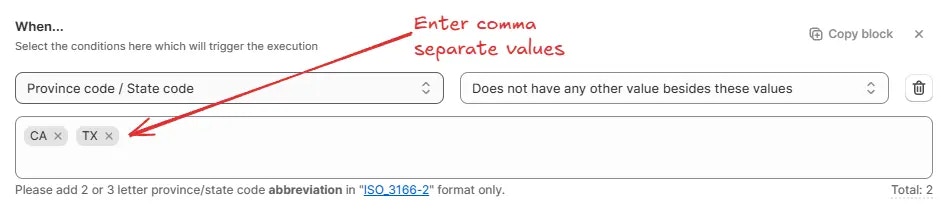
For **Has any of these values**, **Does not have any of these values**, **Has any other value besides these values**, **Does not have any other value besides these values**, enter one or more values to match. Separate multiple values with commas.
Add 2 or 3 letter province/state code abbreviation in "ISO\_3166-2" format
only.
> For example, `Does not have any other value besides these values: CA, TX` → Matches if the field contains only “CA” or “TX” and no other values.
### Province code / State code
Used to compare the Province / State (The Province/State field on the checkout page) values with one or more specific values or states, based on one of the following sub-conditions:
* **Has any of these values** (Matches if the province field contains at least one of the listed values)
* **Does not have any of these values** (Matches if the province field does not contain any of the listed values)
* **Has any other value besides these values** (Matches if the province field contains values other than the listed ones)
* **Does not have any other value besides these values** (Matches if the province field contains only the listed values and no others)
* **Is empty** (Matches if the province field has no value)
* **Is not empty** (Matches if the province field contains any value)
For **Has any of these values**, **Does not have any of these values**, **Has any other value besides these values**, **Does not have any other value besides these values**, enter one or more values to match. Separate multiple values with commas.
Add 2 or 3 letter province/state code abbreviation in "ISO\_3166-2" format
only.
> For example, `Does not have any other value besides these values: CA, TX` → Matches if the field contains only “CA” or “TX” and no other values.
 For **Is empty** and **Is not empty**, no value entry is needed.
> For example, `Is not empty` → Matches if any value is entered for the field.
For **Is empty** and **Is not empty**, no value entry is needed.
> For example, `Is not empty` → Matches if any value is entered for the field.
 ### Country
Used to compare the Country (The Country field on the checkout page) values with one or more specific countries, based on one of the following sub-conditions:
* **Has any of these values** (Matches if the country field contains at least one of the selected countries)
* **Does not have any of these values** (Matches if the country field does not contain any of the selected countries)
* **Has any other value besides these values** (Matches if the country field contains countries other than the selected ones)
* **Does not have any other value besides these values** (Matches if the country field contains only the selected countries and no others)
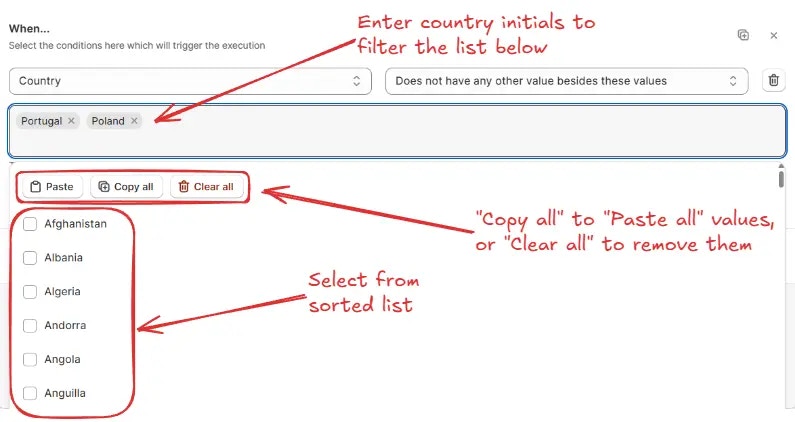
For any of the above options, search and select one or more countries from the list. You can also use the **Paste**, **Copy all**, or **Clear all** options for quick selection.
> For example, `Does not have any other value besides these values: Portugal, Poland` → Matches if the field contains only “Portugal” or “Poland” and no other countries.
### Country
Used to compare the Country (The Country field on the checkout page) values with one or more specific countries, based on one of the following sub-conditions:
* **Has any of these values** (Matches if the country field contains at least one of the selected countries)
* **Does not have any of these values** (Matches if the country field does not contain any of the selected countries)
* **Has any other value besides these values** (Matches if the country field contains countries other than the selected ones)
* **Does not have any other value besides these values** (Matches if the country field contains only the selected countries and no others)
For any of the above options, search and select one or more countries from the list. You can also use the **Paste**, **Copy all**, or **Clear all** options for quick selection.
> For example, `Does not have any other value besides these values: Portugal, Poland` → Matches if the field contains only “Portugal” or “Poland” and no other countries.
 ### Zip code / Postal code
Used to compare the Zip code / Postal code (The Zip/Postal Code field on the checkout page) values with one or more specific zip or postal codes, based on one of the following sub-conditions:
* **Has any of these values** (Matches if the zip/postal code field contains at least one of the listed values)
* **Does not have any of these values** (Matches if the zip/postal code field does not contain any of the listed values)
* **Has value in between these values** (Matches if the zip/postal code field value falls within the specified range)
* **Does not have value in between these values** (Matches if the zip/postal code field value does not fall within the specified range)
* **Has any other value besides these values** (Matches if the zip/postal code field contains values other than the listed ones)
* **Does not have any other value besides these values** (Matches if the zip/postal code field contains only the listed values and no others)
* **Has only digits** (Matches if the zip/postal code field contains only numeric characters)
* **Does not have only digits** (Matches if the zip/postal code field contains any non-numeric characters)
* **Has number of digits in between** (Matches if the number of digits falls within the specified range)
* **Does not have number of digits in between** (Matches if the number of digits does not fall within the specified range)
* **Is empty** (Matches if the zip/postal code field has no value)
* **Is not empty** (Matches if the zip/postal code field contains any value)
Use **Has any of these values**, **Does not have any of these values**, **Has any other value besides these values**, or **Does not have any other value besides these values** to match against one or more specific zip/postal codes. Separate multiple values with commas.
Use \* wildcard to match multiple zip codes. For example, BT\* will match BT12,
bt-590 etc. Use ? to match to any single character.
> For example, `Has any of these values: BT*` → Matches all zip/postal codes starting with “BT”.
### Zip code / Postal code
Used to compare the Zip code / Postal code (The Zip/Postal Code field on the checkout page) values with one or more specific zip or postal codes, based on one of the following sub-conditions:
* **Has any of these values** (Matches if the zip/postal code field contains at least one of the listed values)
* **Does not have any of these values** (Matches if the zip/postal code field does not contain any of the listed values)
* **Has value in between these values** (Matches if the zip/postal code field value falls within the specified range)
* **Does not have value in between these values** (Matches if the zip/postal code field value does not fall within the specified range)
* **Has any other value besides these values** (Matches if the zip/postal code field contains values other than the listed ones)
* **Does not have any other value besides these values** (Matches if the zip/postal code field contains only the listed values and no others)
* **Has only digits** (Matches if the zip/postal code field contains only numeric characters)
* **Does not have only digits** (Matches if the zip/postal code field contains any non-numeric characters)
* **Has number of digits in between** (Matches if the number of digits falls within the specified range)
* **Does not have number of digits in between** (Matches if the number of digits does not fall within the specified range)
* **Is empty** (Matches if the zip/postal code field has no value)
* **Is not empty** (Matches if the zip/postal code field contains any value)
Use **Has any of these values**, **Does not have any of these values**, **Has any other value besides these values**, or **Does not have any other value besides these values** to match against one or more specific zip/postal codes. Separate multiple values with commas.
Use \* wildcard to match multiple zip codes. For example, BT\* will match BT12,
bt-590 etc. Use ? to match to any single character.
> For example, `Has any of these values: BT*` → Matches all zip/postal codes starting with “BT”.
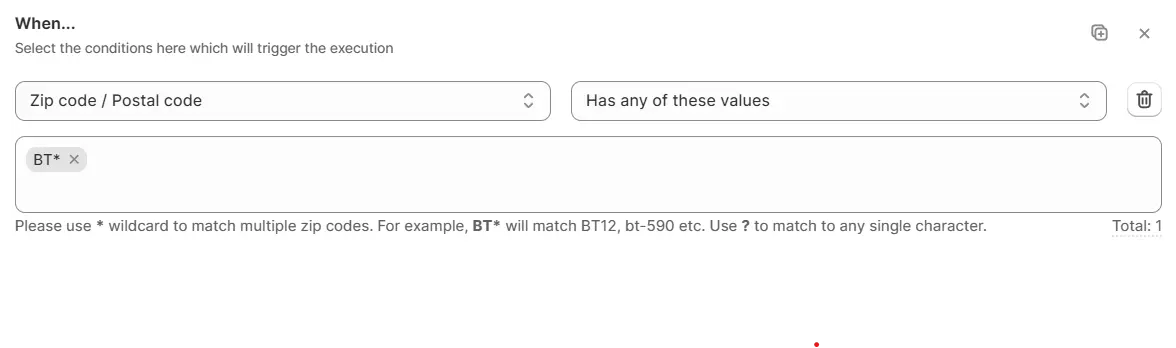 > Another example, `Does not have any of these values: 12345, 67890` → Matches if the code is not “12345” or “67890”.
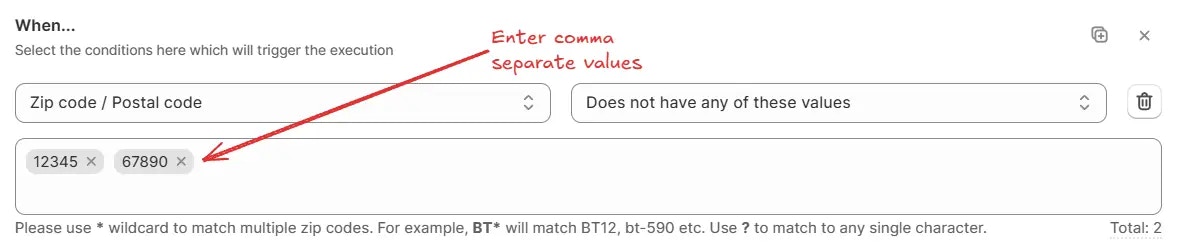 Use **Has value in between these values** or **Does not have value in between these values** to match zip/postal codes within or outside a numeric range.
Enter numbers only. All values ranging in between starting value until the
last value will be matched, including the starting and last value.
> For example, `Has value in between these values: 10000 – 20000` → Matches if the code is between “10000” and “20000”.
Use **Has value in between these values** or **Does not have value in between these values** to match zip/postal codes within or outside a numeric range.
Enter numbers only. All values ranging in between starting value until the
last value will be matched, including the starting and last value.
> For example, `Has value in between these values: 10000 – 20000` → Matches if the code is between “10000” and “20000”.
 Use **Has only digits** or **Does not have only digits** to match zip/postal codes that contain only numeric characters (0–9) or those that include any non-numeric characters, such as letters, spaces, or symbols.
> For example, `Has only digits` → Matches digits only (0–9).
Use **Has only digits** or **Does not have only digits** to match zip/postal codes that contain only numeric characters (0–9) or those that include any non-numeric characters, such as letters, spaces, or symbols.
> For example, `Has only digits` → Matches digits only (0–9).
 Use **Has number of digits in between** or **Does not have number of digits in between** to match based on the count of digits in the code.
Enter numbers only. All values ranging in between given number of digits will
be matched.
> For example, `Has number of digits in between: 4 – 6` → Matches codes that contain between 4 and 6 digits.
Use **Has number of digits in between** or **Does not have number of digits in between** to match based on the count of digits in the code.
Enter numbers only. All values ranging in between given number of digits will
be matched.
> For example, `Has number of digits in between: 4 – 6` → Matches codes that contain between 4 and 6 digits.
 Use **Is empty** or **Is not empty** when you only need to check whether the field is filled in.
> For example, `Is not empty` → Matches if any value is entered in the field
Use **Is empty** or **Is not empty** when you only need to check whether the field is filled in.
> For example, `Is not empty` → Matches if any value is entered in the field
