> ## Documentation Index
> Fetch the complete documentation index at: https://docs.checkoutrules.com/llms.txt
> Use this file to discover all available pages before exploring further.
# Condition Set 7
> Learn about each condition available in _Condition Set 7_.
## Always
If you don’t want to set any condition, select *Always*. The rule will run every time for everyone, without checking any conditions.
 ## Previous all conditions invalid
When all previous conditions are invalid in the previous [rule block](/guides/en/get-started/concepts#block), i-e the previous rule block did not run, this condition becomes true, ensuring the action is triggered only if none of the earlier conditions are met.
Available only when at least one previous rule block exists.
## Previous all conditions invalid
When all previous conditions are invalid in the previous [rule block](/guides/en/get-started/concepts#block), i-e the previous rule block did not run, this condition becomes true, ensuring the action is triggered only if none of the earlier conditions are met.
Available only when at least one previous rule block exists.
 ## Customer
### Email address
This condition checks the customer’s **email address** against specific criteria, based on one of the following sub-conditions:
* **contains** (The email address includes the entered value)
* **does not contain** (The email address does not include the entered value)
* **is empty** (No email address is provided)
* **is not empty** (An email address is provided)
* **is** (The email address exactly matches the entered value)
* **is not** (The email address does not exactly match the entered value)
For **contains**, **does not contain**, **is**, and **is not**, type a value in the text box to compare against the customer’s email address.
> For example, `contains @gmail.com` → Matches any email address ending with “@gmail.com”.
## Customer
### Email address
This condition checks the customer’s **email address** against specific criteria, based on one of the following sub-conditions:
* **contains** (The email address includes the entered value)
* **does not contain** (The email address does not include the entered value)
* **is empty** (No email address is provided)
* **is not empty** (An email address is provided)
* **is** (The email address exactly matches the entered value)
* **is not** (The email address does not exactly match the entered value)
For **contains**, **does not contain**, **is**, and **is not**, type a value in the text box to compare against the customer’s email address.
> For example, `contains @gmail.com` → Matches any email address ending with “@gmail.com”.
 For **is empty** and **is not empty**, no value entry is required.
> For example, `is empty` → Matches when the email field is blank.
For **is empty** and **is not empty**, no value entry is required.
> For example, `is empty` → Matches when the email field is blank.
 ## Discount
### Discount code
This condition evaluates discount codes used at checkout against selected values and determines whether the rule is satisfied based on the chosen logic.
* **Has any of these values** (The condition is satisfied if at least one entered discount code matches one or more of the selected values )
* **Does not have any of these values** ( The condition is satisfied if none of the entered discount codes match any of the selected values )
* **Has any other value besides these values** ( The condition is satisfied if at least one entered discount code is different from the selected values )
* **Does not have any other value besides these values** ( The condition is satisfied only if all entered discount codes exactly match the selected values and no additional discount codes are present )
Please use `*` wildcard to match multiple discount codes. For example, `FREE*`
will match FREE12, free-590 etc. Use `?` to match to any single character.
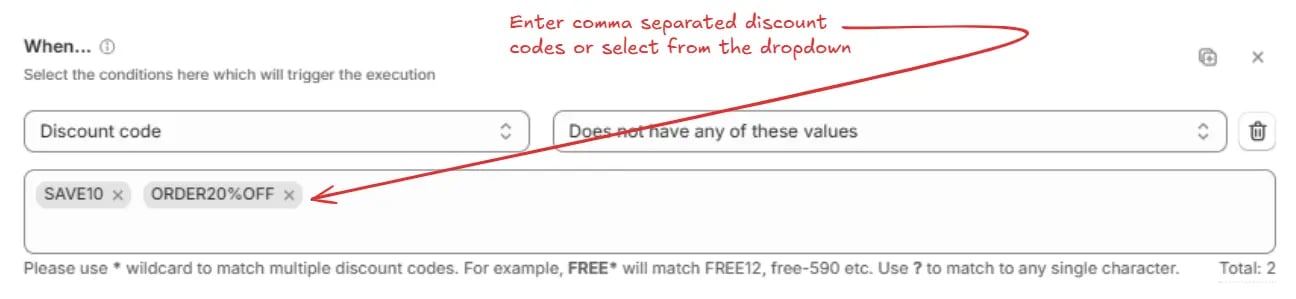
For **Has any of these values**, **Does not have any of these values**, **Has any other value besides these values**, and **Does not have any other value besides these values**, enter one or more values into the field. Separate multiple values with commas or select from the dropdown.
> For example, `Does not have any of these values: SAVE10, ORDER20%OFF` → Matches discount codes other than “SAVE10” or “ORDER20%OFF”.
## Discount
### Discount code
This condition evaluates discount codes used at checkout against selected values and determines whether the rule is satisfied based on the chosen logic.
* **Has any of these values** (The condition is satisfied if at least one entered discount code matches one or more of the selected values )
* **Does not have any of these values** ( The condition is satisfied if none of the entered discount codes match any of the selected values )
* **Has any other value besides these values** ( The condition is satisfied if at least one entered discount code is different from the selected values )
* **Does not have any other value besides these values** ( The condition is satisfied only if all entered discount codes exactly match the selected values and no additional discount codes are present )
Please use `*` wildcard to match multiple discount codes. For example, `FREE*`
will match FREE12, free-590 etc. Use `?` to match to any single character.
For **Has any of these values**, **Does not have any of these values**, **Has any other value besides these values**, and **Does not have any other value besides these values**, enter one or more values into the field. Separate multiple values with commas or select from the dropdown.
> For example, `Does not have any of these values: SAVE10, ORDER20%OFF` → Matches discount codes other than “SAVE10” or “ORDER20%OFF”.
 ## Localization
### User language
This condition checks the language selected by the customer, based on one of the following sub-conditions:
* **Has any of these values** (Matches if the customer language is from the given list)
* **Does not have any of these values** (Matches if the customer language is not from the given list)
* **Has any other value besides these values** (Matches if the customer language is not from the given list)
* **Does not have any other value besides these values** (Matches if the customer language is from the given list and no others)
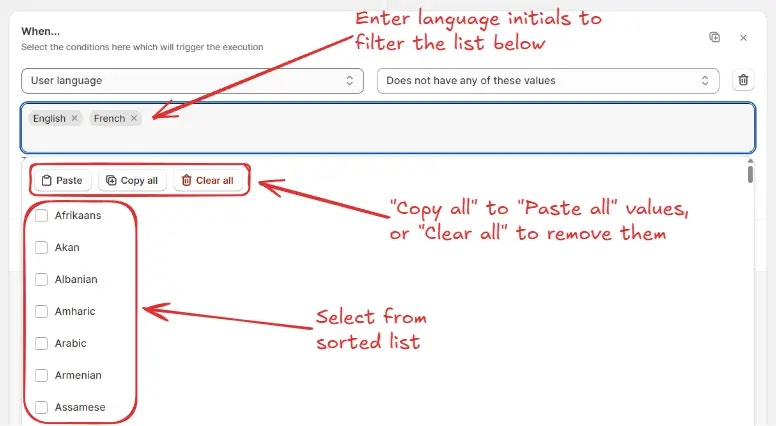
For any of the above options, search and select one or more languages from the list. You can also use the **Paste**, **Copy all**, or **Clear all** options for quick selection.
> For example, `Does not have any of these values: English, French` → Matches if the field does not contain “English” or “French”.
## Localization
### User language
This condition checks the language selected by the customer, based on one of the following sub-conditions:
* **Has any of these values** (Matches if the customer language is from the given list)
* **Does not have any of these values** (Matches if the customer language is not from the given list)
* **Has any other value besides these values** (Matches if the customer language is not from the given list)
* **Does not have any other value besides these values** (Matches if the customer language is from the given list and no others)
For any of the above options, search and select one or more languages from the list. You can also use the **Paste**, **Copy all**, or **Clear all** options for quick selection.
> For example, `Does not have any of these values: English, French` → Matches if the field does not contain “English” or “French”.
 ## Billing Address
### Company
Used to compare the customer’s company name (The company name field on the checkout page) with one or more specific values, counts, or states, based on one of the following sub-conditions:
* **Contains** (Matches if the company name contains the specified value or partial value)
* **Does not contain** (Matches if the company name does not contain the specified value or partial value)
* **Is empty** (Matches if no company name is entered)
* **Is not empty** (Matches if any value is entered in the company name field)
* **Is** (Matches if the company name exactly matches the specified value)
* **Is not** (Matches if the company name is not exactly the specified value)
* **Has no of digits greater than or equals** (Matches if the total number of digits in the company name is greater than or equal to the specified number)
* **Has no of digits less than or equals** (Matches if the total number of digits in the company name is less than or equal to the specified number)
* **Has no of characters greater than or equals** (Matches if the total number of characters in the company name is greater than or equal to the specified number)
* **Has no of characters less than or equals** (Matches if the total number of characters in the company name is less than or equal to the specified number)
* **Has only** (Matches if the company name contains only the allowed character type from the dropdown)
* **Does not have only** (Matches if the company name contains characters other than the allowed character type from the dropdown)
For **Contains**, **Does not contain**, **Is**, and **Is not**, enter the value to match.
> For example, `Contains: Tech` → Matches if the company name contains the word “Tech”.
## Billing Address
### Company
Used to compare the customer’s company name (The company name field on the checkout page) with one or more specific values, counts, or states, based on one of the following sub-conditions:
* **Contains** (Matches if the company name contains the specified value or partial value)
* **Does not contain** (Matches if the company name does not contain the specified value or partial value)
* **Is empty** (Matches if no company name is entered)
* **Is not empty** (Matches if any value is entered in the company name field)
* **Is** (Matches if the company name exactly matches the specified value)
* **Is not** (Matches if the company name is not exactly the specified value)
* **Has no of digits greater than or equals** (Matches if the total number of digits in the company name is greater than or equal to the specified number)
* **Has no of digits less than or equals** (Matches if the total number of digits in the company name is less than or equal to the specified number)
* **Has no of characters greater than or equals** (Matches if the total number of characters in the company name is greater than or equal to the specified number)
* **Has no of characters less than or equals** (Matches if the total number of characters in the company name is less than or equal to the specified number)
* **Has only** (Matches if the company name contains only the allowed character type from the dropdown)
* **Does not have only** (Matches if the company name contains characters other than the allowed character type from the dropdown)
For **Contains**, **Does not contain**, **Is**, and **Is not**, enter the value to match.
> For example, `Contains: Tech` → Matches if the company name contains the word “Tech”.
 For **Has only** and **Does not have only**, select the character type from the dropdown:
* **English characters** (Allows only A–Z and a–z)
* **English characters + accent variants** (Allows A–Z, a–z, plus accented characters like é, ñ, ö)
> For example, `Has only: English characters` → Matches if the company name contains English characters only.
For **Has only** and **Does not have only**, select the character type from the dropdown:
* **English characters** (Allows only A–Z and a–z)
* **English characters + accent variants** (Allows A–Z, a–z, plus accented characters like é, ñ, ö)
> For example, `Has only: English characters` → Matches if the company name contains English characters only.
 For **Has no of digits/characters greater than or equals** or **less than or equals**, enter the threshold value.
> For example, `Has no of characters greater than or equals 10` → Matches if the company name contains 10 or more characters.
For **Has no of digits/characters greater than or equals** or **less than or equals**, enter the threshold value.
> For example, `Has no of characters greater than or equals 10` → Matches if the company name contains 10 or more characters.
 For **Is empty** and **Is not empty**, no value entry is needed.
> For example, `Is empty` → Matches if the company name field is left blank.
For **Is empty** and **Is not empty**, no value entry is needed.
> For example, `Is empty` → Matches if the company name field is left blank.
 ### Phone number
Used to compare the customer’s phone number (The phone number field on the checkout page) with one or more specific values, counts, or states, based on one of the following sub-conditions:
* **Contains** (Matches if the phone number contains the specified value or partial value)
* **Does not contain** (Matches if the phone number does not contain the specified value or partial value)
* **Is empty** (Matches if no phone number is entered)
* **Is not empty** (Matches if any value is entered in the phone number field)
* **Is** (Matches if the phone number exactly matches the specified value)
* **Is not** (Matches if the phone number is not exactly the specified value)
* **Has no of digits greater than or equals** (Matches if the total number of digits in the phone number is greater than or equal to the specified number)
* **Has no of digits less than or equals** (Matches if the total number of digits in the phone number is less than or equal to the specified number)
For **Contains**, **Does not contain**, **Is**, and **Is not**, enter the value to match.
> For example, `Contains: 123` → Matches if the phone number contains “123” anywhere.
### Phone number
Used to compare the customer’s phone number (The phone number field on the checkout page) with one or more specific values, counts, or states, based on one of the following sub-conditions:
* **Contains** (Matches if the phone number contains the specified value or partial value)
* **Does not contain** (Matches if the phone number does not contain the specified value or partial value)
* **Is empty** (Matches if no phone number is entered)
* **Is not empty** (Matches if any value is entered in the phone number field)
* **Is** (Matches if the phone number exactly matches the specified value)
* **Is not** (Matches if the phone number is not exactly the specified value)
* **Has no of digits greater than or equals** (Matches if the total number of digits in the phone number is greater than or equal to the specified number)
* **Has no of digits less than or equals** (Matches if the total number of digits in the phone number is less than or equal to the specified number)
For **Contains**, **Does not contain**, **Is**, and **Is not**, enter the value to match.
> For example, `Contains: 123` → Matches if the phone number contains “123” anywhere.
 For **Has no of digits greater than or equals** or **Has no of digits less than or equals**, enter the threshold value.
> For example, `Has no of digits greater than or equals 10` → Matches if the phone number contains 10 or more digits.
For **Has no of digits greater than or equals** or **Has no of digits less than or equals**, enter the threshold value.
> For example, `Has no of digits greater than or equals 10` → Matches if the phone number contains 10 or more digits.
 For **Is empty** and **Is not empty**, no value entry is needed.
> For example, `Is empty` → Matches if the phone number field is left blank.
For **Is empty** and **Is not empty**, no value entry is needed.
> For example, `Is empty` → Matches if the phone number field is left blank.
 ### City / Area
Used to compare the City / Area (The City/Area field on the checkout page) values with one or more specific values, counts, or states, based on one of the following sub-conditions:
* **Has any of these values** (Matches if the city field contains at least one of the listed values)
* **Does not have any of these values** (Matches if the city field does not contain any of the listed values)
* **Has any other value besides these values** (Matches if the city field contains values other than the listed ones)
* **Does not have any other value besides these values** (Matches if the city field contains only the listed values and no others)
* **Has number of digits greater than or equals** (Matches if the number of digits in the city field is greater than or equal to the specified number)
* **Has number of digits less than or equals** (Matches if the number of digits in the city field is less than or equal to the specified number)
* **Is empty** (Matches if the city field has no value)
* **Is not empty** (Matches if the city field contains any value)
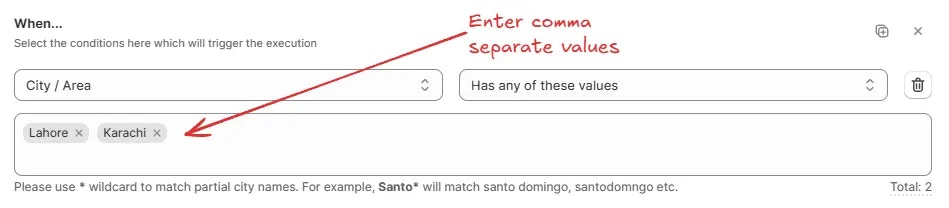
For **Has any of these values**, **Does not have any of these values**, **Has any other value besides these values**, **Does not have any other value besides these values**, enter one or more values to match. Separate multiple values with commas.
Use \* wildcard to match partial city names. For example, Santo\* will match
santo domingo, santodomngo etc.
> For example, `Has any of these values: Lahore, Karachi` → Matches if the field contains either “Lahore” or “Karachi”.
### City / Area
Used to compare the City / Area (The City/Area field on the checkout page) values with one or more specific values, counts, or states, based on one of the following sub-conditions:
* **Has any of these values** (Matches if the city field contains at least one of the listed values)
* **Does not have any of these values** (Matches if the city field does not contain any of the listed values)
* **Has any other value besides these values** (Matches if the city field contains values other than the listed ones)
* **Does not have any other value besides these values** (Matches if the city field contains only the listed values and no others)
* **Has number of digits greater than or equals** (Matches if the number of digits in the city field is greater than or equal to the specified number)
* **Has number of digits less than or equals** (Matches if the number of digits in the city field is less than or equal to the specified number)
* **Is empty** (Matches if the city field has no value)
* **Is not empty** (Matches if the city field contains any value)
For **Has any of these values**, **Does not have any of these values**, **Has any other value besides these values**, **Does not have any other value besides these values**, enter one or more values to match. Separate multiple values with commas.
Use \* wildcard to match partial city names. For example, Santo\* will match
santo domingo, santodomngo etc.
> For example, `Has any of these values: Lahore, Karachi` → Matches if the field contains either “Lahore” or “Karachi”.
 For **Has number of digits greater than or equals** or **Has number of digits less than or equals**, enter the digit count threshold.
> For example, `Has number of digits greater than or equals 5` → Matches if the field’s value has five or more digits.
For **Has number of digits greater than or equals** or **Has number of digits less than or equals**, enter the digit count threshold.
> For example, `Has number of digits greater than or equals 5` → Matches if the field’s value has five or more digits.
 For **Is empty** and **Is not empty**, no value entry is needed.
> For example, `Is empty` → Matches if no value is entered for the field.
For **Is empty** and **Is not empty**, no value entry is needed.
> For example, `Is empty` → Matches if no value is entered for the field.
 ### Province code / State code
Used to compare the Province / State (The Province/State field on the checkout page) values with one or more specific values or states, based on one of the following sub-conditions:
* **Has any of these values** (Matches if the province field contains at least one of the listed values)
* **Does not have any of these values** (Matches if the province field does not contain any of the listed values)
* **Has any other value besides these values** (Matches if the province field contains values other than the listed ones)
* **Does not have any other value besides these values** (Matches if the province field contains only the listed values and no others)
* **Is empty** (Matches if the province field has no value)
* **Is not empty** (Matches if the province field contains any value)
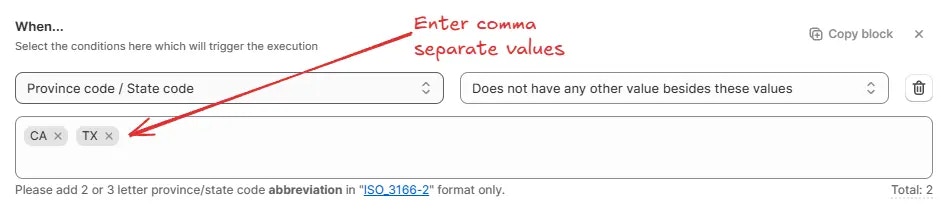
For **Has any of these values**, **Does not have any of these values**, **Has any other value besides these values**, **Does not have any other value besides these values**, enter one or more values to match. Separate multiple values with commas.
Add 2 or 3 letter province/state code abbreviation in "ISO\_3166-2" format
only.
> For example, `Does not have any other value besides these values: CA, TX` → Matches if the field contains only “CA” or “TX” and no other values.
### Province code / State code
Used to compare the Province / State (The Province/State field on the checkout page) values with one or more specific values or states, based on one of the following sub-conditions:
* **Has any of these values** (Matches if the province field contains at least one of the listed values)
* **Does not have any of these values** (Matches if the province field does not contain any of the listed values)
* **Has any other value besides these values** (Matches if the province field contains values other than the listed ones)
* **Does not have any other value besides these values** (Matches if the province field contains only the listed values and no others)
* **Is empty** (Matches if the province field has no value)
* **Is not empty** (Matches if the province field contains any value)
For **Has any of these values**, **Does not have any of these values**, **Has any other value besides these values**, **Does not have any other value besides these values**, enter one or more values to match. Separate multiple values with commas.
Add 2 or 3 letter province/state code abbreviation in "ISO\_3166-2" format
only.
> For example, `Does not have any other value besides these values: CA, TX` → Matches if the field contains only “CA” or “TX” and no other values.
 For **Is empty** and **Is not empty**, no value entry is needed.
> For example, `Is not empty` → Matches if any value is entered for the field.
For **Is empty** and **Is not empty**, no value entry is needed.
> For example, `Is not empty` → Matches if any value is entered for the field.
 ### Country
Used to compare the Country (The Country field on the checkout page) values with one or more specific countries, based on one of the following sub-conditions:
* **Has any of these values** (Matches if the country field contains at least one of the selected countries)
* **Does not have any of these values** (Matches if the country field does not contain any of the selected countries)
* **Has any other value besides these values** (Matches if the country field contains countries other than the selected ones)
* **Does not have any other value besides these values** (Matches if the country field contains only the selected countries and no others)
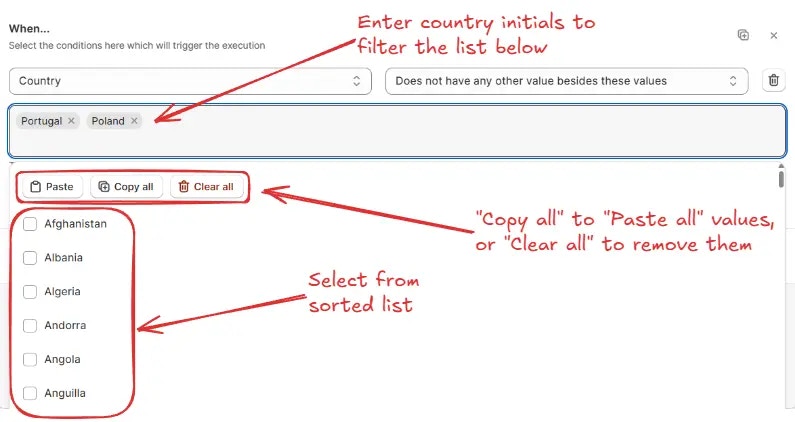
For any of the above options, search and select one or more countries from the list. You can also use the **Paste**, **Copy all**, or **Clear all** options for quick selection.
> For example, `Does not have any other value besides these values: Portugal, Poland` → Matches if the field contains only “Portugal” or “Poland” and no other countries.
### Country
Used to compare the Country (The Country field on the checkout page) values with one or more specific countries, based on one of the following sub-conditions:
* **Has any of these values** (Matches if the country field contains at least one of the selected countries)
* **Does not have any of these values** (Matches if the country field does not contain any of the selected countries)
* **Has any other value besides these values** (Matches if the country field contains countries other than the selected ones)
* **Does not have any other value besides these values** (Matches if the country field contains only the selected countries and no others)
For any of the above options, search and select one or more countries from the list. You can also use the **Paste**, **Copy all**, or **Clear all** options for quick selection.
> For example, `Does not have any other value besides these values: Portugal, Poland` → Matches if the field contains only “Portugal” or “Poland” and no other countries.
 ### Zip code / Postal code
Used to compare the Zip code / Postal code (The Zip/Postal Code field on the checkout page) values with one or more specific zip or postal codes, based on one of the following sub-conditions:
* **Has any of these values** (Matches if the zip/postal code field contains at least one of the listed values)
* **Does not have any of these values** (Matches if the zip/postal code field does not contain any of the listed values)
* **Has value in between these values** (Matches if the zip/postal code field value falls within the specified range)
* **Does not have value in between these values** (Matches if the zip/postal code field value does not fall within the specified range)
* **Has any other value besides these values** (Matches if the zip/postal code field contains values other than the listed ones)
* **Does not have any other value besides these values** (Matches if the zip/postal code field contains only the listed values and no others)
* **Has only digits** (Matches if the zip/postal code field contains only numeric characters)
* **Does not have only digits** (Matches if the zip/postal code field contains any non-numeric characters)
* **Has number of digits in between** (Matches if the number of digits falls within the specified range)
* **Does not have number of digits in between** (Matches if the number of digits does not fall within the specified range)
* **Is empty** (Matches if the zip/postal code field has no value)
* **Is not empty** (Matches if the zip/postal code field contains any value)
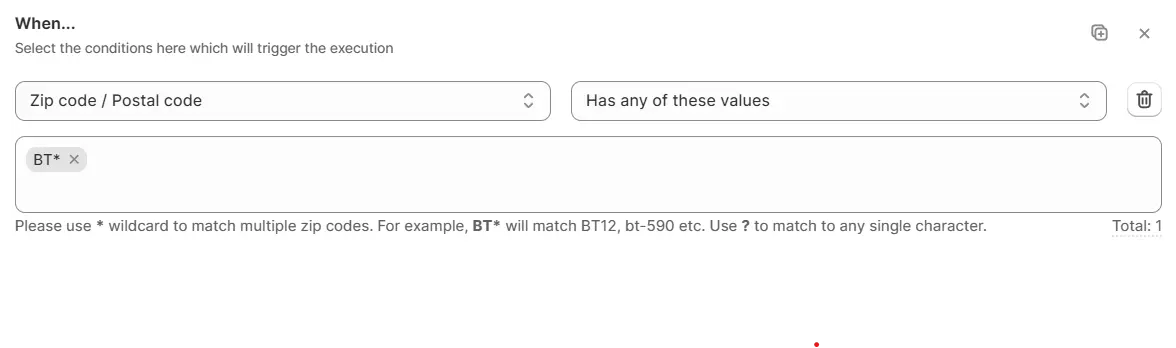
Use **Has any of these values**, **Does not have any of these values**, **Has any other value besides these values**, or **Does not have any other value besides these values** to match against one or more specific zip/postal codes. Separate multiple values with commas.
Use \* wildcard to match multiple zip codes. For example, BT\* will match BT12,
bt-590 etc. Use ? to match to any single character.
> For example, `Has any of these values: BT*` → Matches all zip/postal codes starting with “BT”.
### Zip code / Postal code
Used to compare the Zip code / Postal code (The Zip/Postal Code field on the checkout page) values with one or more specific zip or postal codes, based on one of the following sub-conditions:
* **Has any of these values** (Matches if the zip/postal code field contains at least one of the listed values)
* **Does not have any of these values** (Matches if the zip/postal code field does not contain any of the listed values)
* **Has value in between these values** (Matches if the zip/postal code field value falls within the specified range)
* **Does not have value in between these values** (Matches if the zip/postal code field value does not fall within the specified range)
* **Has any other value besides these values** (Matches if the zip/postal code field contains values other than the listed ones)
* **Does not have any other value besides these values** (Matches if the zip/postal code field contains only the listed values and no others)
* **Has only digits** (Matches if the zip/postal code field contains only numeric characters)
* **Does not have only digits** (Matches if the zip/postal code field contains any non-numeric characters)
* **Has number of digits in between** (Matches if the number of digits falls within the specified range)
* **Does not have number of digits in between** (Matches if the number of digits does not fall within the specified range)
* **Is empty** (Matches if the zip/postal code field has no value)
* **Is not empty** (Matches if the zip/postal code field contains any value)
Use **Has any of these values**, **Does not have any of these values**, **Has any other value besides these values**, or **Does not have any other value besides these values** to match against one or more specific zip/postal codes. Separate multiple values with commas.
Use \* wildcard to match multiple zip codes. For example, BT\* will match BT12,
bt-590 etc. Use ? to match to any single character.
> For example, `Has any of these values: BT*` → Matches all zip/postal codes starting with “BT”.
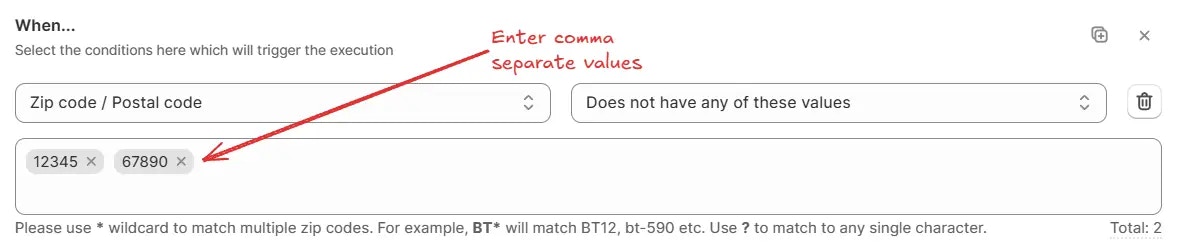
 > Another example, `Does not have any of these values: 12345, 67890` → Matches if the code is not “12345” or “67890”.
 Use **Has value in between these values** or **Does not have value in between these values** to match zip/postal codes within or outside a numeric range.
Enter numbers only. All values ranging in between starting value until the
last value will be matched, including the starting and last value.
> For example, `Has value in between these values: 10000 – 20000` → Matches if the code is between “10000” and “20000”.
Use **Has value in between these values** or **Does not have value in between these values** to match zip/postal codes within or outside a numeric range.
Enter numbers only. All values ranging in between starting value until the
last value will be matched, including the starting and last value.
> For example, `Has value in between these values: 10000 – 20000` → Matches if the code is between “10000” and “20000”.
 Use **Has only digits** or **Does not have only digits** to match zip/postal codes that contain only numeric characters (0–9) or those that include any non-numeric characters, such as letters, spaces, or symbols.
> For example, `Has only digits` → Matches digits only (0–9).
Use **Has only digits** or **Does not have only digits** to match zip/postal codes that contain only numeric characters (0–9) or those that include any non-numeric characters, such as letters, spaces, or symbols.
> For example, `Has only digits` → Matches digits only (0–9).
 Use **Has number of digits in between** or **Does not have number of digits in between** to match based on the count of digits in the code.
Enter numbers only. All values ranging in between given number of digits will
be matched.
> For example, `Has number of digits in between: 4 – 6` → Matches codes that contain between 4 and 6 digits.
Use **Has number of digits in between** or **Does not have number of digits in between** to match based on the count of digits in the code.
Enter numbers only. All values ranging in between given number of digits will
be matched.
> For example, `Has number of digits in between: 4 – 6` → Matches codes that contain between 4 and 6 digits.
 Use **Is empty** or **Is not empty** when you only need to check whether the field is filled in.
> For example, `Is not empty` → Matches if any value is entered in the field
Use **Is empty** or **Is not empty** when you only need to check whether the field is filled in.
> For example, `Is not empty` → Matches if any value is entered in the field
