> ## Documentation Index
> Fetch the complete documentation index at: https://docs.checkoutrules.com/llms.txt
> Use this file to discover all available pages before exploring further.
# Concepts
> Learn the key concepts behind how BeSure Checkout Rules works to customize and control your Shopify checkout experience.
## What is a rule?
A **checkout rule** is a set of logic that defines **what** should happen during the checkout process and **when**.
## Rule essentials
These are the essential parts of every rule that define its purpose, when it should run, what it should do, and how those actions are organized.
### Status
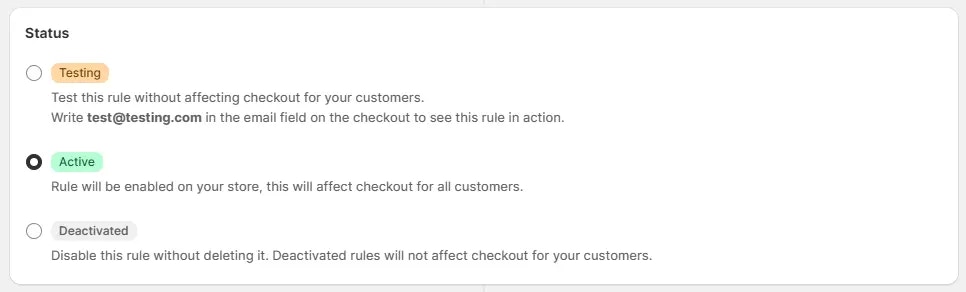
Indicates the current state of the rule, whether it’s in testing, active, or deactivated. This helps control when the rule takes effect.
It is recommended to start with a rule in testing mode, to ensure that the
rule is working as expected without affecting your customers. You can switch
to active mode after testing.
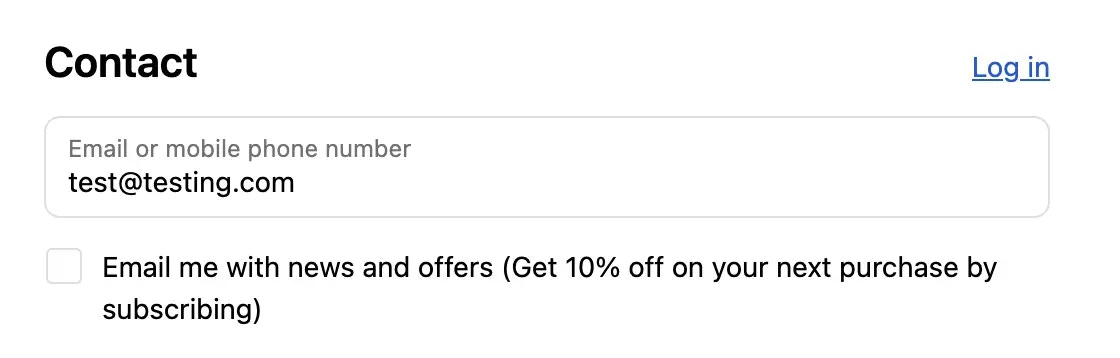
Here is an example of how to turn on the testing mode on the checkout page.
### Condition set
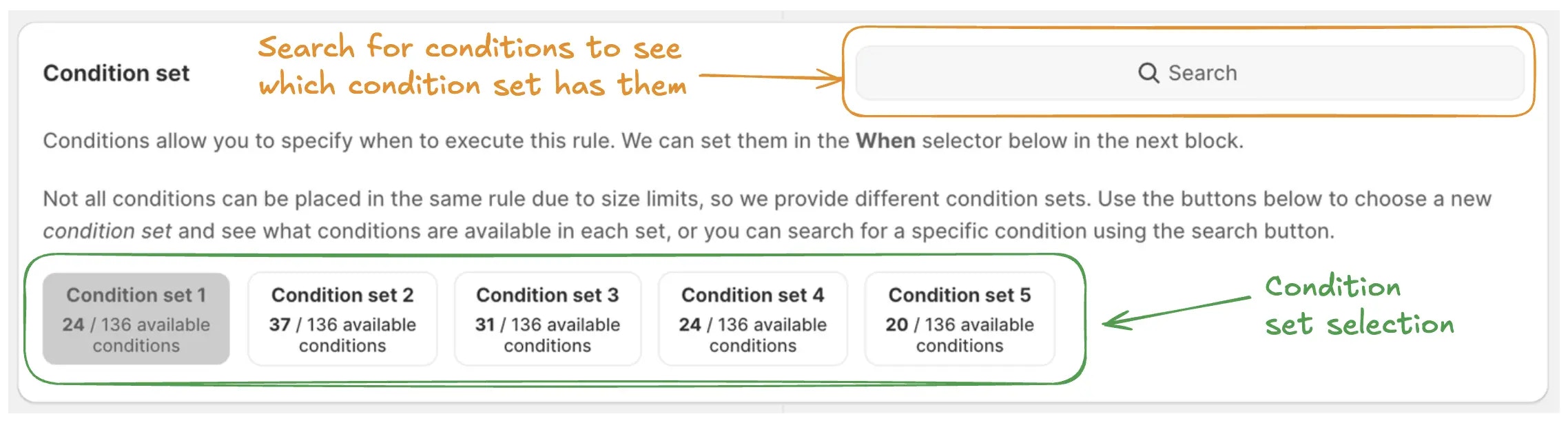
You can use any condition set that suits your needs, if you are unsure you can either start by just using condition set 1 or by using the search box to search which condition set has that condition which you need and switching to it.
> For example, if you want to hide a shipping method based on the product metafield, then you should switch to the condition set 4, then you will be able to use the product metafield condition.
Condition set selection is only available at rule creation time. You cannot
change the condition set after the rule is created. If you need a different
condition set, create a new rule.
Get more information about condition sets [here](/guides/en/essentials/condition-sets/introduction) or learn more about each condition set below.
Learn more about condition set 1.
Learn more about condition set 2.
Learn more about condition set 3.
Learn more about condition set 4.
Learn more about condition set 5.
Learn more about condition set 6.
Learn more about condition set 7.
### Conditions (the "when")
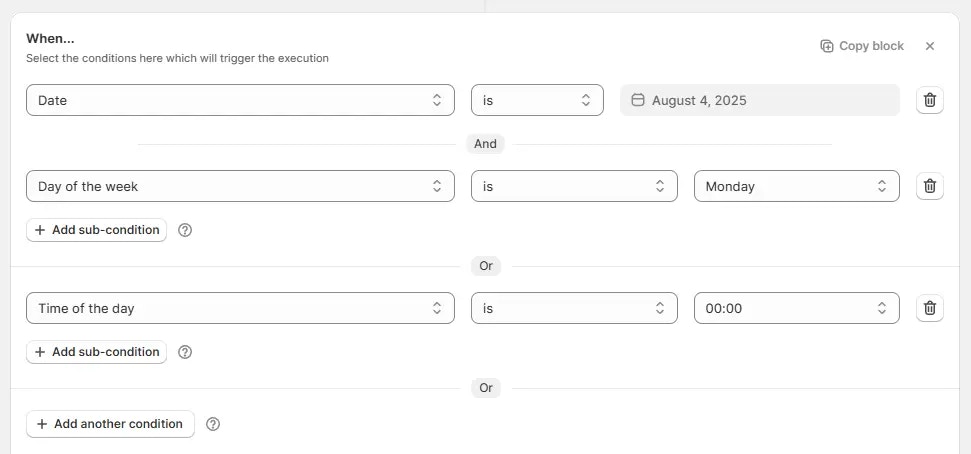
Conditions are based on the selected condition set and define the criteria that must be met to trigger the rule. Use AND (all must be true), OR (any one is true), to group related logic for complex cases.
> See example below - here rule will run under any of the 2 circumstances: when date is 4 August 2025, and that day is Monday, then the rule will run, OR, everyday when time is 00:00 which basically means every day at midnight.
### Action (the "what")
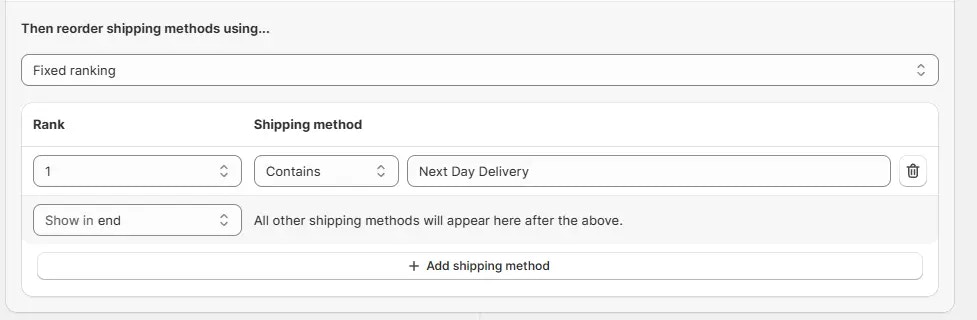
When the conditions in the "when" section are true, the system will perform the action you define. Each action is executed only if its specific criteria (action condition and operations) are also met.
> See example below - here the action is set to reorder shipping methods in a fixed way, by placing 'Next Day Delivery' at the top and putting all the other shipping methods below it.
### Block
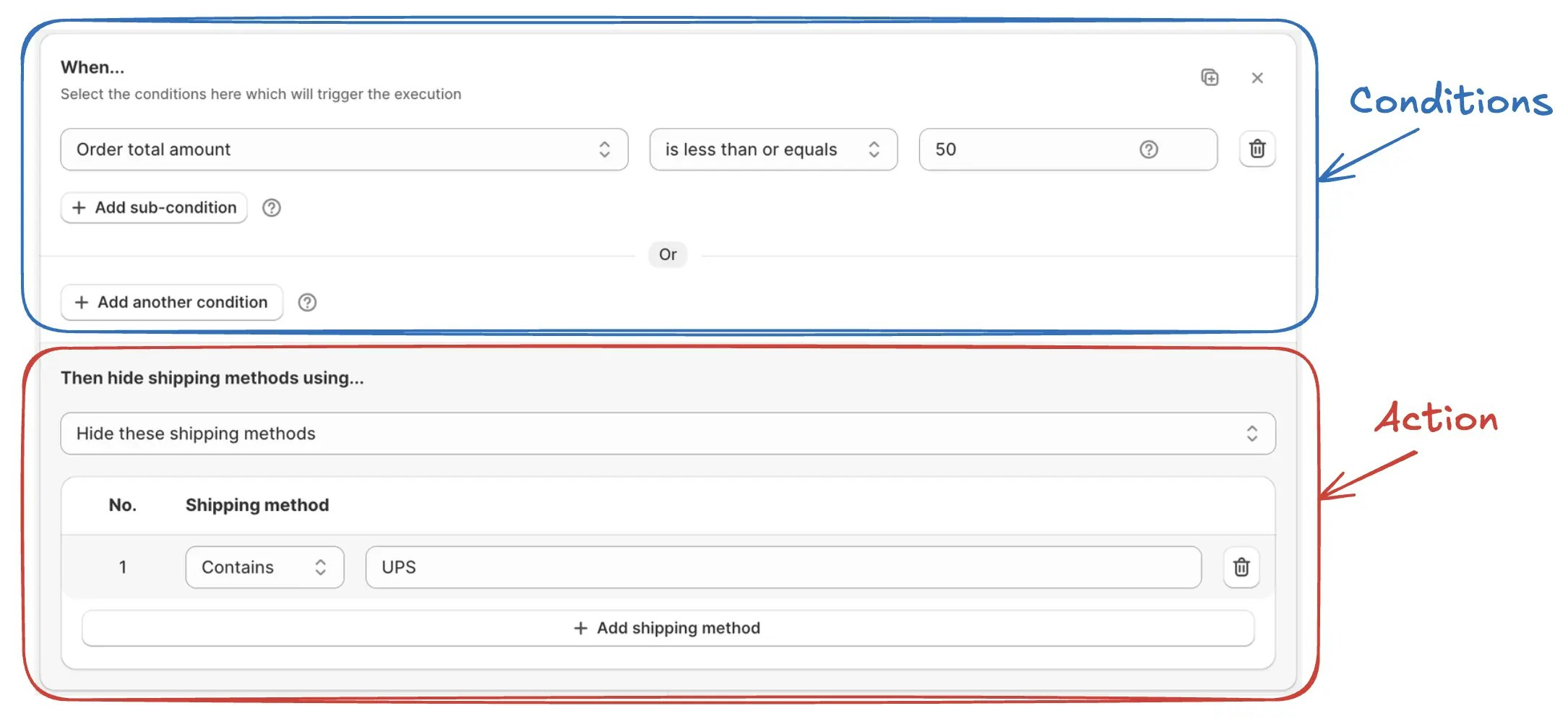
Together, **conditions** (the "when"), and the **action** (the "what") make up a **rule block**. You can use **multiple blocks** within a rule to handle complex scenarios easily.
## Additional options (for some rules)
These optional parts appear in specific rule types and add more control over how and where the rule applies or behaves under special conditions.
### Schedule
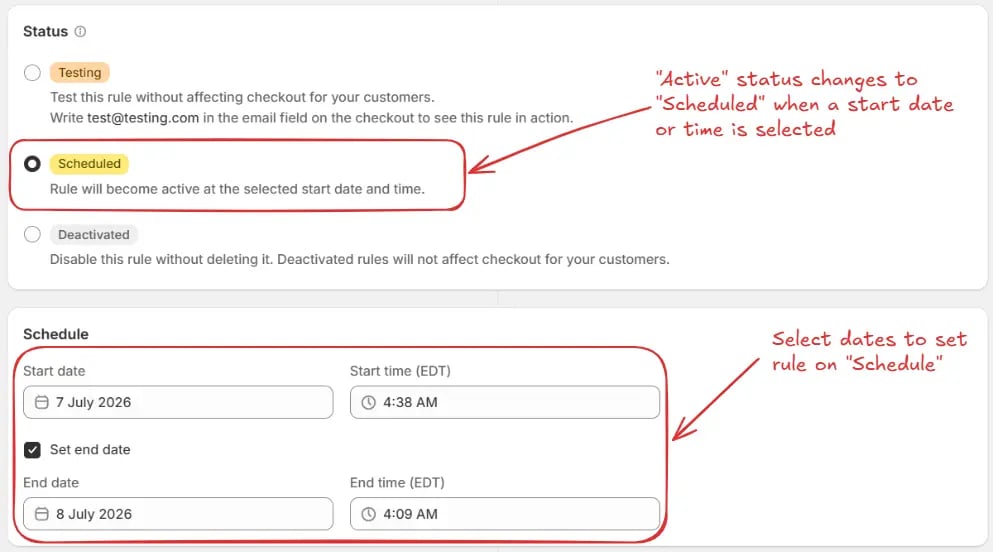
The rule is set to activate automatically at a future date and time, and optionally deactivate at a specified end date and time. This status is currently available only for discount rules.
### Target
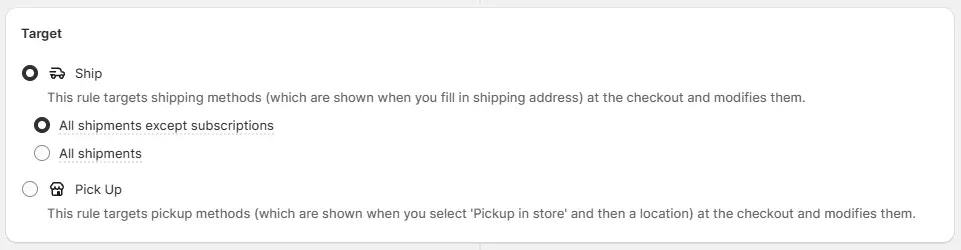
Defines where the rule applies (e.g., shipping or pickup). Used only in shipping rules.
### Combinations
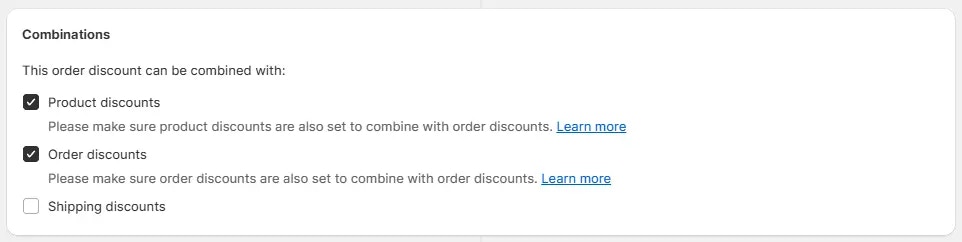
Controls whether the rule discount can be combined with product, order, or shipping discounts. Used only in **Discount** rules.
### Strategy
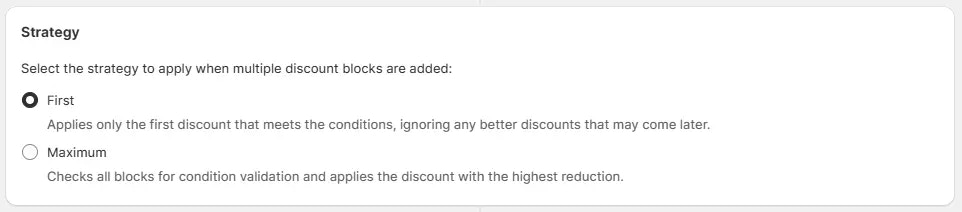
If the discount rule has multiple blocks, then strategy selection comes into play. It determines how those rule blocks are applied (e.g., first valid one or highest value). Used only in **Discount Order Amount** rule.
### Behavior
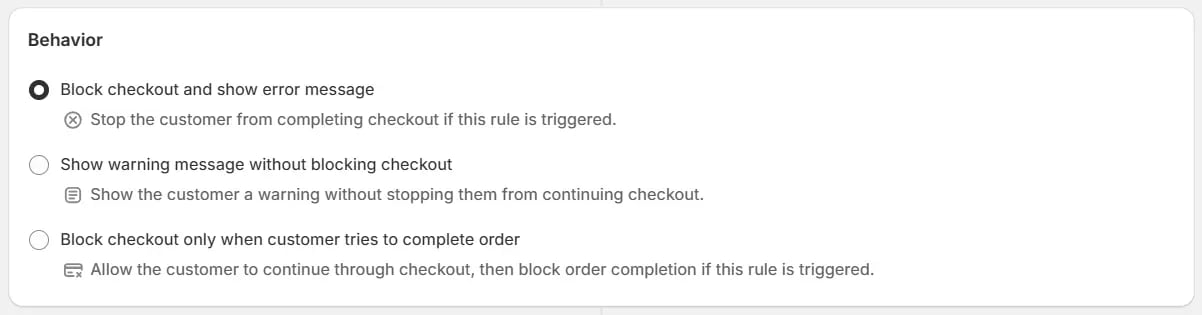
Determines what happens when the rule is triggered. You can choose to immediately block the checkout and display an error message, show a warning message while allowing the customer to continue checkout, or allow the customer to proceed through checkout and only block them when they attempt to complete the order. Used only in **Validate or Block Checkout** rules.
### Subscription Deliveries
Control how shipping discounts apply to subscription orders. Choose whether the discount should apply only to the first delivery or extend to recurring deliveries.
**Limit shipping discount to first delivery**\
Applies the shipping discount only to the first subscription delivery. Recurring deliveries will use standard shipping rates.
**Limit shipping discount to first delivery and set recurring delivery free**\
Applies the shipping discount to the first delivery and provides free shipping for recurring deliveries.
**Limit shipping discount to first delivery and set all recurring deliveries free**\
Provides free shipping for all recurring subscription deliveries after the first shipment.
The **Subscription Deliveries** section options apply only to shipping
products that have a subscription. For normal (non-subscription) product
deliveries, you do not need to select any option. The default setting will
work as expected.
### Fallback
Defines what happens if the app cannot evaluate a rule at checkout.
* For the **Validate or Block Checkout** rule, this setting determines whether checkout is allowed or blocked if the app encounters an unexpected issue while processing the rule.
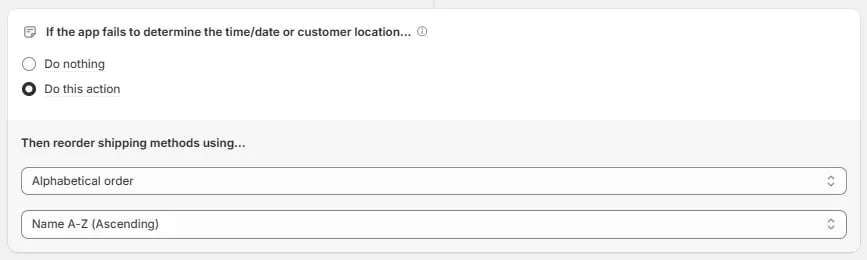
* For rules that use **Date Time** or **Customer location (using GeoIP)** conditions, this setting defines what happens if the app cannot determine the required time/date or customer location:
* **Do nothing**: No action is applied by the rule.
* **Do this action**: The configured fallback action is applied instead.
### Maximum discount uses
Defines the **total number of times** the discount can be used across all customers. Optionally, can also restrict usage to **one time per customer**. Only applicable when using discount codes, not automatic discounts. Used only in **Discount** rules.
> For example, if usage limit **set to 1** and **"Limit to one use per customer"** is unchecked, only one customer will be able to use the discount code. After that, the code becomes invalid for everyone else.
 Here is an example of how to turn on the testing mode on the checkout page.
 ### Condition set
You can use any condition set that suits your needs, if you are unsure you can either start by just using condition set 1 or by using the search box to search which condition set has that condition which you need and switching to it.
> For example, if you want to hide a shipping method based on the product metafield, then you should switch to the condition set 4, then you will be able to use the product metafield condition.
### Condition set
You can use any condition set that suits your needs, if you are unsure you can either start by just using condition set 1 or by using the search box to search which condition set has that condition which you need and switching to it.
> For example, if you want to hide a shipping method based on the product metafield, then you should switch to the condition set 4, then you will be able to use the product metafield condition.
 Get more information about condition sets [here](/guides/en/essentials/condition-sets/introduction) or learn more about each condition set below.
 ### Action (the "what")
When the conditions in the "when" section are true, the system will perform the action you define. Each action is executed only if its specific criteria (action condition and operations) are also met.
> See example below - here the action is set to reorder shipping methods in a fixed way, by placing 'Next Day Delivery' at the top and putting all the other shipping methods below it.
### Action (the "what")
When the conditions in the "when" section are true, the system will perform the action you define. Each action is executed only if its specific criteria (action condition and operations) are also met.
> See example below - here the action is set to reorder shipping methods in a fixed way, by placing 'Next Day Delivery' at the top and putting all the other shipping methods below it.
 ### Block
Together, **conditions** (the "when"), and the **action** (the "what") make up a **rule block**. You can use **multiple blocks** within a rule to handle complex scenarios easily.
### Block
Together, **conditions** (the "when"), and the **action** (the "what") make up a **rule block**. You can use **multiple blocks** within a rule to handle complex scenarios easily.
 ## Additional options (for some rules)
These optional parts appear in specific rule types and add more control over how and where the rule applies or behaves under special conditions.
### Schedule
The rule is set to activate automatically at a future date and time, and optionally deactivate at a specified end date and time. This status is currently available only for discount rules.
## Additional options (for some rules)
These optional parts appear in specific rule types and add more control over how and where the rule applies or behaves under special conditions.
### Schedule
The rule is set to activate automatically at a future date and time, and optionally deactivate at a specified end date and time. This status is currently available only for discount rules.
 ### Target
Defines where the rule applies (e.g., shipping or pickup). Used only in shipping rules.
### Target
Defines where the rule applies (e.g., shipping or pickup). Used only in shipping rules.
 ### Combinations
Controls whether the rule discount can be combined with product, order, or shipping discounts. Used only in **Discount** rules.
### Combinations
Controls whether the rule discount can be combined with product, order, or shipping discounts. Used only in **Discount** rules.
 ### Strategy
If the discount rule has multiple blocks, then strategy selection comes into play. It determines how those rule blocks are applied (e.g., first valid one or highest value). Used only in **Discount Order Amount** rule.
### Strategy
If the discount rule has multiple blocks, then strategy selection comes into play. It determines how those rule blocks are applied (e.g., first valid one or highest value). Used only in **Discount Order Amount** rule.
 ### Behavior
Determines what happens when the rule is triggered. You can choose to immediately block the checkout and display an error message, show a warning message while allowing the customer to continue checkout, or allow the customer to proceed through checkout and only block them when they attempt to complete the order. Used only in **Validate or Block Checkout** rules.
### Behavior
Determines what happens when the rule is triggered. You can choose to immediately block the checkout and display an error message, show a warning message while allowing the customer to continue checkout, or allow the customer to proceed through checkout and only block them when they attempt to complete the order. Used only in **Validate or Block Checkout** rules.
 ### Subscription Deliveries
Control how shipping discounts apply to subscription orders. Choose whether the discount should apply only to the first delivery or extend to recurring deliveries.
**Limit shipping discount to first delivery**\
Applies the shipping discount only to the first subscription delivery. Recurring deliveries will use standard shipping rates.
**Limit shipping discount to first delivery and set recurring delivery free**\
Applies the shipping discount to the first delivery and provides free shipping for recurring deliveries.
**Limit shipping discount to first delivery and set all recurring deliveries free**\
Provides free shipping for all recurring subscription deliveries after the first shipment.
### Subscription Deliveries
Control how shipping discounts apply to subscription orders. Choose whether the discount should apply only to the first delivery or extend to recurring deliveries.
**Limit shipping discount to first delivery**\
Applies the shipping discount only to the first subscription delivery. Recurring deliveries will use standard shipping rates.
**Limit shipping discount to first delivery and set recurring delivery free**\
Applies the shipping discount to the first delivery and provides free shipping for recurring deliveries.
**Limit shipping discount to first delivery and set all recurring deliveries free**\
Provides free shipping for all recurring subscription deliveries after the first shipment.
 ### Fallback
Defines what happens if the app cannot evaluate a rule at checkout.
* For the **Validate or Block Checkout** rule, this setting determines whether checkout is allowed or blocked if the app encounters an unexpected issue while processing the rule.
### Fallback
Defines what happens if the app cannot evaluate a rule at checkout.
* For the **Validate or Block Checkout** rule, this setting determines whether checkout is allowed or blocked if the app encounters an unexpected issue while processing the rule.
 * For rules that use **Date Time** or **Customer location (using GeoIP)** conditions, this setting defines what happens if the app cannot determine the required time/date or customer location:
* **Do nothing**: No action is applied by the rule.
* **Do this action**: The configured fallback action is applied instead.
* For rules that use **Date Time** or **Customer location (using GeoIP)** conditions, this setting defines what happens if the app cannot determine the required time/date or customer location:
* **Do nothing**: No action is applied by the rule.
* **Do this action**: The configured fallback action is applied instead.
 ### Maximum discount uses
Defines the **total number of times** the discount can be used across all customers. Optionally, can also restrict usage to **one time per customer**. Only applicable when using discount codes, not automatic discounts. Used only in **Discount** rules.
> For example, if usage limit **set to 1** and **"Limit to one use per customer"** is unchecked, only one customer will be able to use the discount code. After that, the code becomes invalid for everyone else.
### Maximum discount uses
Defines the **total number of times** the discount can be used across all customers. Optionally, can also restrict usage to **one time per customer**. Only applicable when using discount codes, not automatic discounts. Used only in **Discount** rules.
> For example, if usage limit **set to 1** and **"Limit to one use per customer"** is unchecked, only one customer will be able to use the discount code. After that, the code becomes invalid for everyone else.
