> ## Documentation Index
> Fetch the complete documentation index at: https://docs.checkoutrules.com/llms.txt
> Use this file to discover all available pages before exploring further.
# Instalación
> Aprende cómo instalar y configurar la aplicación **BeSure Checkout Rules** en tu tienda Shopify para comenzar a personalizar y mejorar tu experiencia de checkout.
## Instalar aplicación
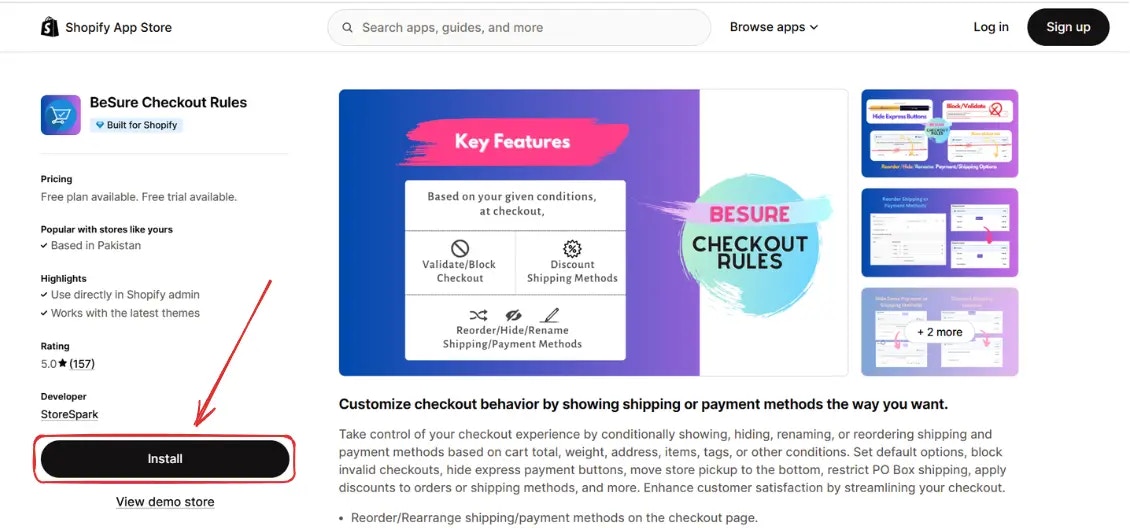
Para instalar la aplicación, ve a [BeSure Checkout Rules](https://apps.shopify.com/checkout-rules) en la Shopify App Store.
## Ir a la aplicación
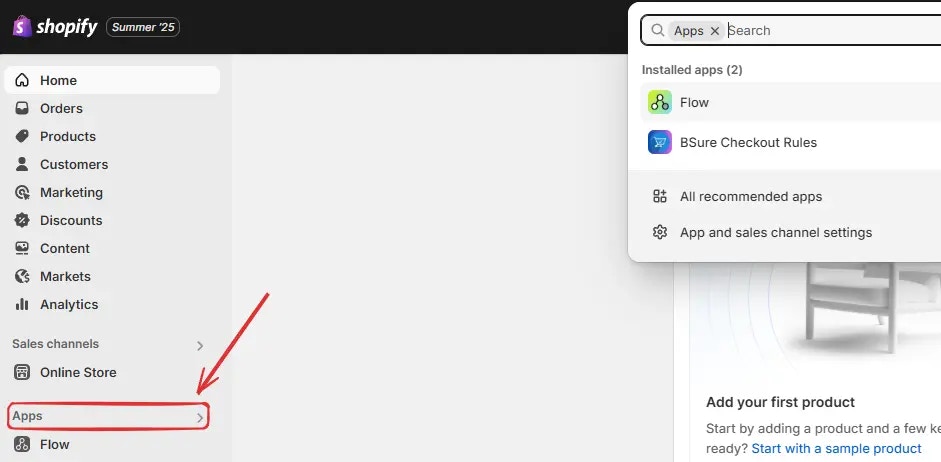
Después de la instalación, ve a tu [admin de Shopify](https://admin.shopify.com), haz clic en **Aplicaciones** en la barra lateral.
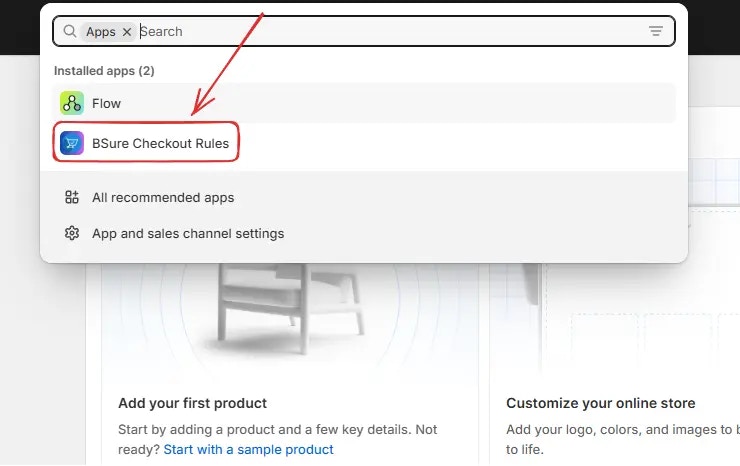
Luego haz clic en **BSure Checkout Rules** para abrir la aplicación.
## Actualizar tu plan
Cuando la aplicación está instalada, el **Plan Gratuito** se activa por defecto. Este plan está destinado para tiendas de **prueba** o **desarrollo** y te permite explorar las características de la aplicación.
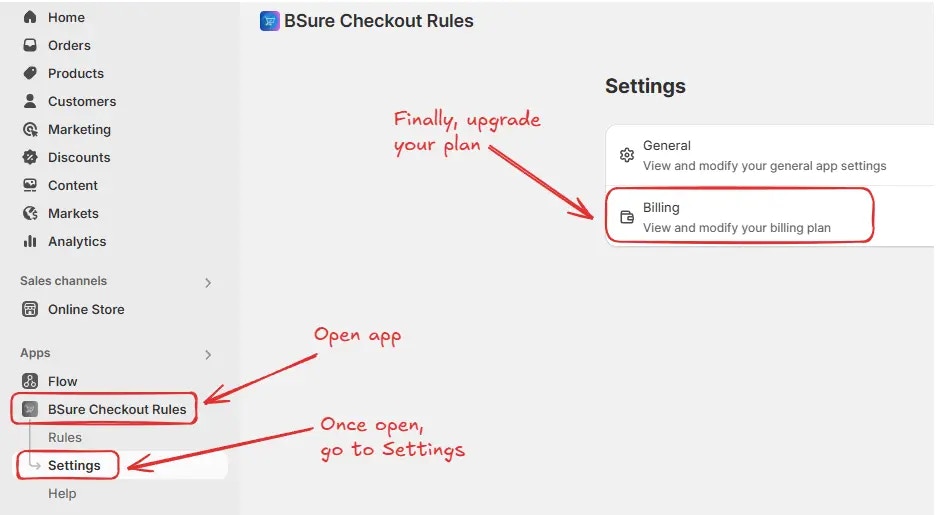
Para activar reglas en tu tienda, navega a *BSure Checkout Rules → Configuración → Facturación*.
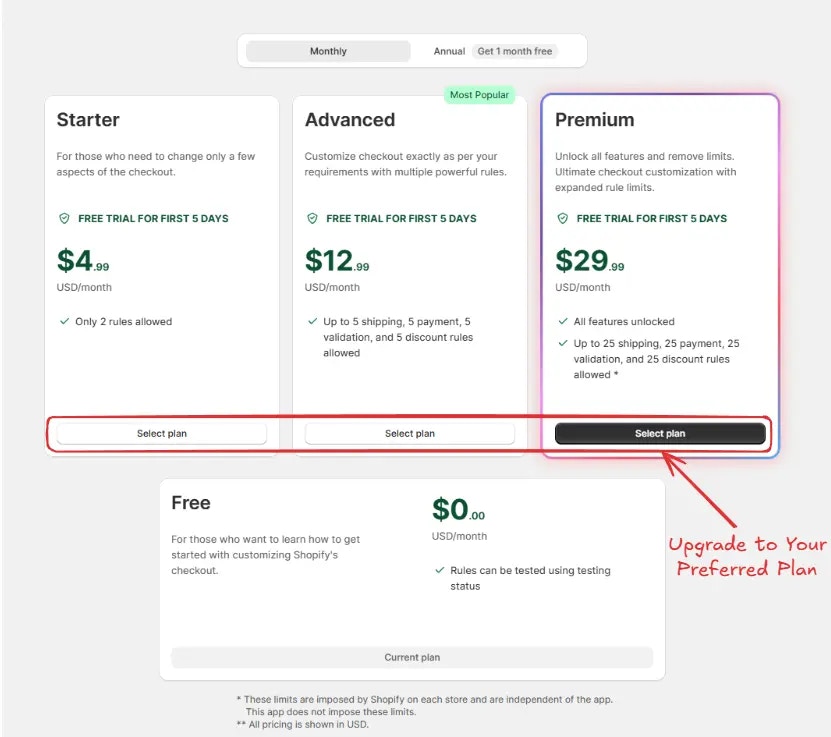
Luego serás redirigido a la pantalla de **Facturación**. Elige tu período seleccionando
la pestaña **Mensual** o **Anual**, y haz clic en **Seleccionar plan** en tu opción preferida.
Después de actualizar tu plan, ahora puedes activar reglas en tu tienda.
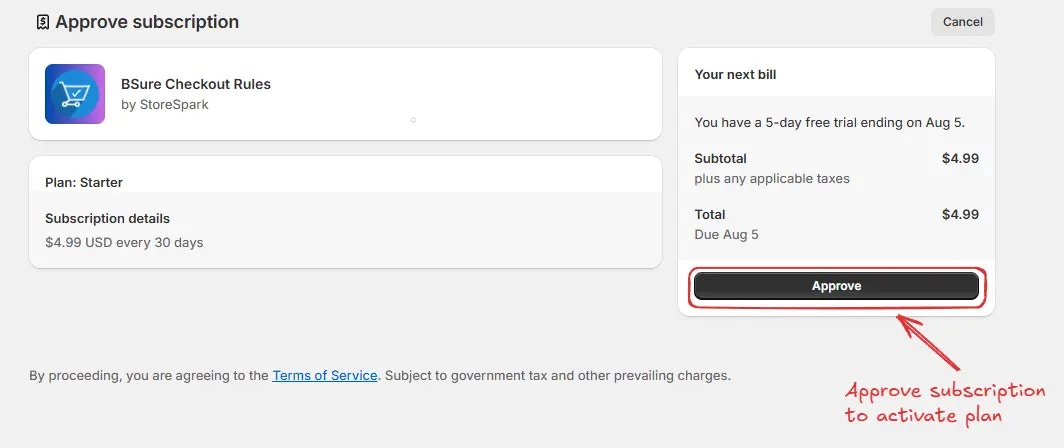
Luego serás redirigido a la pantalla **Aprobar suscripción**. Elige tu **método de pago** y **haz clic en "Aprobar"** para completar la actualización y activar tu plan.
Después de actualizar tu plan, ahora puedes **activar reglas** en tu tienda.
 ## Ir a la aplicación
Después de la instalación, ve a tu [admin de Shopify](https://admin.shopify.com), haz clic en **Aplicaciones** en la barra lateral.
## Ir a la aplicación
Después de la instalación, ve a tu [admin de Shopify](https://admin.shopify.com), haz clic en **Aplicaciones** en la barra lateral.
 Luego haz clic en **BSure Checkout Rules** para abrir la aplicación.
 ## Actualizar tu plan
Cuando la aplicación está instalada, el **Plan Gratuito** se activa por defecto. Este plan está destinado para tiendas de **prueba** o **desarrollo** y te permite explorar las características de la aplicación.
Para activar reglas en tu tienda, navega a *BSure Checkout Rules → Configuración → Facturación*.
## Actualizar tu plan
Cuando la aplicación está instalada, el **Plan Gratuito** se activa por defecto. Este plan está destinado para tiendas de **prueba** o **desarrollo** y te permite explorar las características de la aplicación.
Para activar reglas en tu tienda, navega a *BSure Checkout Rules → Configuración → Facturación*.
 Luego serás redirigido a la pantalla de **Facturación**. Elige tu período seleccionando
la pestaña **Mensual** o **Anual**, y haz clic en **Seleccionar plan** en tu opción preferida.
Después de actualizar tu plan, ahora puedes activar reglas en tu tienda.
Luego serás redirigido a la pantalla de **Facturación**. Elige tu período seleccionando
la pestaña **Mensual** o **Anual**, y haz clic en **Seleccionar plan** en tu opción preferida.
Después de actualizar tu plan, ahora puedes activar reglas en tu tienda.
 Luego serás redirigido a la pantalla **Aprobar suscripción**. Elige tu **método de pago** y **haz clic en "Aprobar"** para completar la actualización y activar tu plan.
 Después de actualizar tu plan, ahora puedes **activar reglas** en tu tienda.