> ## Documentation Index
> Fetch the complete documentation index at: https://docs.checkoutrules.com/llms.txt
> Use this file to discover all available pages before exploring further.
# 阻止复制
> 了解如何复制规则中的区块、粘贴并重复使用。
## 概览
区块复制允许您快速在规则中复制现有逻辑,而无需手动重新创建。\
当区块的内容相似时,这特别有用,因为它节省时间并确保一致性。
## 使用方法
### 复制区块
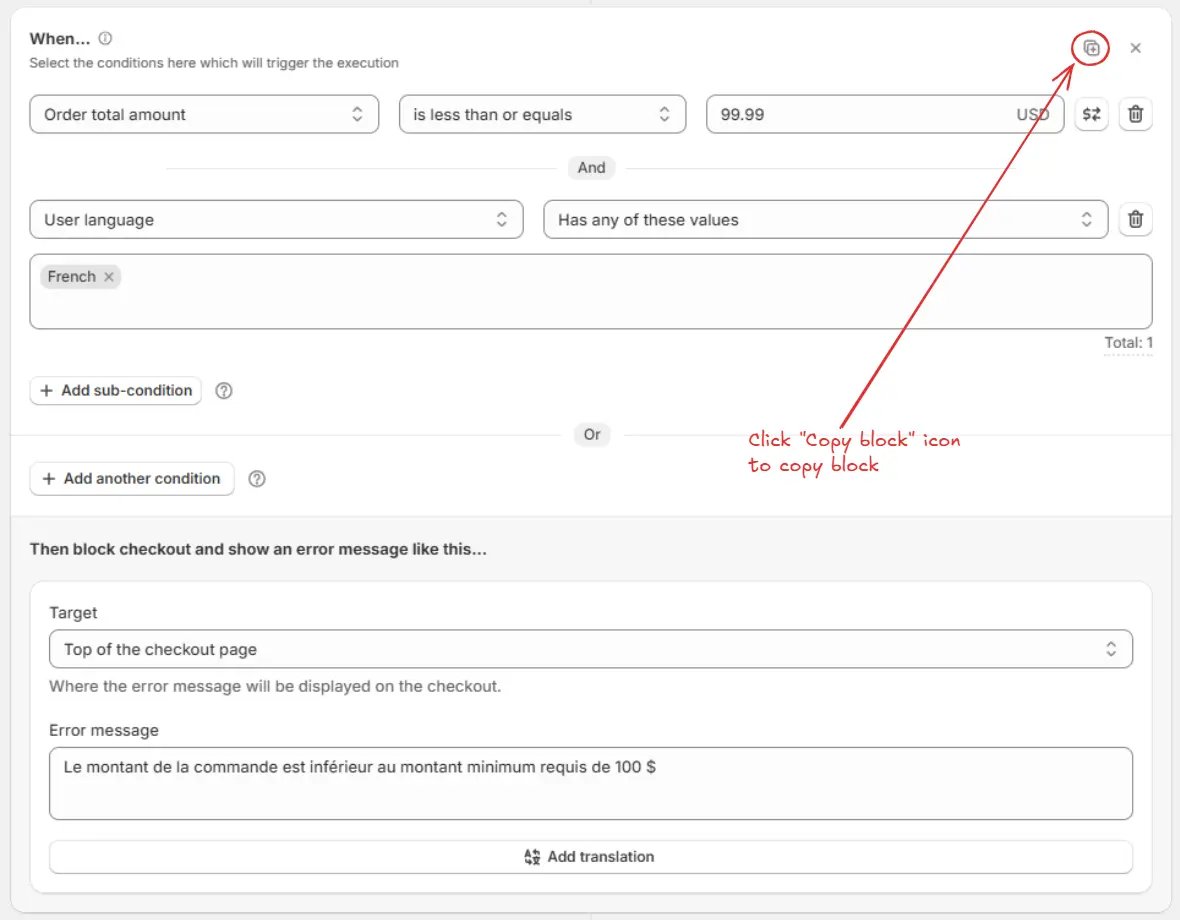
点击您想要复制的区块上的 **复制区块** 图标。这样将复制整个区块,包括其条件和操作。
复制后,**勾选图标**和 **"已复制"** 文本将出现在复制区块图标的位置。同时,底部会显示确认消息 **"区块复制成功!"**。
 ### 粘贴区块
在 **相同规则** 或其他相同类型的规则中,点击 **粘贴区块** 图标,将复制的区块粘贴到下方。
底部会显示确认消息 **"区块粘贴成功!"**。
### 粘贴区块
在 **相同规则** 或其他相同类型的规则中,点击 **粘贴区块** 图标,将复制的区块粘贴到下方。
底部会显示确认消息 **"区块粘贴成功!"**。
 如果您复制了多个区块,只有**最后一个复制的区块**会被粘贴,而不是全部。
### 更新内容
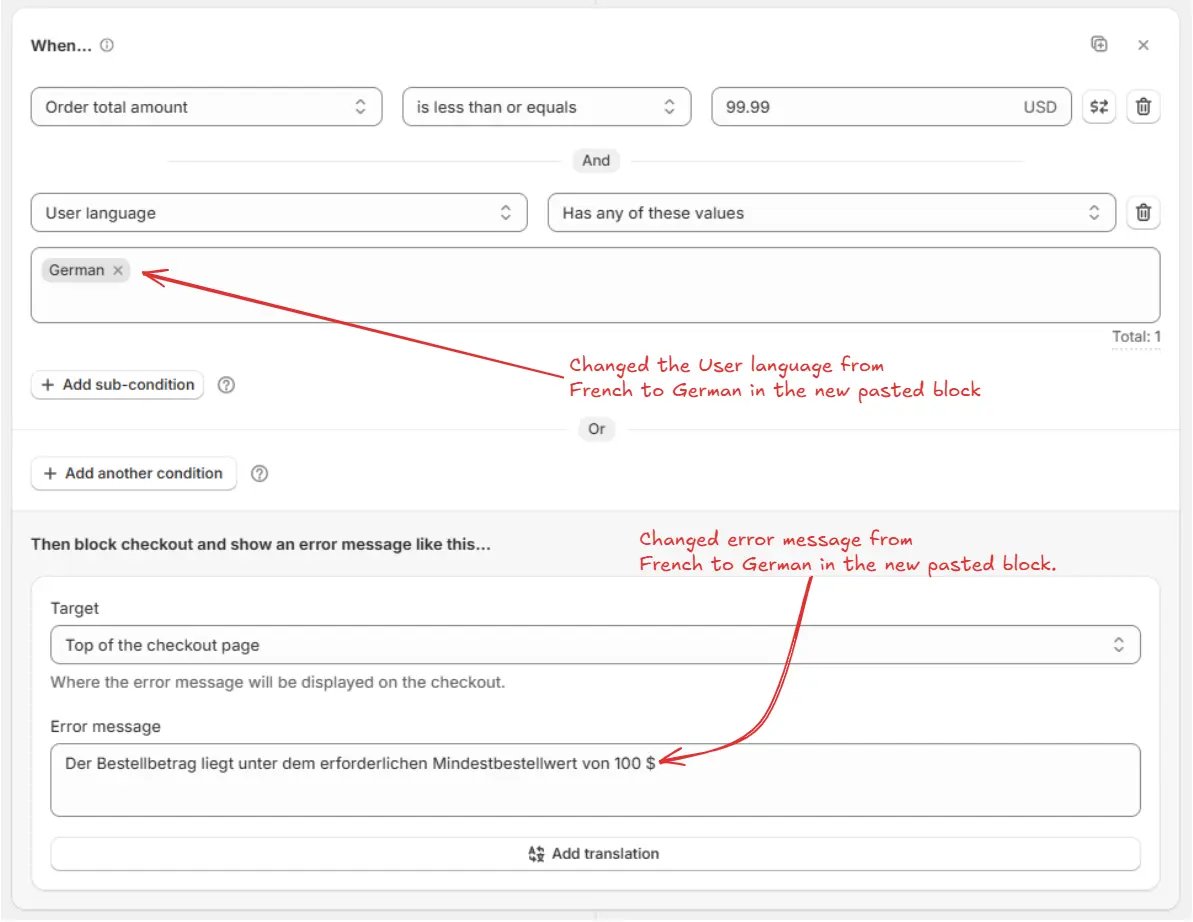
修改粘贴后区块中的必要条件、数值或操作,以适应新的场景。这样,您可以重复利用结构,同时为新情况进行定制。
**示例:**\
如果您复制了一个子条件 **用户语言** 设置为 **法语** 并且错误信息是法语的区块,在粘贴区块后,您可以:
* 将子条件 **用户语言** 从 **法语** 改为 **德语**。
* 将错误信息文本替换为德语翻译。
这样,区块的逻辑保持不变(最低订单检查),但细节根据不同语言进行了定制。
如果您复制了多个区块,只有**最后一个复制的区块**会被粘贴,而不是全部。
### 更新内容
修改粘贴后区块中的必要条件、数值或操作,以适应新的场景。这样,您可以重复利用结构,同时为新情况进行定制。
**示例:**\
如果您复制了一个子条件 **用户语言** 设置为 **法语** 并且错误信息是法语的区块,在粘贴区块后,您可以:
* 将子条件 **用户语言** 从 **法语** 改为 **德语**。
* 将错误信息文本替换为德语翻译。
这样,区块的逻辑保持不变(最低订单检查),但细节根据不同语言进行了定制。
 ## 示例用例
让我们创建一个规则,强制执行 **最低订单金额**,同时以多种语言显示错误消息。
通过使用 **区块复制**,您只需要创建第一个区块(法语),然后简单地在同一规则中复制并粘贴它,并更新 **用户语言** 条件和错误消息为德语。最后,添加一个英文的回退区块。
### 区块 1(法语)
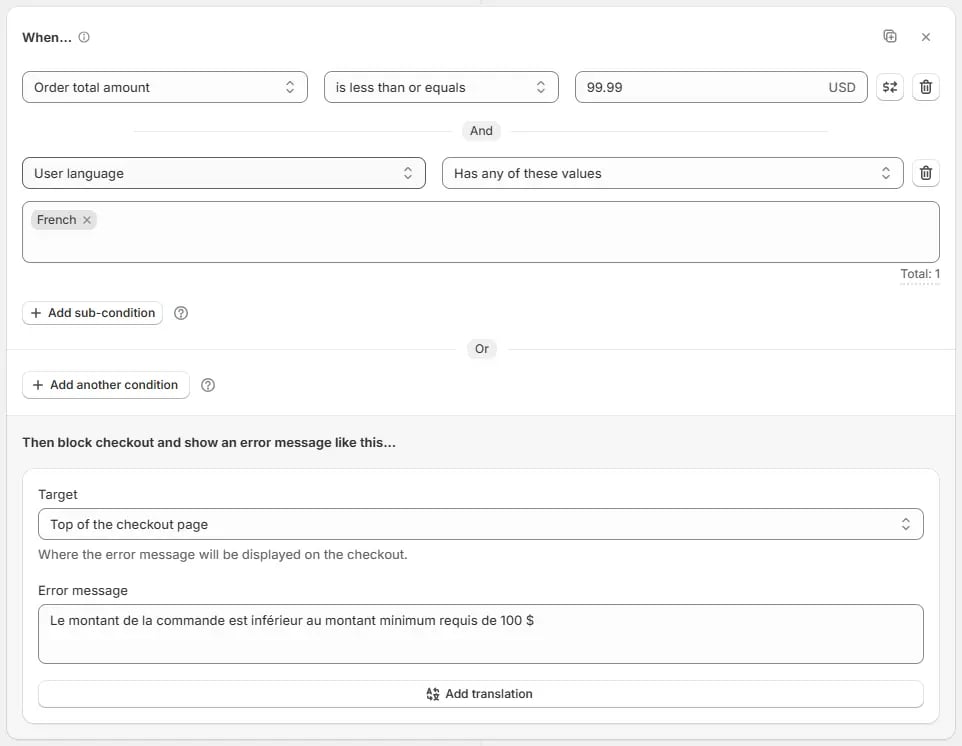
* 添加 **订单总金额** 条件,并将其设置为 **小于或等于 99.99**,以在订单金额低于 100 时触发错误。
* AND 子条件 **用户语言** 为 **法语**。
* 设置错误消息:
> "Le montant de la commande est inférieur au montant minimum requis de 100 \$"
## 示例用例
让我们创建一个规则,强制执行 **最低订单金额**,同时以多种语言显示错误消息。
通过使用 **区块复制**,您只需要创建第一个区块(法语),然后简单地在同一规则中复制并粘贴它,并更新 **用户语言** 条件和错误消息为德语。最后,添加一个英文的回退区块。
### 区块 1(法语)
* 添加 **订单总金额** 条件,并将其设置为 **小于或等于 99.99**,以在订单金额低于 100 时触发错误。
* AND 子条件 **用户语言** 为 **法语**。
* 设置错误消息:
> "Le montant de la commande est inférieur au montant minimum requis de 100 \$"
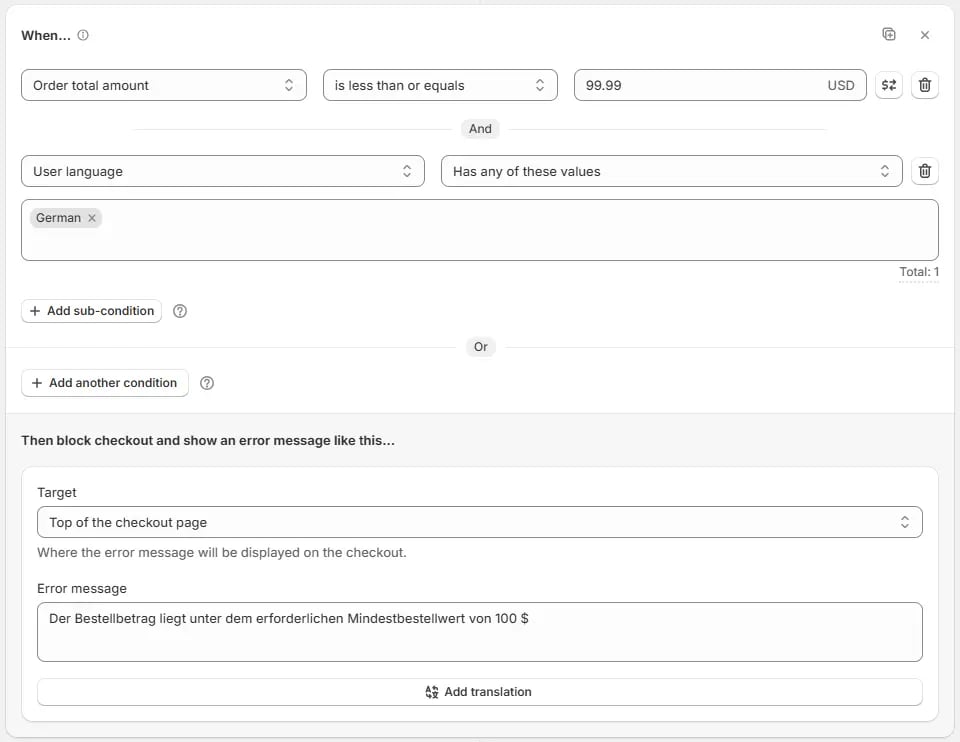
 ### 区块 2(德语)— 通过复制区块 1 创建
* 在所有区块下方点击 **粘贴区块** 图标,将复制的区块粘贴到 **相同规则** 中。
* 更新 **用户语言** 子条件为 **德语**。
* 更新错误消息:
> "Der Bestellbetrag liegt unter dem erforderlichen Mindestbestellwert von 100 \$"
### 区块 2(德语)— 通过复制区块 1 创建
* 在所有区块下方点击 **粘贴区块** 图标,将复制的区块粘贴到 **相同规则** 中。
* 更新 **用户语言** 子条件为 **德语**。
* 更新错误消息:
> "Der Bestellbetrag liegt unter dem erforderlichen Mindestbestellwert von 100 \$"
 ### 区块 3(默认回退 – 英语)
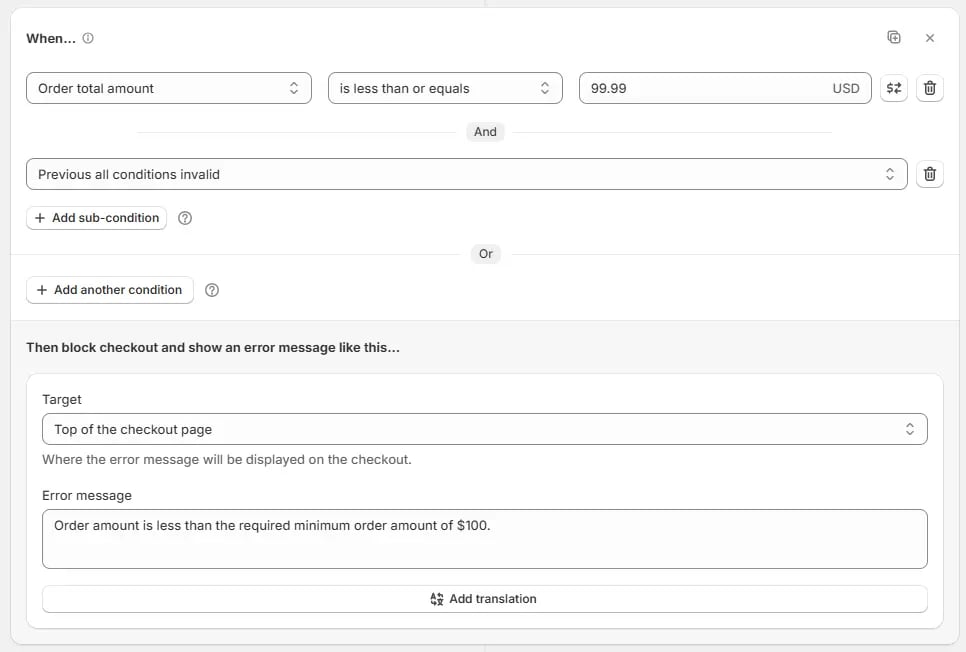
* 添加 **订单总金额** 条件,并将其设置为 **小于或等于 99.99**,以在订单金额低于 100 时触发错误。
* 对于 **else / 回退条件**,AND 子条件 **之前的所有条件无效**。
* 设置错误消息:
> "Order amount is less than the required minimum order amount of \$100"
### 区块 3(默认回退 – 英语)
* 添加 **订单总金额** 条件,并将其设置为 **小于或等于 99.99**,以在订单金额低于 100 时触发错误。
* 对于 **else / 回退条件**,AND 子条件 **之前的所有条件无效**。
* 设置错误消息:
> "Order amount is less than the required minimum order amount of \$100"