> ## Documentation Index
> Fetch the complete documentation index at: https://docs.checkoutrules.com/llms.txt
> Use this file to discover all available pages before exploring further.

# 安装

> 了解如何在您的 Shopify 商店中安装和设置 **BeSure 结账规则** 应用，以开始自定义和优化您的结账体验。

<iframe className="w-full aspect-video rounded-xl" src="https://www.youtube.com/embed/5KRBmWhMcog?si=Vc3665ze_uC_H8kL" title="BeSure 安装" style={{ border: 0 }} allow="accelerometer; autoplay; clipboard-write; encrypted-media; gyroscope; picture-in-picture" allowFullScreen />

## 安装应用

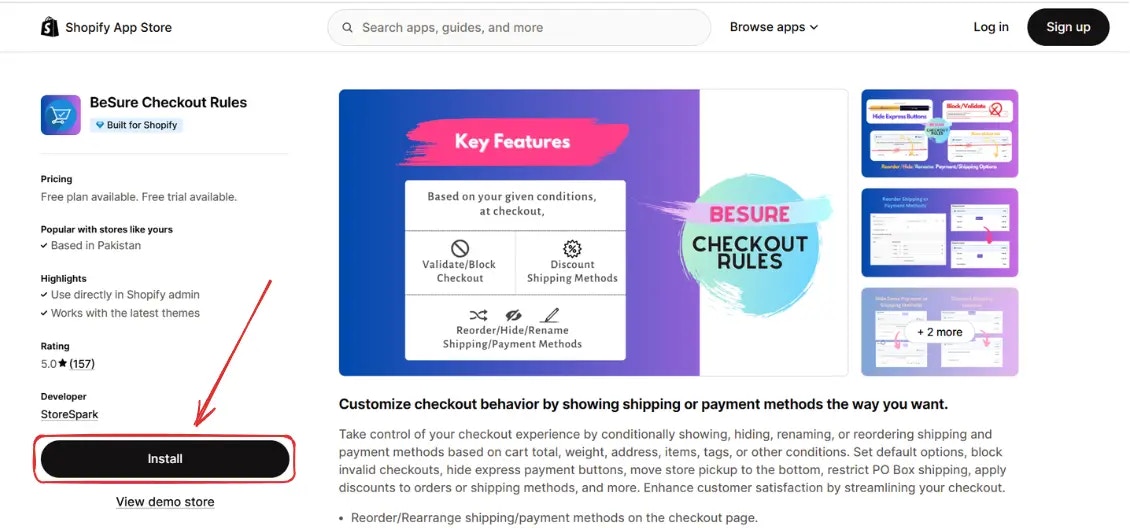
要安装该应用，请前往 [BeSure 结账规则](https://apps.shopify.com/checkout-rules) 的 Shopify 应用商店。
<img src="https://mintcdn.com/storespark/ZoBcc0QT_aT_tX8T/images/installation/besure-app-shopify-app-store.webp?fit=max&auto=format&n=ZoBcc0QT_aT_tX8T&q=85&s=ff87ddabe82f8286f297e7ab00eea432" alt="BeSure 应用 Shopify 应用商店" width="1130" height="528" data-path="images/installation/besure-app-shopify-app-store.webp" />

## 前往应用

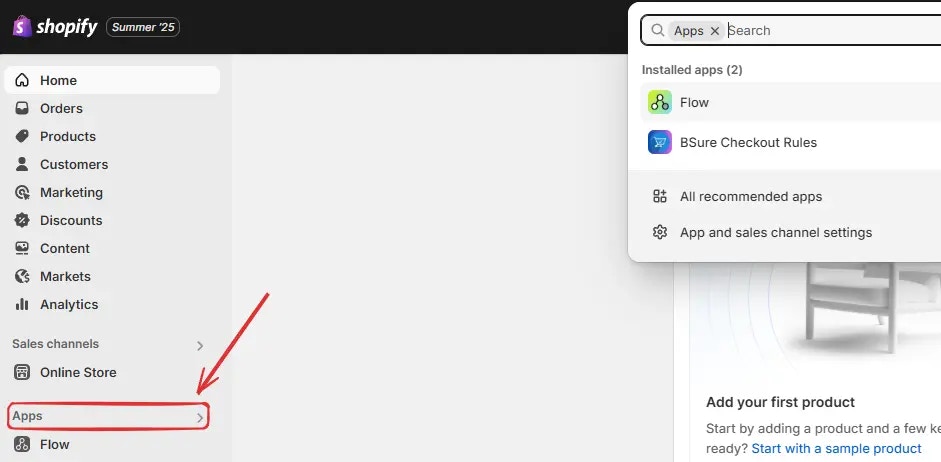
安装完成后，进入您的 [Shopify 管理后台](https://admin.shopify.com)，在侧边栏点击 **应用**。

<img src="https://mintcdn.com/storespark/ZoBcc0QT_aT_tX8T/images/installation/shopify-admin-click-on-apps.webp?fit=max&auto=format&n=ZoBcc0QT_aT_tX8T&q=85&s=c26047ad84aaf06aa8a20345fc202f11" alt="Shopify 管理后台点击应用" width="941" height="462" data-path="images/installation/shopify-admin-click-on-apps.webp" />

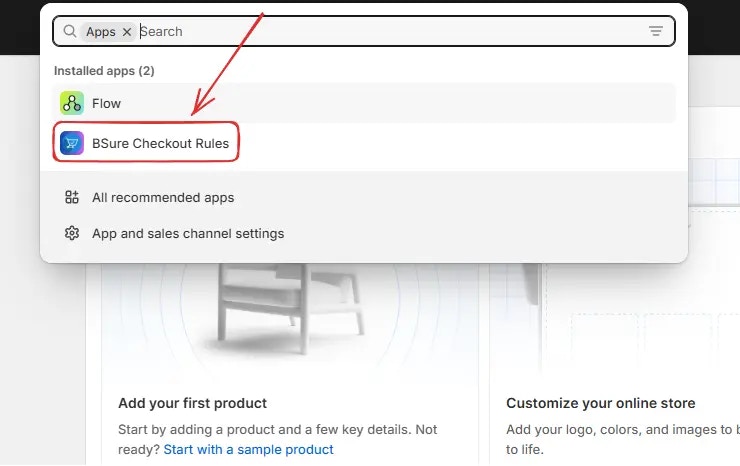
然后点击 **BeSure 结账规则** 打开应用。

<img src="https://mintcdn.com/storespark/ZoBcc0QT_aT_tX8T/images/installation/shopify-admin-click-on-besure-app.webp?fit=max&auto=format&n=ZoBcc0QT_aT_tX8T&q=85&s=8908b4c8d6fd1873793e67dff56c80f0" alt="Shopify 管理后台点击 BeSure 应用" width="740" height="466" data-path="images/installation/shopify-admin-click-on-besure-app.webp" />

## 升级您的套餐

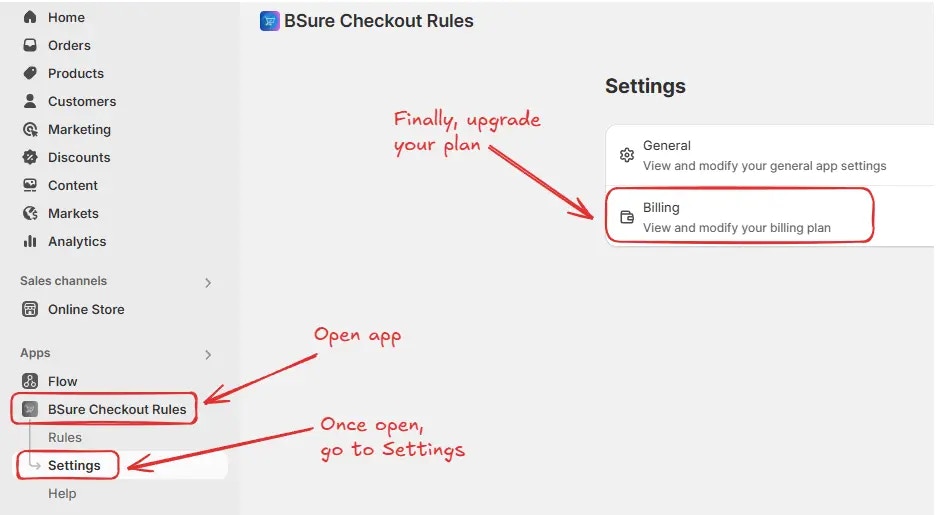
当应用安装完成后，默认会启用 **免费套餐**。该套餐适用于 **测试** 或 **开发** 商店，并允许您探索应用功能。要在您的商店中启用规则，请导航到 *BeSure 结账规则 → 设置 → 账单*。

<img src="https://mintcdn.com/storespark/ZoBcc0QT_aT_tX8T/images/installation/navigation-to-billing.webp?fit=max&auto=format&n=ZoBcc0QT_aT_tX8T&q=85&s=58ff1a500874975e742cae88a7fec664" alt="导航到账单" width="936" height="515" data-path="images/installation/navigation-to-billing.webp" />

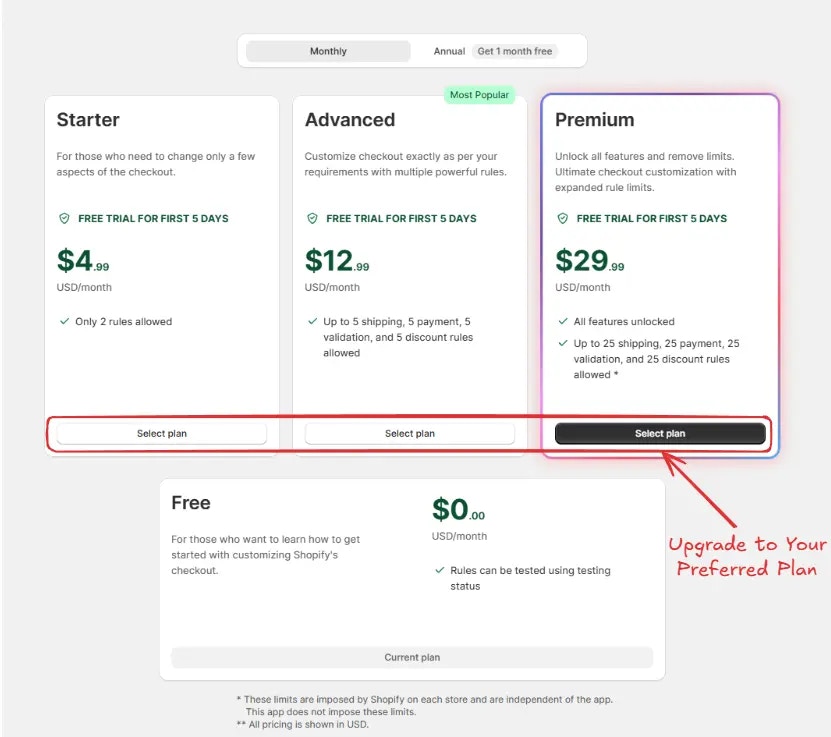
接着您将被重定向到 **账单** 界面。通过选择 **月付** 或 **年付** 标签来选择您的套餐周期，并点击您首选选项上的 **选择套餐**。升级套餐后，您即可在商店中启用规则。

<img src="https://mintcdn.com/storespark/ZoBcc0QT_aT_tX8T/images/installation/choose-plan.webp?fit=max&auto=format&n=ZoBcc0QT_aT_tX8T&q=85&s=6fa12aa7007504e73e6fe8c4148822ea" alt="选择套餐" width="831" height="737" data-path="images/installation/choose-plan.webp" />

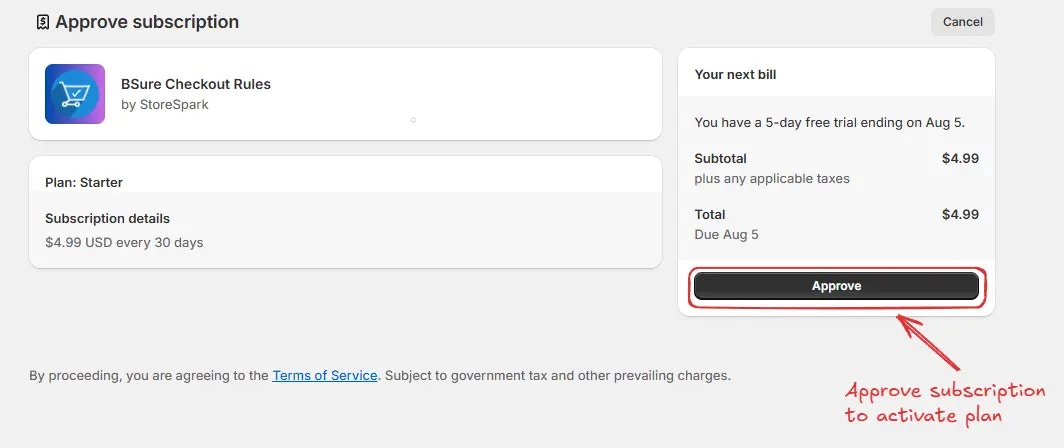
然后您将被重定向到 **确认订阅** 界面。选择您的 **支付方式** 并 **点击“确认”** 来完成升级并激活您的套餐。
<img src="https://mintcdn.com/storespark/ZoBcc0QT_aT_tX8T/images/installation/approve-subscription.webp?fit=max&auto=format&n=ZoBcc0QT_aT_tX8T&q=85&s=05ff142ca3d57cd9bdafc58ffa462465" alt="确认订阅" width="1064" height="448" data-path="images/installation/approve-subscription.webp" />

升级套餐后，您即可在商店中 **启用规则**。